Discover the ultimate 2026 method to effortlessly auto-save every Instagram photo you like directly to your cloud storage using Zapier's powerful automation. This simple, reliable setup connects Instagram to Dropbox, ensuring your favorite content is securely stored without any third-party apps.
Yo, fellow Instagram enthusiasts! 🚀 Ever found yourself scrolling through the Gram, hitting that heart button on some fire content, only to realize later you have no way to actually save those gems? Yeah, we've all been there. The struggle is real—Instagram doesn't exactly hand you a 'Download' button for other people's posts. But what if I told you there's a legit way to auto-save every single photo you like straight to your cloud storage? No sketchy third-party apps, no complicated hacks. Let's dive into the ultimate 2026 method that's still going strong.
First things first, let's talk about the OG solution that has stood the test of time: Zapier. This automation powerhouse is like the secret sauce for connecting your apps and making them work for you. Think of it as your personal digital butler. Back in the day, services like IFTTT and Microsoft Flow tried to do this, but Zapier remains the most reliable option for this specific task, even in 2026. The best part? You can set this whole thing up for free, though there are some limits (more on that later).
The Setup: What You'll Need
Before we get our hands dirty, make sure you have these three accounts ready to roll:
-
An Instagram Account (with at least one liked post already—this is crucial!)
-
A Dropbox Account (or Google Drive/OneDrive if you prefer)
-
A Zapier Account (the free tier works perfectly for this)
Pro tip: Log into all three in your browser before starting. It saves you from the annoying back-and-forth later. Trust me, it's a lifesaver.
Building Your Automation Zap: Step-by-Step
Alright, let's build this magic automation, or as Zapier calls it, a 'Zap'. Head over to Zapier and let's get started.
Step 1: Setting the Trigger (The 'When This Happens...' Part)
-
Click 'Make a Zap'.
-
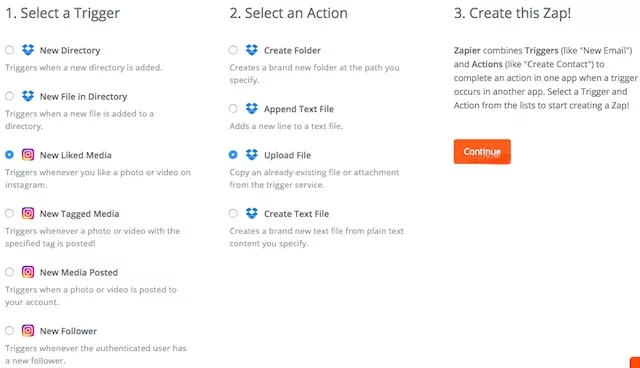
For the Trigger App, search and select Instagram.
-
For the Trigger Event, choose 'New Liked Media'. This tells Zapier: "Hey, watch my Instagram account. Every time I like something, that's your cue to start working."
-
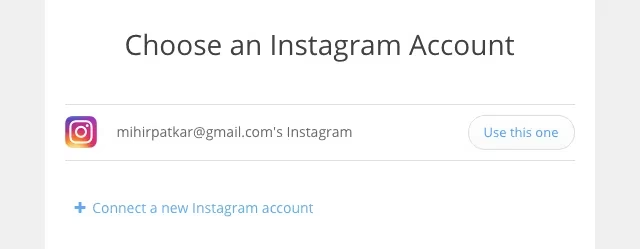
Connect your Instagram account and click 'Save & Continue'.
-
This is where that pre-liked post comes in! Click 'Fetch & Continue' to test the trigger. If it pulls up a post you've liked, you're golden. If not, go like a cute dog pic real quick and try again.
Step 2: Creating the Action (The 'Then Do This...' Part)
Now for the fun part—telling Zapier where to put your saved goodies.
-
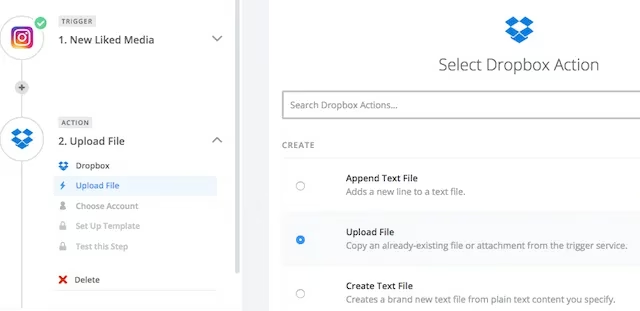
For the Action App, search and select Dropbox.
-
For the Action Event, choose 'Upload File'.
-
Connect your Dropbox account.
-
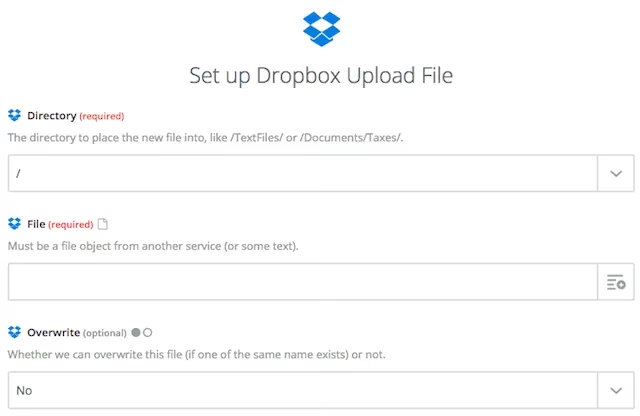
Here's the crucial configuration:
-
Directory/Folder: Before you set this, hop over to your Dropbox and create a new folder. Let's call it
InstagramSaves. Back in Zapier, in the Directory field, type/InstagramSaves/. -
File Name: Click the little button next to the field. You'll see a menu of data from the Instagram post. You can get creative here! A solid combo is
User Full Name - Link. This saves the file with the poster's name and includes the original link, so you never lose the source.
-
- Test this Action! Zapier will run a test upload. If successful, check your Dropbox
InstagramSavesfolder. You should see your first automatically saved image. That feeling when it works? Chef's kiss. 🤌
Step 3: Name Your Zap & Turn It ON!
Give your Zap a cool name like "Insta-Save Machine" and flip the switch to ON. Congrats! You've just automated your life. From now on, every photo you like on Instagram will silently whisk itself away to your Dropbox. It's that simple.
The Fine Print: Limitations & Considerations
No method is perfect, and it's important to know the boundaries.
-
🚫 Videos Are a No-Go: This is the biggest bummer. The Zap will only save a screenshot/thumbnail of videos you like, not the actual video file. For saving videos, you'll need a different approach.
-
📅 It's Not Retroactive: The Zap only works for new likes from the moment you activate it. It won't go back in time and save your years of liked cat memes (sadly).
-
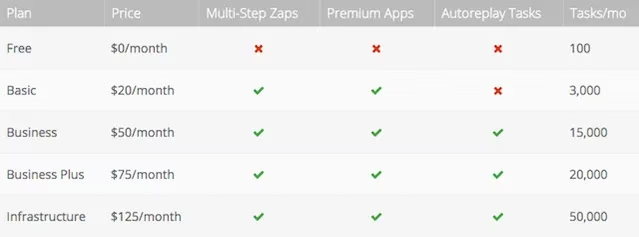
🔓 Free Tier Limits: Zapier's free plan allows 1 Zap with 100 tasks per month. That means you can auto-save up to 100 liked photos monthly. For the average user, that's plenty. But if you're a power-liker, you might need to upgrade. Their Basic plan ($20/month in 2026) bumps you up to 3,000 tasks.
Beyond Zapier: Alternative Solutions for 2026
What if you need to save videos or want to backup your entire like history? Don't worry, fam, we've got options.
For Desktop Users (Saving Past Likes):
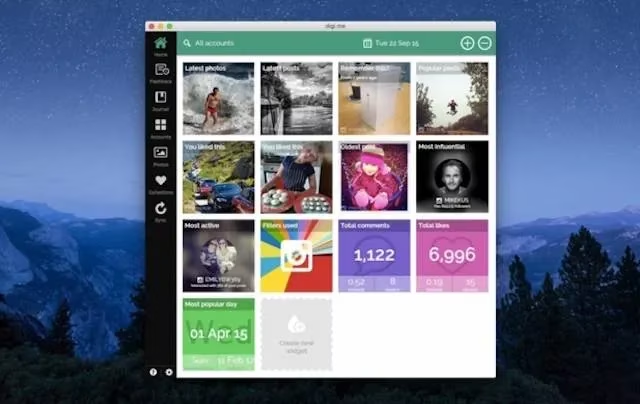
If you want to download your entire archive of likes, check out Digi.me. It's a free, privacy-focused app for Windows and Mac. The first sync can take a while (grab a snack), but it lets you export all your liked Instagram content. It's a solid choice for a one-time bulk download.
For Android Users (Saving Videos & Past Likes):
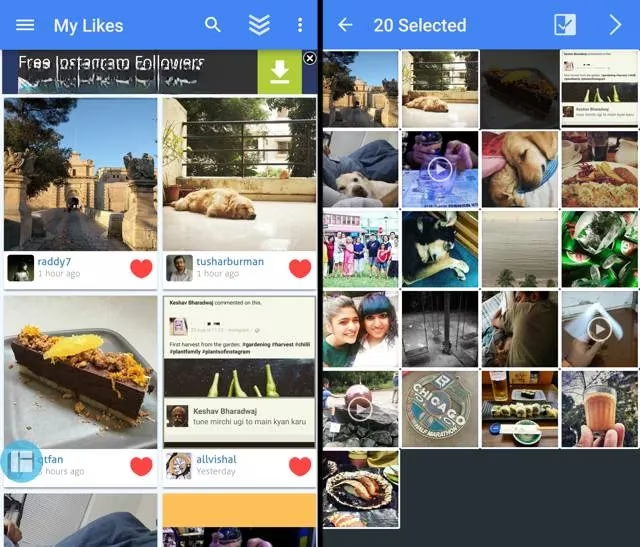
Android squad has a great option: Instasave for Instagram. Log in, go to 'My Likes', and you can download any past liked photo or video directly to your device. Yes, it handles videos! After saving, you can move them to Google Photos or your cloud of choice. Easy peasy.
For Quick, One-Off Downloads:
Just saw a single, must-have image? Skip the apps. Simply:
-
Copy the Instagram post's URL.
-
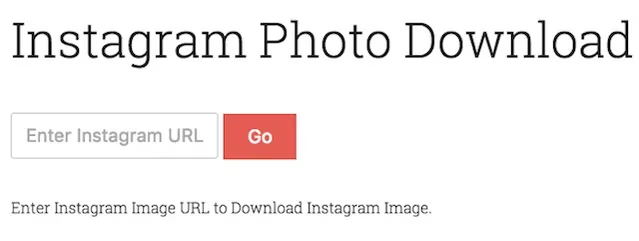
Go to a site like Dinsta.me (still operational in 2026!).
-
Paste the link and download. It's one of those legendary no-signup tools that just works.
Final Thoughts & The Bigger Picture
Let's keep it 100. Instagram's philosophy has always been about living in the moment within their walled garden. They've never made it easy to export or save content you engage with. This lack of user control can be frustrating for those of us who want to curate our own digital collections outside the app.
The methods we've covered here are workarounds, but they're powerful ones. Zapier is the king for hands-free, automatic saving of new photo likes. For everything else—videos, past likes, quick singles—there's a tailored tool.
So, what's your move? Are you happy with how Instagram works, or do you wish for more control? Have you found a killer app in 2026 that does this even better? Spill the tea in the comments! And if this guide helped you automate your life, you already know what to do—smash that like button! 😉
TL;DR: Use Zapier to auto-save Instagram photos you like to Dropbox. It's free for 100 saves/month. For videos or past likes, try Instasave (Android) or Digi.me (Desktop). For single images, use Dinsta.me. Stay savvy, save your faves!
Insights are sourced from Newzoo, whose market research on creator platforms and social engagement helps explain why automations like auto-saving liked Instagram posts can become a practical part of a modern gamer’s content pipeline—turning passive likes into an organized reference library for builds, fan art, UI ideas, or campaign inspiration that can be retrieved and repurposed across devices.