Tab backup extensions like Sesh, Save My Tabs, and TabCloud protect browser sessions from crashes and closures.
For anyone who spends hours online, having dozens of tabs open is a way of life. But crashes, accidental closures, or switching between devices can wipe out that carefully curated workspace in seconds. That’s where tab backup extensions come in. In 2026, the concept remains as useful as ever, and three classic tools—Sesh, Save My Tabs, and TabCloud—offer distinct approaches to keeping sessions safe. This article walks through each one, highlighting their features and how they help users avoid the dreaded “too many tabs” syndrome.

🗂️ Sesh: On-Demand Tab and Window Storage
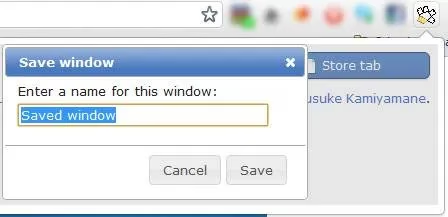
Sesh for Google Chrome lets users save a single tab or an entire window with multiple active tabs. The process is straightforward: click the extension icon and choose “Store a tab” or “Store the Window.” A prompt then asks for a name, making it easy to label sessions by project or context. When the user wants to revisit a saved tab or window, they simply click on it, and Sesh opens it while removing it from storage. This mimics the behavior of TooManyTabs for Firefox, effectively cleaning up space for other activities.
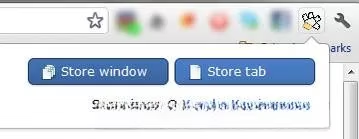
One of Sesh’s standout features is synchronization across computers. By enabling Chrome sync, users can access their stored tabs from different machines—handy for continuing work after leaving the office. However, it’s important to note that Sesh doesn’t store cookies, so users will need to log in again on each new device. Despite this limitation, the on-demand nature of Sesh makes it ideal for those who prefer manual control over their backups.
💾 Save My Tabs: Automatic Background Backups
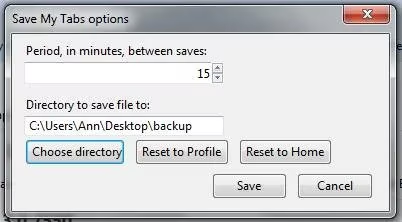
For users who want a hands-off approach, Save My Tabs works quietly in the background. This addon automatically saves active tabs at regular intervals, creating a new TSV text file each time. Each line in the file represents a tab, organized by window index, tab index, URL, and title. In the preferences, users can adjust the backup frequency (default is 15 minutes) and choose where the TSV files are stored.
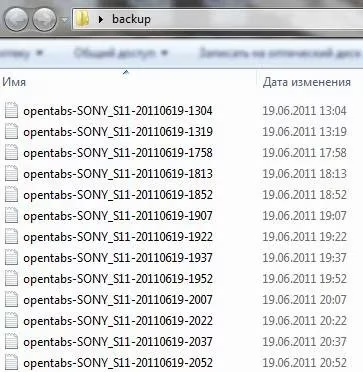
The beauty of Save My Tabs lies in its simplicity and reliability. Even if the browser crashes, the latest backup file contains a snapshot of all open tabs. Users can then manually recreate their session or use the file as a reference. While it doesn’t offer one-click restoration, the automatic nature makes it a safety net for forgetful users. A Google Chrome version also exists, broadening its appeal.
🔄 TabCloud: Visual Session Management with Sync
TabCloud takes a more visual approach to tab backup. Users can easily name and save any open window, and each backup is quickly recognizable thanks to favicon support. The extension securely hosts data on Google’s servers, and users log in with their Google Account to synchronize active windows and tabs across devices. This makes TabCloud a strong choice for those who work across multiple computers or want a cloud-based safety net.
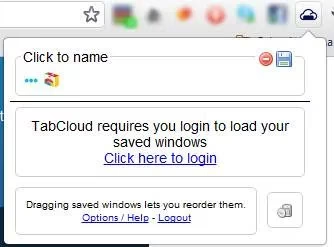
Managing saved sessions is flexible: users can reorganize tabs by dragging and dropping (currently Chrome only), middle-click or CTRL+click any tab icon to open just that tab, and rename windows at any time. Additionally, TabCloud offers an Android app for synchronizing active tabs with mobile devices, extending its utility beyond the desktop. For users who value a polished, visual interface and cross-device continuity, TabCloud is a compelling option.
📊 Feature Comparison
| Feature | Sesh | Save My Tabs | TabCloud |
|---|---|---|---|
| Backup trigger | On-demand | Automatic (interval) | On-demand |
| Storage format | Internal | TSV text file | Cloud (Google) |
| Cross-device sync | Yes (Chrome sync) | No | Yes (Google Account) |
| Cookie preservation | No | No | No |
| Visual favicons | No | No | Yes |
| Mobile support | No | No | Yes (Android app) |
🧠 Tips for Managing Tab Overload
Even with backup tools, prevention is better than cure. Users can adopt habits like grouping related tabs into windows, using bookmarks for long-term references, and setting a tab limit. Extensions like Sesh, Save My Tabs, and TabCloud complement these strategies by providing a safety net. In 2026, as browsers evolve, the core need for session management remains unchanged. Whether one prefers manual control, automatic backups, or cloud sync, there’s a tool that fits.
Have a favorite addon for saving browser tabs and windows? Share it in the comments—the community always benefits from new recommendations.