Trello project management transforms personal organization and creativity, offering flexible solutions beyond traditional Kanban boards.
When most people think of Trello, they picture a neat Kanban board filled with task cards, deadlines, and progress columns. It’s true that Trello excels as a project management tool, but limiting it to software sprints and to-do lists ignores its incredible flexibility. As Joel Spolsky, one of Trello’s founders, once remarked, “Some people saw Trello and said, ‘oh, it’s Kanban boards. For developing software the agile way.’ Yeah, it’s that, but it’s also for planning a wedding, for making a list of potential vacation spots to share with your family, for keeping track of applicants to open job positions, and for a billion other things.” Even in 2026, with countless productivity apps vying for attention, Trello remains a canvas for personal organization, creativity, and life management in ways few could have predicted.

The following compilation dives into some of the most inventive applications users have discovered over the years, turning a simple list-making tool into a Swiss Army knife for modern life.
1. Curate a Self-Directed Learning Hub
Imagine someone teaching themselves graphic design. Instead of scattered notes and browser bookmarks, they create a Trello board called “Design Fundamentals.” One card lists essential principles like contrast, alignment, and white space. Another holds a collection of Photoshop shortcuts and vector tricks. A third becomes a glossary of typography terms that stubbornly refuse to stick. As the board grows, it transforms into a personalized textbook that can be revisited anytime for a quick refresher. This method works for any subject—coding languages, cooking techniques, or even musical theory. The visual layout makes it easy to spot connections between topics, and the ability to attach files, links, and images turns each card into a rich mini-lesson. By the time the board is mature, the student has built a resource far more valuable than a pile of disorganized PDFs.
2. Orchestrate a Job Hunt with Surgical Precision
Job searching is notoriously chaotic. There are company profiles to research, application deadlines to juggle, follow-up emails to schedule, and interview notes to preserve. A job hunt board centralizes everything. A list for “Prospects” holds leads yet to be explored. Another for “Applied” tracks active applications with due dates and contact names. A “Follow-Up” column ensures no opportunity slips through the cracks. Back in the day, Trello user Lauren Moon famously used this approach to land a position at Trello itself—a testament to the system’s effectiveness. In 2026, job seekers can enhance this setup with Power-Ups that integrate calendar views, custom fields for salary expectations, and even automated reminders. The key is treating the job search like a project, and Trello provides the perfect blueprint.
3. Empty Your Mind into a Visual Idea Dump
The weight of unorganized thoughts can be paralyzing. A mind dump board offers a pressure-release valve. One massive board, unconstrained by structure, absorbs everything: article ideas, gift suggestions, holiday destinations, home renovation concepts, and random business brainwaves. Cards can be reshuffled later, tagged with labels like “urgent” or “someday,” and gradually refined into actionable plans. For those who prefer order from the start, separate boards for different life domains—creative work, personal goals, family projects—prevent cross-contamination. This visual approach mirrors the way human brains naturally associate ideas, making it easier to spot patterns and convert fleeting daydreams into concrete steps.
4. Assemble a Bucket List That Inspires Action
Everyone maintains mental lists of adventures they crave: books to devour, films to watch, skills to master, and places to explore. Transferring these lists to Trello turns them from passive daydreams into active inspiration. A dedicated bucket list board can include lists for travel, learning, fitness challenges, and creative pursuits. Each card becomes a micro-goal, enriched with photos, links to booking sites, and checklists of prerequisites. The visual card covers—perhaps a snapshot of the Amalfi Coast or the cover of a must-read novel—serve as daily motivation. Some users even add a “Completed” list, which doubles as a gratitude journal over time.
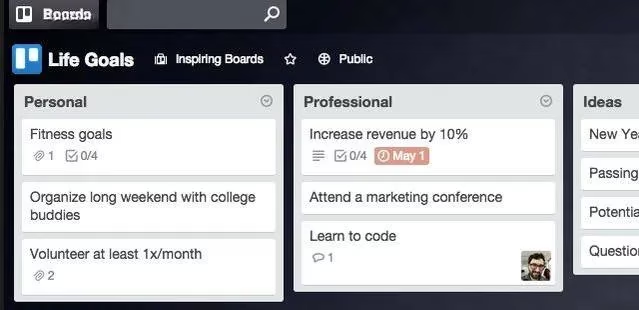
5. Take Control of Personal Finances with a Money Tracker
Spreadsheets often feel sterile and intimidating. Trello offers a friendlier alternative for monitoring monthly cash flow. A finance board can include lists such as recurring bills, debt payments, one-time expenses, and savings goals. Each card might represent a bill, with due dates set via the calendar Power-Up and colored labels signifying payment methods or priority levels. A “Budget” list could feature cards for categories like groceries, entertainment, and utilities, with running totals in the description. When unexpected expenses arise, red labels immediately flag them for review. Templates like the Financial Plan board provide a ready-made structure, but the real magic comes from customizing the board to match a household’s unique financial rhythm. The act of moving a paid bill to a “Cleared” list provides a satisfying psychological reward that a stale spreadsheet never can.
6. Run an Editorial Calendar Without Email Chains
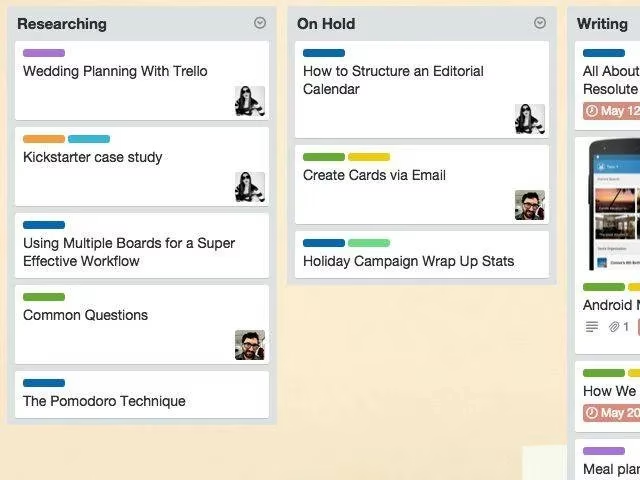
For bloggers, magazine editors, or content marketers, Trello becomes a living editorial calendar. A single board holds the entire publishing pipeline. Lists represent stages: “Brainstorming,” “Drafts,” “Ready for Review,” “Scheduled,” and “Published.” Each card contains an article pitch, target keywords, assigned authors, and due dates. Team members can discuss edits directly on the card via comments, eliminating the need for long email threads. Labels differentiate content types—tutorials, opinion pieces, case studies—and checklists ensure SEO tasks are never forgotten. The MakeUseOf team proved this model’s worth long ago, and in 2026 it remains a staple for distributed teams. Public editorial calendars on Trello also serve as transparency tools, letting audiences peek behind the curtain.
7. Master the Chaos of Meetings and Appointments
A packed schedule of meetings, doctor visits, and social commitments can overwhelm even the most organized person. Trello boards bring clarity by replacing rigid calendar grids with flexible lists. Cards can be grouped by day of the week, week of the month, or meeting type. Color-coded labels distinguish locations (office, virtual, offsite) or time blocks (morning, afternoon). Dragging a card from “Monday” to “Thursday” becomes an effortless rescheduling act. This visual overview often reveals hidden conflicts, like two appointments on opposite sides of town at adjacent times. When paired with a map Power-Up, travel routes can be optimized. The board also doubles as a meeting preparation tool, with checklists for agendas, required documents, and follow-up actions.
8. Uncover Lost Time with Task-Level Tracking
While Trello lacks native time tracking, the 2026 ecosystem offers a wealth of integrations. By linking cards to tools like Toggl, Harvest, or Clockify, users can log hours spent on individual tasks directly from card menus. A board bursting with high-effort cards reveals productivity leaks at a glance. Perhaps “social media management” is consuming twice the expected time, or “email processing” balloons on Mondays. With this data, a freelancer can adjust rates, and a team lead can redistribute workloads. The board becomes a diagnostic instrument, and over time, historical data paints a picture of personal efficiency trends.
9. Plan Events and Trips That Run Like Clockwork
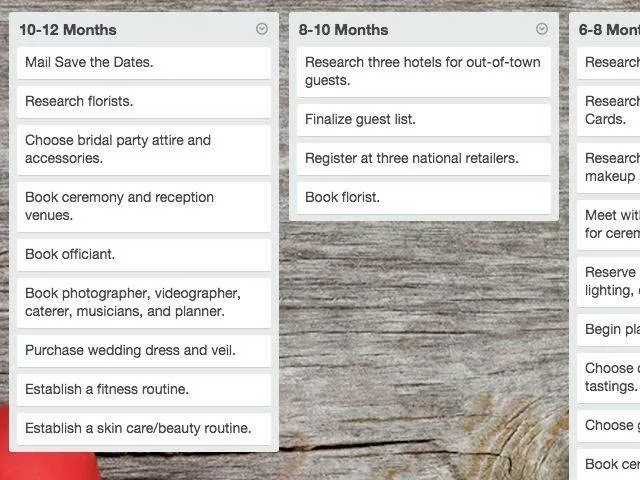
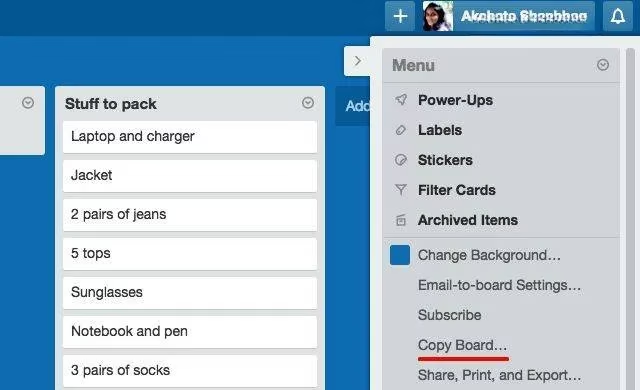
Weddings, birthday parties, and corporate retreats share a common need: meticulous coordination. A Trello board becomes the command center. Lists break down the planning into phases: “Concept & Theme,” “Guest List & RSVPs,” “Catering & Menu,” “Decor & Entertainment,” and “Day-of Checklist.” Each card holds vendor contacts, inspiration photos, and due dates for deposits. Delegation is simple—just assign cards to specific helpers. Post-event, the board serves as a scrapbook of decisions and memories. The same blueprint works for travel. A trip planning board houses packing lists, travel document reminders, sightseeing options, and emergency contacts. Frequent travelers keep a master template and copy it for each new adventure, tweaking only the specifics.
10. Craft a Pick-Me-Up Board for Rough Days
Everyone encounters days when motivation evaporates. A dedicated board filled with positivity provides an instant lift. One card might collect favorite quotes from admired thinkers. Another could hold a gallery of cherished photos—family snapshots, pet pictures, travel highlights. A third card might link to soothing music playlists, humorous videos, or mindfulness resources. Some users add a “Daily Anchors” card with a checklist of small wins: drink enough water, move for 20 minutes, write down one thing you’re grateful for. Checking off these items, even on gloomy days, reinforces a sense of control. Over the years, this board becomes a personal archive of resilience, a testament to the strategies that reliably restore equilibrium.
11. Facilitate Democratic Team Decisions
When a team must choose a new office chair, a vacation spot, or a software vendor, Trello can host a transparent voting process. A “Decisions” board lists options as cards, with checklists for pros, cons, and cost analysis. A dedicated poll card, enabled through a Power-Up or simple comment threads, allows members to cast votes. Labels can highlight the most popular choices. This approach replaces noisy meetings with clear, documented reasoning. It is geeky, yes, but far more effective than endless debates. After a decision is made, the board remains as a record, useful for justifying the choice months later.
Embrace the Copy-and-Customize Philosophy
Trello’s true power lies in its reproducibility. Public boards can be copied with a single click from the sidebar menu, giving instant access to templates perfected by others. In 2026, the Trello community has exploded with creative blueprints for everything from homeschooling plans to novel-writing frameworks. Integrations with IFTTT, Zapier, and Slack automate repetitive workflows, turning Trello into a hub that talks to the rest of one’s digital life. The sidebar menu itself, once a humble navigation tool, has become a launchpad for cloning, archiving, and transformation.
The uses described here barely scratch the surface. Trello’s adaptability means that anyone can reinvent it for their own quirky needs—tracking houseplant care, managing a community pantry, or even mapping out a novel’s plot points. The limitation is never the tool itself, but the imagination of the person wielding it. So take a cue from these unusual applications, copy a template, and twist it into something uniquely yours. After all, a tool designed for lists can handle a billion other things—you just have to shuffle the cards.