Chrome extensions and taskbar alternatives deliver clocks, dates, and mail alerts for a sleek, distraction-free desktop.
The battle for screen real estate has never been a joking matter—especially on widescreen laptops where a chunky dock can gobble up precious pixels. In 2026, as distraction-free workflows and minimalist setups keep gaining traction, a cluster of classic Chrome extensions is enjoying a quiet renaissance: they replace the taskbar’s most useful at-a-glance information—time, date, and mail alerts—so users can autohide or banish the taskbar entirely. The logic is simple: if the taskbar is only there for a clock, why keep it around? Chromium’s own title-bar window controls already show that browsers can be lean and mean, so the same less-is-more philosophy can apply to the desktop. 
Clock Extensions: Time Without the Taskbar
For users who have long docked the taskbar vertically to see the system tray, dates, and notifications—Ubuntu-style—the goal is not to lose information but to stop sacrificing a horizontal strip of the screen. Clock for Google Chrome is a good candidate to take the place of the taskbar clock, with one key difference: it serves up an analog clock instead of a digital one. Beyond that, it offers another color setting for the clock hands, a few more European languages, and little else. It is a no-frills option, but for minimalists, that is the point. 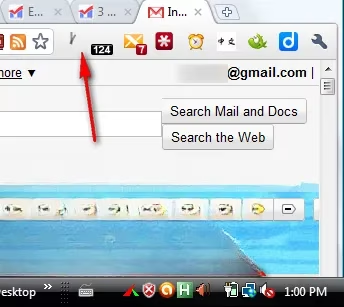
If a more fully featured clock is the order of the day, Chrome Clock is an excellent choice. It supports digital and analog models and even alarms, making it a stronger stand-in for the taskbar’s timekeeping duties. 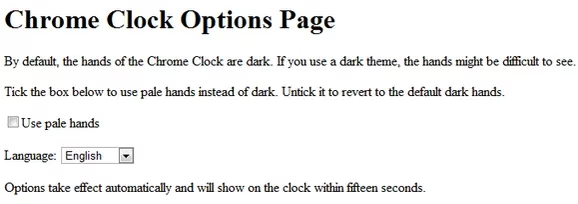 Digital Clock is another extension that promises to use less memory in Chrome—a detail that matters when dozens of tabs are already hogging resources. A few more clock extensions exist in the Extensions gallery, so users who prefer a robust alternative can shop around; the market is hardly short on timepieces.
Date and Mail: The Other Reasons People Keep the Taskbar
One thing that has sometimes irked users is how the Windows taskbar, at least in Vista and XP, would not show additional date information beyond the time in the system tray unless the taskbar was doubled in size. Ubuntu displays the date and time together effortlessly, so the omission felt puzzling. Even the Windows 7 Superbar, praised for its features and full date and time information, was double the size of the Vista taskbar—a trade-off that made little sense on laptops already short on vertical height. Badge Date solves this minor annoyance by displaying the month and day of the current date in the corner of Chrome, where it does not occupy another horizontal bar. Right now, it has a small glitch with the slash sign, but it remains a good, informative extension. 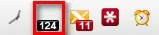
Mail alerts are another taskbar tether. The author of Webmail Notifier, a wonderful plugin for Firefox, created an app for Chrome, and the high-quality nature of the app makes this optional extension totally worth the download. It displays visual and audio notifications set to the user’s choices of duration. The extremely well-made extension supports all major webmail sites, including Gmail, AOL, Hotmail, and—drum roll—even Yahoo with no Pro subscription. For anyone who lives in a browser, that is a godsend. 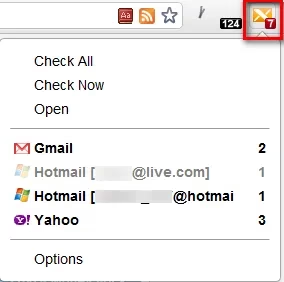
The Payoff: Hide the Taskbar, Keep the Info
The point of having these extensions is that users no longer need the taskbar, so they can autohide it or keep it hidden. The taskbar is probably not used for much beyond seeing the time, anyway. For those who actually use the taskbar to monitor how many programs are running, switching between windows with Alt + Tab gives a glance of open programs, while Windows key + Tab offers an even better preview of windows. Saving screen real estate may understandably be the concern of many users, particularly those on small-screen laptops, compact convertibles, and other machines where every pixel counts.
| Extension | What it replaces | Standout feature | Quirk |
|---|---|---|---|
| Clock for Google Chrome | Taskbar clock | Analog face with hand-color settings | Minimal extras |
| Chrome Clock | Taskbar clock | Digital and analog models, alarms | More features, more options |
| Digital Clock | Taskbar clock | Low-memory design | Basic by design |
| Badge Date | Taskbar date | Month and day in Chrome’s corner | Small slash sign glitch |
| Webmail Notifier | Mail alerts | Visual and audio notifications | Supports major webmail sites |
In 2026, the extension names may feel old-school, but the screen-saving philosophy is spot-on. Widescreen laptops, split-screen multitasking, and distraction-free reading all reward a setup that keeps the browser front and center. The taskbar can stay visible for users who like it, but for those who prefer a cleaner canvas, these Chrome add-ons make hiding it a no-brainer. The question is simple: keep the taskbar visible, or kick it to the curb? 🖥️✨