Discover the power of Selenium and Python for automation testing—streamline web workflows with cross-platform installation and robust browser support.
Automation has evolved into a cornerstone of modern software development, with numerous frameworks enabling developers to streamline workflows and eliminate repetitive tasks through code. Among these powerful tools, Selenium stands out as a premier open-source automation testing framework, specifically designed for validating web applications across diverse browsers and platforms. The Selenium ecosystem comprises several key components, including Selenium IDE, Selenium Remote Control, Selenium WebDriver, and Selenium Grid, each offering distinct functionalities that collectively facilitate comprehensive web application testing. Beyond traditional testing, Selenium WebDriver has gained significant traction for developing sophisticated web crawlers and automating complex browser interactions, making it an indispensable asset for developers and cybersecurity professionals alike in 2026.

Installing Selenium WebDriver begins with ensuring a supported programming language is present on your system. While Selenium supports multiple languages like Java, C#, and Perl, Python remains the most popular choice due to its simplicity and extensive library support. For Windows users, the process starts by downloading the latest Python version from the official website. Once Python is installed, Selenium can be effortlessly added using Pip, Python's package manager. The installation command varies slightly depending on your system configuration:
-
Standard installation:
pip install selenium -
Alternative method:
python -m pip install selenium
Linux distributions offer streamlined installation through native package managers. Debian-based systems utilize sudo apt-get install python, while Arch Linux employs sudo pacman -S python. Fedora users rely on sudo dnf install python, and CentOS systems use sudo yum install python. Following Python installation, Selenium setup remains consistent across all Linux flavors with the familiar pip install selenium command.
MacOS installation mirrors the Windows approach, requiring users to download Python binaries from the official source before proceeding with Selenium installation via terminal commands. The cross-platform consistency in Selenium installation reflects its well-designed architecture and widespread adoption in the development community.
The true power of Selenium WebDriver emerges when paired with browser-specific drivers that enable scripted control over web browsers. Selenium currently maintains official support for all major browsers:
| Browser | Official Driver |
|---|---|
| Google Chrome | ChromeDriver |
| Mozilla Firefox | Geckodriver |
| Microsoft Edge | MSEdgeDriver |
| Apple Safari | SafariDriver |
Proper integration requires adding these drivers to your system's PATH variables, a process that varies by operating system but follows similar principles across platforms.
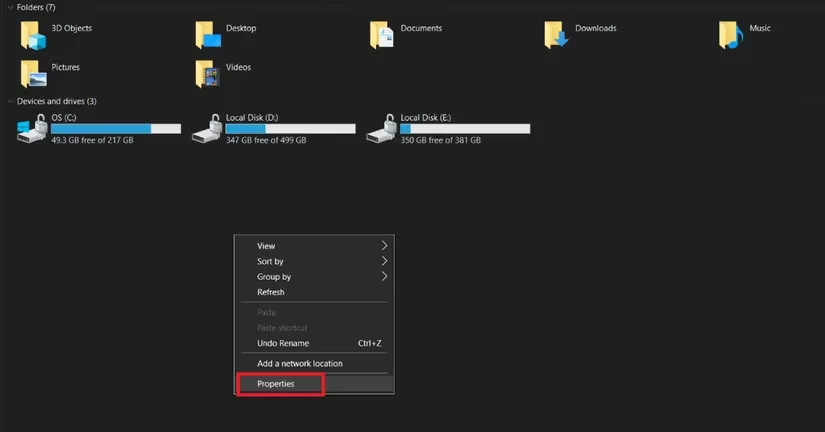
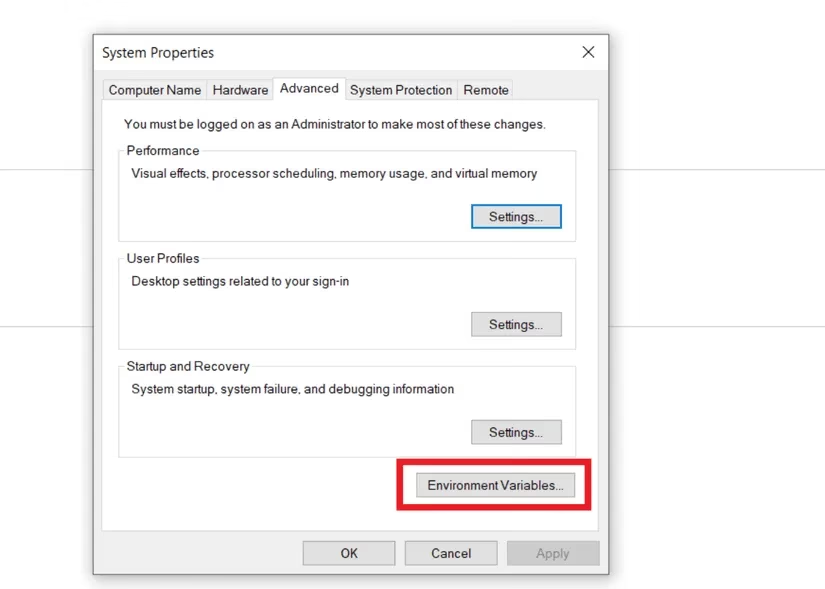
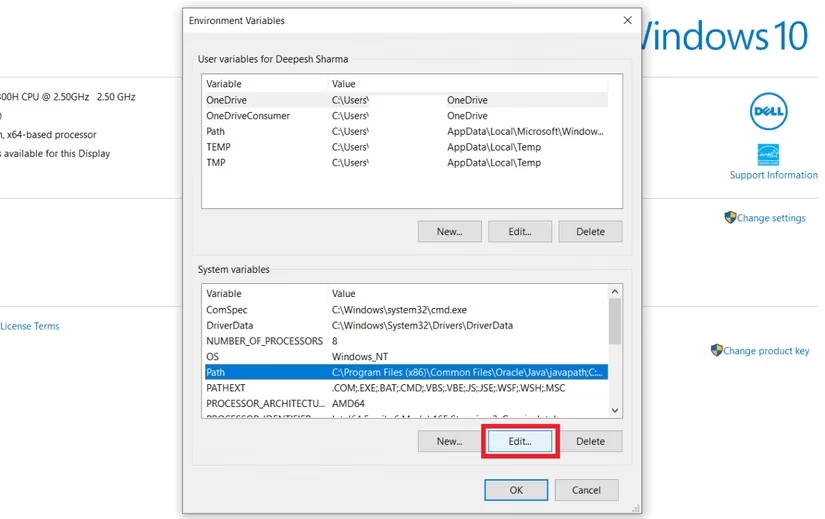
Windows configuration involves multiple steps beginning with driver download and extraction. The executable must be copied to a permanent location, with its path added to system variables through the Control Panel. The navigation sequence is: This PC → Properties → Advanced System Settings → Environment Variables → System Variables → Path → Edit. Users should paste the driver path at the end of existing variables, ensuring proper separation with semicolons. Verification involves opening Command Prompt and typing the driver name; successful installation yields driver information rather than recognition errors.
Linux PATH configuration employs terminal-based editing of user profile files. After downloading and extracting the Linux-compatible driver, users must identify the executable path and modify the profile using text editors like Nano. The command sudo nano /home/username/.profile opens the configuration file, where export PATH=$PATH:/pathtodriver/webdriver should be appended before saving changes. This approach ensures the driver remains accessible across terminal sessions.
MacOS follows a similar pattern with slight variations in file locations. The /etc/paths file serves as the primary configuration target, editable through sudo nano /etc/paths with administrative privileges. Appending the driver path to this system-wide file guarantees availability for all users on the system.
The versatility of Selenium WebDriver extends far beyond basic automation testing. Developers in 2026 leverage its capabilities for numerous advanced applications:
🔹 Web scraping and data extraction from dynamic JavaScript-heavy websites
🔹 Automated form filling and submission for testing and data entry
🔹 Cross-browser compatibility testing across multiple browser versions
🔹 Performance monitoring through automated user journey simulations
🔹 Security testing by automating penetration testing scenarios
🔹 Visual regression testing through screenshot comparisons
Cybersecurity professionals particularly benefit from Selenium's ability to automate complex attack simulations and vulnerability assessments. The framework's capacity to interact with web elements as human users do makes it invaluable for identifying security flaws that might escape traditional scanning tools.
Despite Selenium's dominance, the automation testing landscape in 2026 offers several alternative frameworks worth considering. Playwright has gained significant traction with its cross-browser testing capabilities and automatic waiting mechanisms. Cypress provides a developer-friendly experience with real-time reloading and time-travel debugging. Puppeteer offers excellent Chrome/Chromium control with a focus on performance and reliability. TestCafe stands out for its zero-configuration approach and built-in concurrency support.
Successful Selenium implementation requires understanding several best practices that have evolved over time. Page Object Model (POM) design pattern remains essential for maintaining scalable test suites, while explicit waits prevent flaky tests caused by timing issues. Regular driver updates ensure compatibility with browser updates, and parallel execution through Selenium Grid significantly reduces testing time for large test suites.
Looking forward, Selenium continues to adapt to emerging web technologies. Enhanced support for progressive web apps, improved mobile testing capabilities, and integration with AI-powered testing tools represent exciting developments. The framework's open-source nature ensures it remains responsive to community needs while maintaining backward compatibility for existing test suites.
The installation and configuration process, while occasionally challenging, represents a worthwhile investment given Selenium's powerful capabilities. Proper setup establishes a foundation for creating robust, maintainable automation scripts that can save countless hours of manual testing. As web applications grow increasingly complex, automated testing frameworks like Selenium become not just convenient tools but essential components of the development lifecycle.
For organizations and individual developers alike, mastering Selenium WebDriver provides competitive advantages in software quality assurance. The ability to automate repetitive testing tasks frees developers to focus on creative problem-solving and innovation. As the digital landscape continues to evolve, automation skills remain among the most valuable assets in a developer's toolkit, with Selenium standing as a proven, reliable solution for web automation challenges in 2026 and beyond.