Drag2Up, a pioneering Chrome extension, made drag-and-drop uploads effortless by sending images to Imgur and text files to GitHub.
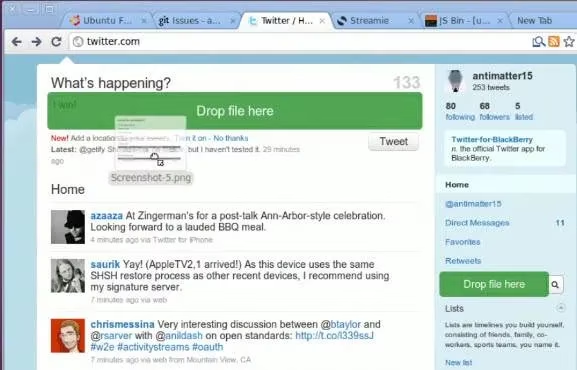
In 2026, dragging a screenshot into a chat box feels ordinary. Gmail helped make drag-and-drop attachments feel natural, and modern browsers now treat file drops as a baseline expectation. That makes Drag2Up, a Chrome extension from the late 2000s, feel like an interesting ancestor: a small tool that tried to bring desktop-style drag-and-drop uploading to ordinary website text fields. Drag2Up accepted images and text files, sent images to Imgur, sent text files to GitHub, and then inserted a ready-to-use address into the active text field. The promise was simple: remove the save-open-upload-copy-paste loop and keep the writer in the writing flow.
Why the Idea Had Appeal
For forum posters, blog commenters, bug reporters, and developers, the old workflow was tedious. A user had to save a file, open a separate upload page, choose the file, wait for the upload, copy the resulting address, and return to the original text field. Drag2Up compressed that sequence into one gesture. The extension acted like a bridge between the desktop and the browser, and it did so without asking the user to learn a new interface.
The core appeal was not the upload service itself. It was the reduction in context switching. A person writing a post could stay focused on the post. A person reporting a bug could drag in a screenshot and keep describing the problem. A person sharing a code snippet or log file could drag in a text file and continue the conversation. That is still a strong design lesson in 2026, even though the specific implementation now feels dated.
How It Worked
| Input type | Destination | Result in the text field |
|---|---|---|
| Image file | Imgur | A direct image address ready for Markdown, BBCode, or plain text |
| Text file | GitHub | A GitHub-hosted address for the uploaded text |
A user dragged a file from the desktop onto a website text field. Drag2Up handled the upload in the background. For images, Imgur served as the free image host. For text files, GitHub served as the storage destination. The visible result was an address that could be pasted into a post, comment, issue report, or message. The extension worked on Chrome, and its value depended heavily on whether the user was comfortable with those two third-party services.
That dependency was also its main limitation. The reference material noted that the only reason not to use Drag2Up would be a dislike of Imgur for image uploads or GitHub for text uploads. In practice, that is a significant caveat. Upload destinations are not interchangeable. They carry different privacy rules, retention policies, public visibility defaults, and reliability risks. A tool that automates uploading is convenient, but it also automates the chance of publishing something accidentally.
The 2026 Reality Check
Modern browsers and websites have absorbed much of Drag2Up's original value. Native drag-and-drop uploads are common. Clipboard paste is often enough for screenshots. Chat apps, issue trackers, documentation tools, and social platforms frequently include inline attachment controls. Cloud storage and share sheets have replaced many ad hoc upload workflows. In 2026, a user rarely needs a separate extension just to move a file from the desktop into a text field.
The old extension would also face modern Chrome extension requirements, permission reviews, manifest changes, and service compatibility issues. Imgur and GitHub have evolved their platforms and policies over the years. An extension from that era should be treated as a historical artifact rather than a default recommendation. Security-minded users would want to inspect what permissions it requests, whether it still receives updates, and whether uploaded files become public by default. Automatic uploads are convenient, but they can expose private screenshots, internal logs, or sensitive text if a file is dragged by mistake.
Who Would Still Find It Interesting?
-
🧑💻 Retro Chrome extension fans who enjoy studying early browser add-ons.
-
✍️ Writers on legacy forums that still use plain text fields and external image hosting.
-
🐞 Developers researching the history of frictionless bug reporting and inline uploads.
-
🧪 UX designers who want examples of how small tools reduce context switching.
-
🔐 Privacy-conscious users who want a reminder to check upload destinations before dragging files.
A modern user can appreciate the idea without adopting the old tool. The better 2026 habit is to use native upload controls when they exist, paste screenshots directly when the platform supports it, and choose access-controlled storage for anything private. For public screenshots and open text sharing, modern alternatives are plentiful, but they should still be selected deliberately.
Design Lesson That Still Holds
Drag2Up was narrow, dependent on third parties, and tied to a specific era of Chrome extensions. Yet its central insight remains useful: context switching is expensive. The best upload tool is often the one that stays out of the way. Modern products echo this with inline attachments, paste-to-upload editors, drag-and-drop canvases, and share sheets. Drag2Up was early and limited, but its user-experience thesis was correct.
Final Verdict
Drag2Up deserves a nostalgic nod. It saved time for a specific kind of user, and it demonstrated how a simple gesture could remove several tedious steps from online publishing. In 2026, it is not an essential tool for most people. Native browser features and modern platform uploaders have largely taken its place. Still, as a case study in frictionless publishing, it remains a neat piece of Chrome extension history. The practical takeaway is straightforward: enjoy the convenience, verify the implementation, and never drag sensitive files into an automatic uploader without understanding where they will go. 🧩