Master Evernote organization with Evernote tags: simplify notebooks and use layered tags for fast, scalable search.
Somewhere in 2026, a hypothetical Evernote user named Pat opens their account and feels a familiar chill. Pat’s digital life is in there—recipes, meeting notes, half-finished novel ideas, a screenshot of a dentist appointment from 2021—but finding anything feels like trying to catch a specific snowflake in a blizzard. The problem isn’t Evernote. Evernote is still a mighty tool, even with its AI-powered search and shiny modern updates. The problem is that Pat organized notes the way a raccoon organizes a trash can: with enthusiasm, but no scalable system. 😅
Evernote offers three layers: notebooks, stacks, and tags. Notebooks are folders. Stacks are parent folders. Tags are searchable labels. Most people fixate on notebooks and stacks because Windows trained them to think in folders. But notebooks cannot be nested, and each note lives in exactly one notebook. That is a disaster for a note that belongs to two projects. Tags, however, can be nested, and multiple tags can be assigned to a single note. Tags are the real hero here.

| Layer | Role | Can you nest? | Can a note have many? |
|---|---|---|---|
| Notebook | Broad container | No | No, only one |
| Stack | Parent container for notebooks | One level only | N/A |
| Tag | Granular label | Yes | Yes |
Step one for Pat is to shrink the notebook collection. Pat once had over 40 notebooks; now five is plenty. The default notebook should be renamed to something like -Inbox or -CollectionBox. The hyphen keeps it at the top of the list. New notes, web clippings, and screenshots all get dumped there first. Tagging every note immediately is a productivity trap. Batch processing once a week or once a month is far saner. Other notebooks should be created sparingly: Ideas, Personal, Reference, Work. Avoid spaces in notebook names. Spaces make searching grumpier than a Monday morning.

Step two is the tag taxonomy. For every note, Pat should ask three questions: What area does it relate to? What type of content is it? What themes does it cover? Prefix the answers with 1, 2, and 3. So a personal note about a Jack Kerouac book on travel might get 1personal, 2booknote, 3life, and 3travel. This ensures every note can be found from multiple angles. A note tagged only with travel is a note that will vanish into the void. A note tagged with all three layers is a note that can be summoned like a well-trained puppy. 🐶
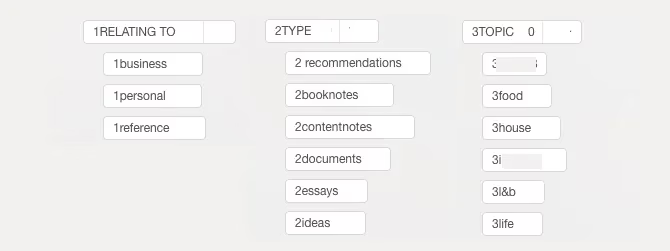
Step three is searching like a wizard. Evernote’s search bar can combine multiple tags. If Pat remembers a conversation with a friend about traveling to Brazil, a search for 1personal 3travel 2conversation should pull it up. For routine searches, saved searches are a gift. On Windows, click File > Save Search. On Mac, click Edit > Find > Save Search. Name the search, then drag it to the shortcuts widget. Suddenly, every recurring query is one click away. Searching for a quote about politics? No problem. Searching for that receipt from the thing? Also no problem.

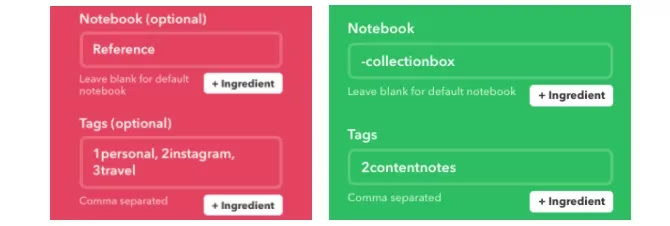
Step four is automation. In 2026, Evernote’s own AI features can help clean up notes, but third-party automation still shines. IFTTT can connect Instagram, Instapaper, and other services to Evernote. Pat can set Instagram posts to save to Reference with 1personal, 2instagram, and 3travel. Instapaper highlights can land in -CollectionBox with 2contentnotes. This saves time during the weekly tagging ritual. The robots handle the boring part; Pat handles the judgment calls.
The full system looks like this:
-
Save almost every new note to a
-CollectionBoxnotebook. -
Tag notes routinely using a
1-2-3taxonomy: area, type, theme. -
Move tagged notes into one of a few broad notebooks.
-
Use tags and saved searches to retrieve specific notes instantly.
-
Automate repetitive saves with IFTTT or Evernote’s built-in tools.
This is not as simple as dragging notes into vague notebooks and hoping for the best. It is, however, scalable. It works whether Pat has 100 notes or 100,000. It keeps Evernote from becoming a digital landfill. And it means Pat can finally find that one quote about politics, that travel idea, that book highlight, and that dentist appointment screenshot. The raccoon can retire. 🦝
Will this exact system work for everyone? Probably not. But some version of it will work for anyone who has ever muttered, ‘I know I saved that somewhere.’ In 2026, with more information than ever pouring into our accounts, a tag-first Evernote setup is not just tidy. It is survival.