Unlock powerful automation with Windows Scripting Host and VBScript, surpassing batch files for flexible, modern scripting in 2026.
So, you think you know automation because you've dabbled with a .bat file or two? Let me tell you, my friend, back in the day, batch jobs were the duct tape of the computer world—handy in a pinch but oh-so-limited. Remember trying to do a proper for loop or an if-then statement? It was like trying to build a spaceship with a spoon. But then, a hero emerged from the shadows of Windows 98: the Windows Scripting Host, later rebranded as the Microsoft Script Host (MSH). And let me tell you, it changed everything for us tinkerers. The best part? If your PC is from this century (and let's be real, in 2026, even a potato has more power than a Win98 machine), you already have this Swiss Army knife for automation installed. No downloads, no fuss.

Why Ditch the Old Batch Files?
Let's be honest, batch scripting felt like communicating in grunts. The command set was short, and complex logic was a nightmare. Want to iterate through a list of files and perform different actions based on their type? Good luck! MSH, on the other hand, opened the door to real programming languages right on your desktop. It's the difference between finger painting and having a full artist's studio.
The Language Buffet: Pick Your Poison!
This is where the magic happens. With MSH, you're not stuck with one syntax. It's a multi-language playground! Fancy some JavaScript? Go with JScript. Are you a fan of the classic Visual Basic vibe like I am? VBScript is your best buddy. But wait, there's more! With the right scripting engines, you can also play with:
-
Perl 🐪
-
Python 🐍
-
PHP
-
Ruby 💎
-
Even good ol' Basic
Isn't that wild? You can automate using the language you're most comfortable with, all without installing a heavy Integrated Development Environment (IDE).
My Personal Favorite: The Humble VBScript
I've always had a soft spot for Visual Basic, so VBScript feels like home. The beauty is in its simplicity. You don't need fancy software—just Notepad (or any text editor, but let's keep it classic). Remember writing batch files? It's the same process, but with superpowers.
Let's start with the "Hello World" of scripting, shall we? Here's how you make a pop-up window appear:
MsgBox "Hello from the automated future of 2026!"
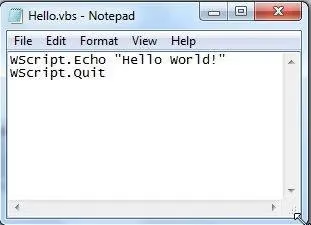
You save that little gem as something like greeting.vbs, double-click, and voilà!
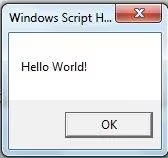
A dialog box appears! It's simple, but it proves the point: you're now a script writer. From this basic building block, you can create scripts that interact with files, folders, applications, and even other parts of the Windows system.
Beyond Simple Messages: What Can You Really Do?
Think of MSH as your backstage pass to Windows. With a bit of knowledge in your chosen language, you can automate tasks that would make batch files cry. Here are some ideas I've played with:
| Task | Old Batch Way (Painful) | MSH Script Way (Bliss) |
|---|---|---|
| Rename 1000 files | Complex for loops with arcane syntax |
A clean For Each loop in VBScript |
| Read/Write data files | Nearly impossible | Use the FileSystemObject with ease |
| Control other apps | Forget about it | Send keystrokes or use COM objects |
Make decisions (If/Then) |
Clunky and limited | Full, structured logic like a real program |
See the difference? It's like upgrading from a bicycle to a teleporter.
Getting Started in 2026: Is This Still Relevant?
You might be wondering, in the age of powerful PowerShell, cloud automation, and AI assistants, is this old-school scripting still useful? My answer is a resounding YES! Here's why:
-
Universality: It's still there, built into Windows. For quick, one-off tasks on any machine, it's unbeatable.
-
Low Overhead: No need to enable execution policies or install modules. Just write and run.
-
Foundation: Understanding these concepts makes learning more modern tools like PowerShell a breeze. They all share the same core idea: telling the computer what to do for you.
So, how do you begin? It's easier than you think!
-
Choose Your Language. Sticking with VBScript is a great start.
-
Open Notepad. Yes, seriously.
-
Write a Small Goal. Don't try to automate your entire life on day one. Start with something like "list all the text files on my desktop."
-
Search and Learn. The internet is full of examples. Need to know the VBScript code for reading a folder? A quick search will give you the
FileSystemObjectcode snippet. -
Save as .vbs (or .js, etc.) and Run! Double-click and see what happens. Debugging is part of the fun.
A Word of Caution (With a Wink)
With great power comes great responsibility. Scripts can delete files, modify settings, and generally cause chaos if you're not careful. Always test new scripts on dummy files or in a safe folder. Remember, the goal is to save time, not to spend an afternoon recovering your precious vacation photos!
So, what are you waiting for? Ditch those archaic batch file memories and step into the more capable, more fun world of Windows Scripting Host. Open Notepad, channel your inner automator, and make your computer work for you for a change. Isn't it about time?