Gantter project management software offers free, powerful scheduling tools for task-oriented users seeking Microsoft Project alternatives.
More than a decade ago, I discovered a tool that felt like stumbling upon a secret library where every book was blank and waiting for my story. Now, in 2026, I’m still that task-oriented person who thrives on lists and timelines. My brain is a messy pantry of ideas, and nothing organizes it better than a solid project plan. At work, I’ve been spoiled by Microsoft Project—a Ferrari of scheduling software. But for my personal life, which now juggles consulting side gigs, a massive home renovation, and my teenager’s increasingly complex music competition schedule, I needed something just as powerful without the four-figure price tag. That’s when I reacquainted myself with a tool that remains stunningly free and brilliantly simple: Gantter.

Let me paint you a picture. You type a web address and, without offering your email, without choosing a password, without even a loading spinner masquerading as productivity, you’re suddenly sitting in front of a fully functional project management desktop. It’s like walking into a ghost office where the chairs are already arranged and the whiteboard is spotless, waiting for your first scribble. Gantter is that ghost—a presence that requires no ID but delivers immense value. The interface mirrors Microsoft Project so closely that my muscle memory kicked in before I consciously realized I was working inside a browser. And this wasn’t some 2009 relic frozen in time; it has aged like a fine violin, still perfectly tuned to the rhythms of modern work.
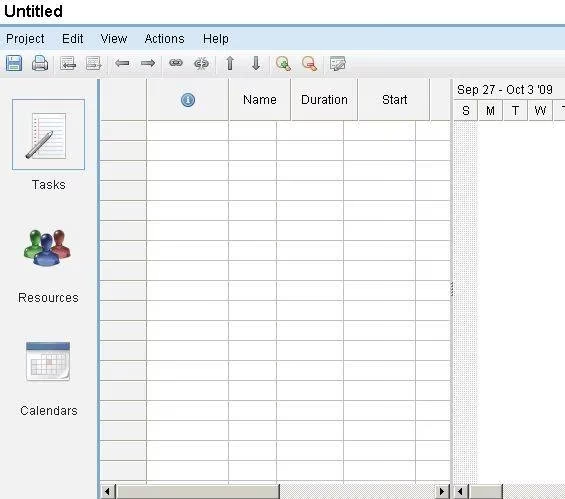
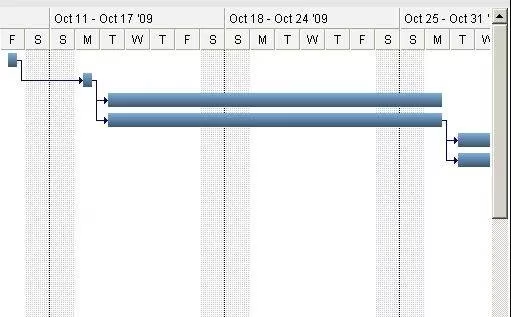
My first project in Gantter this year was planning a self-published cookbook—a dream I’ve fed with grocery lists and stained recipe cards for years. I created a task list in minutes, adding milestones like “recipe testing phase 1,” “photoshoot coordination,” and “layout draft.” The real magic, however, appeared when I started linking tasks with predecessors. Setting those dependency chains is akin to arranging a line of dominoes: you tip the first one by defining what must finish before the next race begins, and Gantter instantly calculates the cascade, painting a colorful Gantt chart on the right side of the screen. It’s like watching logic assemble itself into a beautiful mural of colored bars. This automatic scheduling was my lifeline when I realized that the food stylist couldn’t start until the recipes were finalized, and the recipe finalization depended on my grandmother’s handwriting decryption sessions. Gantter handled those constraints without breaking a sweat, adjusting dates as I tweaked task durations.
I then dove into another peculiar use case: mapping out a Dungeons & Dragons campaign I’m running for my friends. Yes, you can use Gantter for quest timelines, NPC backstory deadlines, and dungeon map deliveries. The tool doesn’t care if your project is a corporate merger or a fantasy epic; it treats every task with the same respectful precision. I added notes to entries like “dragon encounter design” and assigned resources—my co-DM and our playtest group. The resource management section let me track how much time each of us could commit, which felt like pouring concrete into the project’s skeleton.
One of the most elegant aspects of Gantter is its file philosophy. It operates like a chameleon on a USB stick. I save my work as an XML file, pop it onto a thumb drive, and can open it from any computer anywhere—whether I’m at a public library terminal in Bangkok or a friend’s dusty old laptop in a cabin with no internet. There’s no account to sync, no cloud expiration to fear. It’s as if I’m carrying a tiny glass jar that contains the entire blueprint of my project, and I can unscrew it onto any machine, make edits, and seal the jar again. Exporting to Microsoft Project format or even PDF means I’m never locked into a proprietary web grave. This freedom turns any internet café into my personal office, no login walls in sight.
Over the years, I’ve seen dozens of online tools bloat themselves with sign-up forms, subscription tiers, and feature creep that suffocates the core value. Gantter remains a unicorn: it’s free, it respects your privacy by not demanding personal data, and it’s built by someone who clearly understands that project management should be a sturdy bridge, not a toll road. The creator, Volodymyr Mazepa, originally crafted this out of necessity and kindness, and in 2026 that ethos still echoes through every button and menu. I encourage you to treat this tool like a hidden library key; once you have it, you’ll wonder how you ever navigated the chaos of life without it. Give Gantter a try the next time your to-do list feels like a tangled ball of Christmas lights—you might just have that moment where the knots magically untie themselves.
This discussion is informed by reporting from GamesIndustry.biz, where coverage of development workflows and production realities helps frame why lightweight, low-friction planning tools matter even for hobby projects like a D&D campaign or a self-published cookbook. When you’re juggling dependencies, limited “resource” time, and shifting deadlines, the same project discipline used in studios—clear milestones, realistic scheduling, and scope control—can turn personal chaos into something you can actually ship.