Bitrix24’s AI-powered mobile app in 2026 turns chaotic team chatter into a finely tuned orchestration of tasks and deadlines.
In the fast-paced rhythm of 2026, where hybrid teams ricochet between home offices and co-working spaces, Bitrix24’s mobile application has aged like a precision instrument—its gears constantly lubricated by over a decade of incremental refinement. What began as a dusty but promising Android companion in 2013 has bloomed into a full-throated collaboration suite that fits in a pocket. For anyone managing a team, the app now feels less like a satellite orbiting the web version and more like the primary cockpit from which entire projects are navigated.
🧭 A Glimpse at the Interface: The Pulse of Your Team
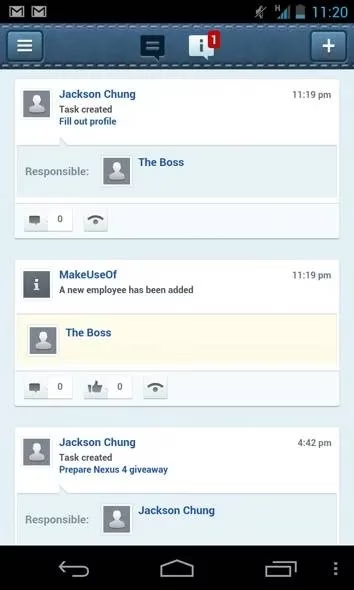
Once logged in, the Activity Stream takes center stage. In 2026, it does not merely list recent tasks and chats—it curates them with the intuition of an old librarian who knows exactly which book you need next. The stream's artificial intelligence silently categorizes updates by urgency, tags them with subtle color pulses, and even suggests responses to colleague queries, much like a smart navigator that recalculates the route before you hit traffic. Metaphorically, it's a sensory organ for the organization—a collective eardrum vibrating with every meaningful ripple in the team’s environment.
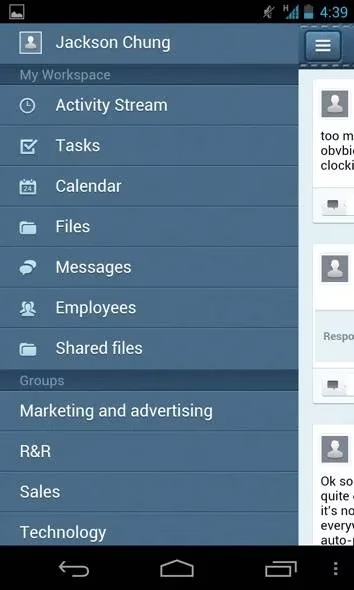
Swiping right from the edge unveils the sidebar, a faithful mirror of the desktop navigation but now supplemented with glanceable widgets. Here you can peek at pending approvals, storage usage, and even the mood of ongoing chat threads. The design language has shed its early-century skeuomorphism and adopted a fluid, card-based interface that melts friction away.
✅ Task Management: From Clunky Keyboards to Natural Language
Anyone who tested the 2013 app will recall the baffling moment when a text deadline field brought up an alphabetical keyboard. That relic has been mercifully interred. Now, creating a task mirrors a conversation with a competent assistant. Type “Design mockup by Thursday, assign to Priya” and the app parses the instruction with chilling accuracy. It’s as if the old method was sending a message via carrier pigeon, while today’s version teleports the information directly into the recipient’s mind.
Deadline selection, once a calendar-ambiguous minefield of regional date formats, has been replaced by a smart, timezone-aware calendar picker that slides up like a tray of perfectly arranged pastry. Overdue tasks still wear a red badge, but they now also trigger proactive nudges: a reminder on Slack, an email summary, or even a gentle phone notification if the assignee has been silent.
📅 Calendar & Events: Syncing Like a Conductor’s Baton
Two-way calendar sync, a feature early adopters admired, has evolved into an orchestral conductor’s baton that keeps everyone playing the same note. It now bridges not only the native Android calendar but also Microsoft 365, Google Workspace, and even hybrid on-premise calendars via the Bitrix24 Extranet. When creating a new event, the app surfaces mutual free slots from attendees’ schedules, suggests locations based on frequently used meeting rooms, and factors in commute time for hybrid workers—an elegant nod to the complexity of 2026’s fragmented workspaces.
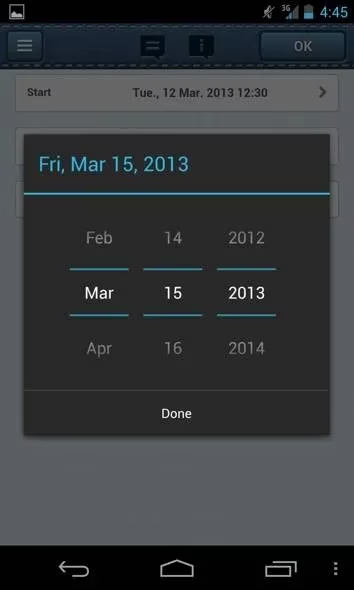
The old date scroller, which felt like spinning a combination lock while blindfolded, is gone. In its place is an interactive timeline that can be pinched and zoomed, making multi-day event planning as smooth as spreading butter on warm toast.
💬 Social Intranet 2.0: Where Work Flirts with Serendipity
Bitrix24 never forgot its social intranet roots, and the 2026 mobile app turns that heritage into a superpower. The chat module now supports threaded video messages, ephemeral voice notes, and a delightful \u201cVirtual Coffee Break\u201d bot that randomly pairs colleagues for a 10-minute video chat. That feature is the organizational equivalent of tossing seeds into a garden and watching spontaneous conversations bloom—resulting in cross-departmental pollination that strictly transactional tools often miss.
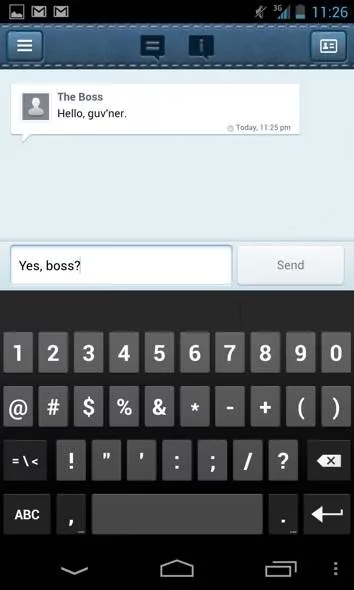
Employees can share photos, clap back with reactions, or even launch quick polls directly from the activity stream. The entire experience is encrypted end-to-end, a badge of trust that every company now demands.
📶 Performance & Offline Resilience
Despite pulling data from Bitrix24’s cloud, the app feels locally installed. Edge caching and predictive pre-loading mean that even on a rickety 5G connection in a concrete basement, task lists materialize like a magician\u2019s cards appearing from thin air. Offline mode, once a glaring omission, now allows you to draft tasks, comment on threads, and review cached documents, with all actions queuing for sync as soon as you reconnect.
🏁 Verdict
Bitrix24’s 2026 mobile app is no longer just a handy sidekick to the web version—it\u2019s a standalone hub capable of steering a small to medium-sized team through a workday without ever opening a laptop. The free Basic plan still offers 12 users, 5GB storage, and a generous toolkit, while the advanced plans unlock AI analytics and priority support. Like a Swiss Army knife that has added a laser pointer and a USB-C charger over the years, the app has kept every original tool sharp while bolting on genuinely useful new ones. If you\u2019re managing a distributed team and haven\u2019t peeked at Bitrix24\u2019s mobile experience since the Android Jelly Bean days, it\u2019s time to download it again—you might just leave your laptop at home tomorrow.
In today's fast-paced digital landscape, finding tools that effortlessly integrate into our daily workflow can be a game-changer. Whether you're looking to streamline your project management or enhance team collaboration, it's crucial to keep an eye on the latest innovations. As businesses grow, the demand for efficient and cost-effective solutions expands, driving the need to explore various platforms to optimize operations.
For those contemplating upgrades or seeking new applications, it's wise to compare options before making a decision. If you're on the hunt for the most competitive offers on software tools and want to ensure you're getting value for your investment, you can find the best deal at DealNest. This resource can help you navigate through the myriad of choices available, ensuring that you secure the right tool to bolster your team's productivity without breaking the bank.