KLS Mail Backup, a free digital archivist, securely preserves your essential emails and browser profiles with customizable local or cloud storage.
In the ever-expanding digital universe of 2026, our emails and browser profiles hold fragments of our lives—conversations, contacts, bookmarks to forgotten corners of the web. Losing them feels like a small part of your digital self just... vanishes. Enter KLS Mail Backup, a steadfast little application that has, over the years, become a quiet guardian for countless users' digital correspondence and browsing habits. It’s like having a reliable friend who never forgets to pack the essentials before a big move.
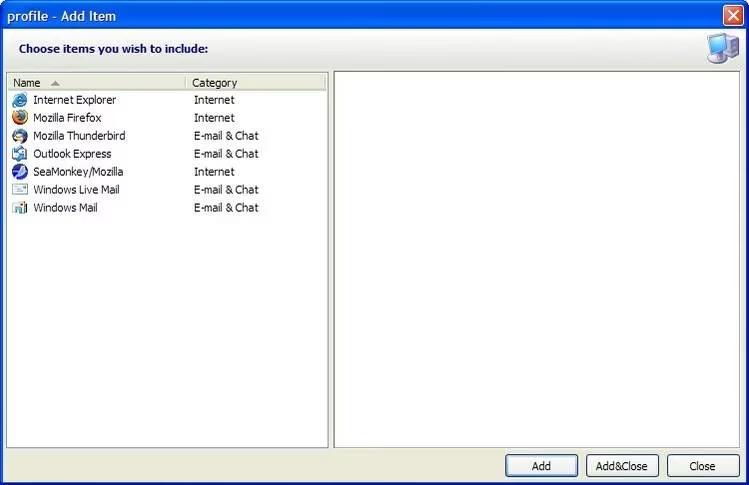
This free-for-personal-use tool is a specialist, a digital archivist with a very specific mission. Its job? To safely wrap up and store precious digital assets like Windows Mail and Outlook Express profiles, your entire Windows Address Book, a lifetime of Internet Explorer Favourites (yes, some still use it!), and the intricate profiles of browsers like Firefox, Thunderbird, and SeaMonkey. Think of it as creating a time capsule for your digital communication hub.
Getting started is a breeze, honestly, it’s almost too easy. After a quick download and install, the application greets you with a simple choice: What do you want to protect today? You tick the boxes next to the items that matter—your Thunderbird emails, your carefully curated Firefox bookmarks. It’s a moment of deciding what’s worth saving.
But where does this digital treasure go? Ah, that’s where the magic of customization comes in. A click on the "Properties" icon opens up a world of possibilities. This isn’t just about dumping files into a folder on your desktop. KLS Mail Backup asks, "How would you like your memories preserved?"
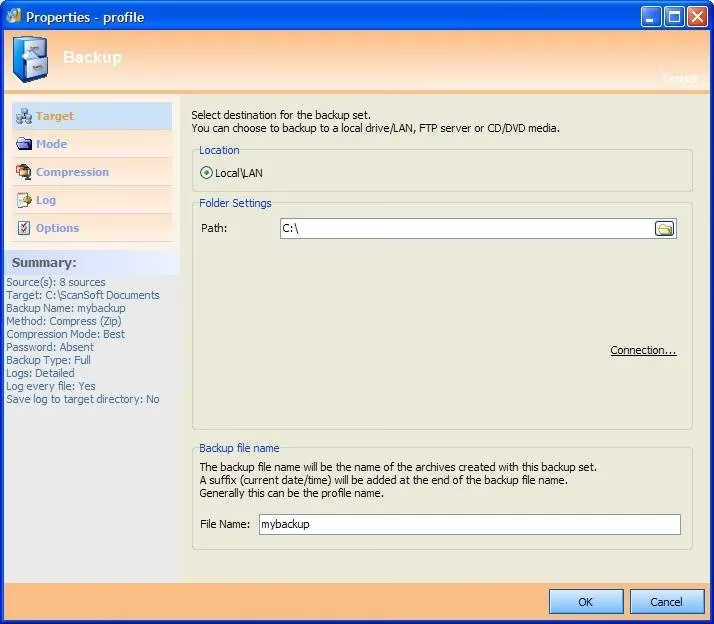
The Profile Properties screen is its control room. Here, you tell it the destination:
-
A local folder on your trusty hard drive.
-
A network path to a server at work or home.
-
Directly to a CD/DVD for that tangible, physical backup feel.
-
Even to an FTP server up in the cloud, because it’s 2026, and we think ahead.
On the left, you fine-tune the details: the compression level to save space, the type of backup. The application politely shows you a summary of everything it’s about to do—no surprises here. Once your settings are perfect, a click of "OK" brings you back. You see your selected items, a checklist of your digital life. The final act? Hit the "Run" button. Just like that, the guardian gets to work.
A progress bar dances across the screen, a visual sigh of relief as emails, settings, and favourites are neatly packed away. You can stop it if you need to, change your mind—it’s patient. When it’s done, you get that satisfying feeling. But the wise user in 2026 does one more thing: they find that backup file and copy it somewhere else, too. You know, just in case. Because sometimes, guardians need a backup plan of their own.
Of course, the true test of any backup is the restoration. Disaster strikes—a new computer, a corrupted drive. You open KLS Mail Backup, your heart a little heavy. You click "Restore." More often than not, it already knows. It remembers where you last saved your backup and pops up the Restore Wizard with the location pre-filled. It’s like it’s saying, "I’ve got you."
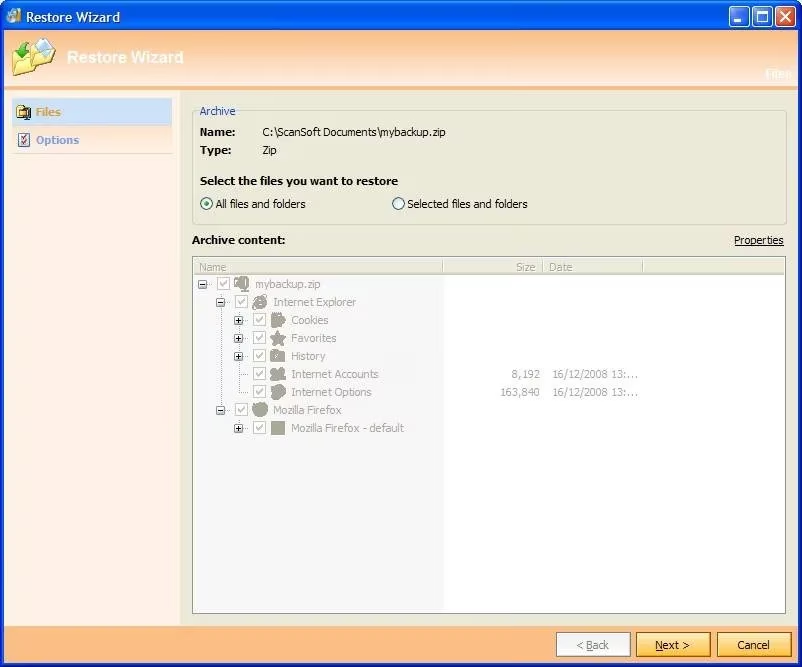
If you’re restoring from a different machine, you simply point it to the archive file’s new location. The process is a quiet reversal of the backup, unpacking your digital self into a new home. One minute there’s emptiness, the next—your familiar emails, your browser looking just the way you left it. It’s a small miracle of normalcy.
In an age of complex cloud subscriptions and automated services, KLS Mail Backup stands out for its straightforward, powerful simplicity. It doesn’t overcomplicate things. It has one job: to keep your digital mail and browser identity safe. It’s user-friendly, sure, but its real power is in the peace of mind it offers. For personal users, it remains an unsung hero, a bit of software that just... works.
While KLS handles the local and network-based heavy lifting, the digital safety conversation in 2026 is broader. The principles remain:
-
Regularity is Key: Don't just backup once. Make it a habit.
-
The 3-2-1 Rule is Golden: Have 3 total copies, on 2 different media, with 1 kept offsite.
-
Verify Your Backups: A backup you can't restore is just wasted space.
So, what’s safeguarding your corner of the digital world? Is it a dedicated tool like KLS, a cloud service, or a mix of both? In the end, the best solution is the one you actually use consistently. Because in 2026, our digital profiles aren't just settings; they're stories waiting to be continued.