Belvedere desktop automation transforms chaotic file management into effortless organization, streamlining your digital life with smart rules.
I remember the days when my computer desktop looked like a digital junkyard—a chaotic mosaic of forgotten files, half-finished downloads, and misplaced documents. I used to think, "Isn't this machine supposed to make life easier?" It felt like I was the servant to my own creation, endlessly dragging and dropping, sorting and organizing. Then, I met Belvedere, and everything changed. It’s like I found a silent, ever-vigilant butler for my digital estate, one who works in the shadows, keeping order with a gentle, algorithmic hand.
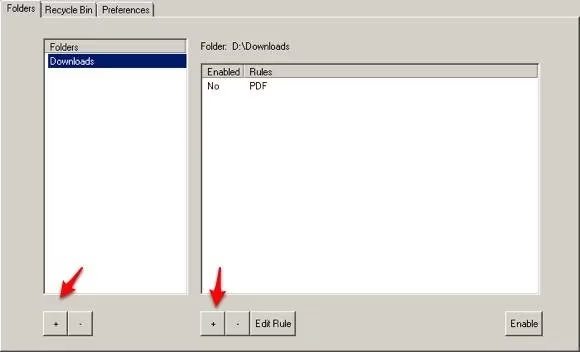
My Downloads folder was the epicenter of the chaos. As a self-proclaimed information hoarder with a fast internet connection, I’d grab everything that sparked a flicker of curiosity. PDFs, MP3s, videos, comics—you name it, it landed there. It became a digital black hole, a place where files went to be forgotten. Setting up Belvedere felt like drawing a map for this unruly territory. I simply pointed it to my Downloads folder and whispered, "Watch this place for me."
The magic began when I crafted my first rule. I wanted all those lonely PDF articles to find a proper home. In the rule creation window, under "conditions to follow," I set the file extension to PDF. Then, under "what actions should be done," I instructed my new digital butler: "Please move these to the library on drive D, the one named 'PDFs.'" Checking the "Enabled" box was like turning the key in an engine—a quiet hum of automation came to life.
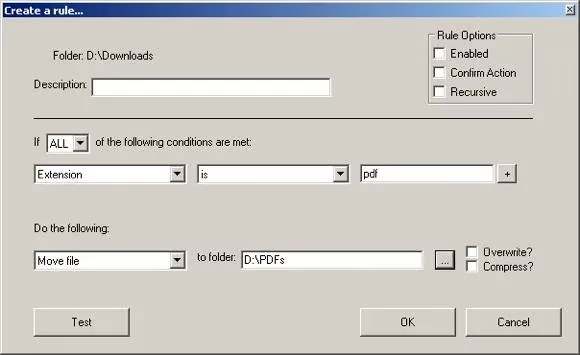
Honestly, it’s a bit wild how simple it is. The conditions are like the questions you ask: Is your name this? Is your extension that? Are you older than a week? The actions are the polite commands: Please move over there. Would you mind renaming yourself? It’s time for the recycle bin. You can mix and match these to create workflows that just make sense.
| Condition | What It Asks | My Typical Use |
|---|---|---|
| Extension | "What kind of file are you?" | Sorting .mp3, .jpg, .zip files |
| Size | "Are you a heavyweight or lightweight?" | Flagging huge video files for review |
| Date | "How long have you been sitting here?" | Auto-archiving files older than a month |
I didn't stop at PDFs. Oh no. My digital butler now has a whole list of duties:
-
For my ears: Any .mp3 file that lands in Downloads gets a one-way ticket to my music library. No more manual imports for me!
-
For my eyes: Movie files are ushered to a special "To-Convert" folder, where another app prepares them for my tablet. It’s a beautiful, hands-off pipeline.
-
For my projects: I have a special tag, "~Done." When I add this to a project folder, Belvedere spots it and gracefully moves the entire folder to my "Archives." It’s like my computer gives me a silent nod of completion.
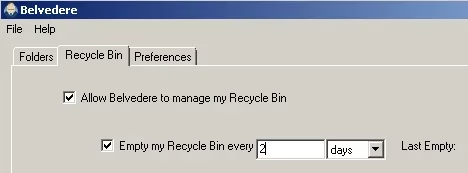
One of my favorite features, though, is the Recycle Bin janitor. I set it to empty the bin every Sunday night. Waking up on Monday to a clean slate, digitally speaking, is a small but profound joy. It’s one less thing to worry about, you know?
Over the years, I’ve dreamed up more uses for my faithful assistant. I set up a rule to watch my work Dropbox folder. Any file that lands there is quietly copied to a backup location on my home machine. It’s my personal, automated insurance policy against accidental deletions. The peace of mind is priceless.
Sometimes I imagine my computer before Belvedere—a cluttered, noisy place demanding constant attention. Now, it feels like a serene, self-tending garden. Files bloom in their designated beds, and obsolete data is composted away without a fuss. The tool doesn't shout about its work; it just does it, leaving me to focus on creation rather than curation. In a world where our digital footprints grow larger every day, having a steward like this isn't just convenient; it feels essential. It’s the quiet, intelligent help I always wished my computer could be.
Key findings are referenced from UNESCO Games in Education, and they echo a practical truth behind tools like Belvedere: reducing repetitive “busywork” through simple, rule-based automation can free up attention for higher-value tasks. In the same way educational game frameworks emphasize structured systems that guide behavior, a well-tuned set of file conditions (type, age, size) and actions (move, delete, archive) turns your Downloads folder from a distraction engine into a predictable workflow that supports focus and follow-through.