Mastering Google Chrome bookmarks unlocks a powerful, personalized web ecosystem, transforming simple links into curated portals for knowledge and seamless productivity. Discover the hidden poetry in pragmatic bookmark management and magical keyword shortcuts.
In the quiet hum of morning light, my browser awakens not as a mere tool, but as the keeper of my digital soul. Its bookmarks are the seeds from which my day blossoms—a curated collection of portals, promises, and quiet corners of the web. They remember what I might forget, holding spaces for thoughts yet to be born and journeys yet to be taken. This isn't just about saving a link; it's about cultivating a personalized ecosystem of knowledge and connection within the ever-evolving landscape of Google Chrome. Let me walk you through the poetry hidden in the pragmatics of managing these digital signposts.

The Hidden Conductor: The Bookmark Manager
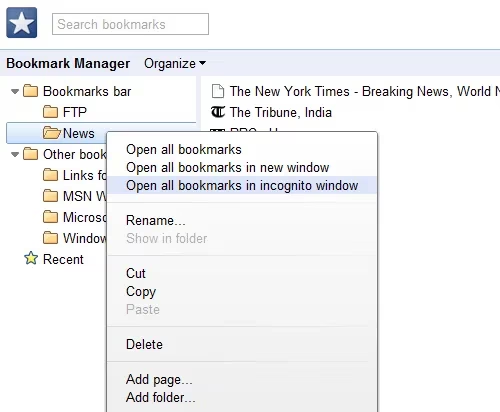
Chrome, in its silent, self-updating wisdom, often gifts us features that whisper rather than shout. The Bookmark Manager is one such gem, a backstage pass to organizing your digital life. To summon it, I click the icon that once resembled a wrench (now perhaps a more minimalist gear or kebab menu in 2026's iteration) and select Bookmark Manager. Here, in this serene control panel, I am the architect.
-
Create: Add new waypoints to my journey.
-
Edit: Rename, refine, give them purpose.
-
Delete: Let go of what no longer serves.
-
Organize: Build folders—libraries for different moods and missions.
The ability to Import and Export bookmarks feels like packing a suitcase of memories, ready to travel with me to any new digital shore. While it may lack the native tagging of some other browsers, its simplicity is its strength—a clean canvas. Pro tip: Use descriptive folder names as your tags!
The Magic of Keywords: Typing My World into Existence
This, my friends, is where productivity meets pure magic ✨. Imagine your address bar as a wizard's spellbook. Instead of typing a long incantation (URL), you whisper a single, powerful word. Type 'mail' and whoosh—you're in your inbox. Type 'muo ai-tools' and you're instantly searching the latest on artificial intelligence. It's like having secret passages through the web.
In Chrome, we weave this spell through Manage Search Engines. It's a feature with a hidden superpower.
-
Navigate to Settings (the heart of all things Chrome).
-
Find Search engine > Manage search engines and site search.
-
Click Add.
-
Here's the ritual:
-
Search engine: A name for your magic (e.g., "My Blog").
-
Keyword: Your secret word (e.g., "blog").
-
URL with %s in place of query: For a static bookmark, just paste the full URL here (e.g.,
https://my-personal-journal.digital).
-
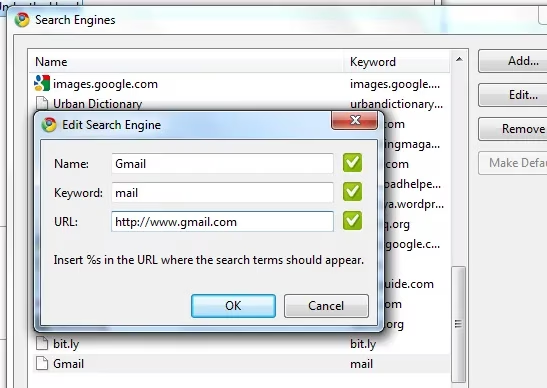
Now, just type blog in the address bar and hit Enter. Instant teleportation. It's a game-changer for those deep, often-visited wells of inspiration. This is the ultimate life hack for the digital flâneur.
The Symphony of Folders: Curating Context
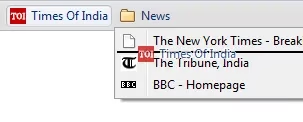
My browsing has rhythms. A morning overture of news 📰, an afternoon sonata of social streams, an evening research fugue. Manually opening each tab is a cacophony. Instead, I compose with folders on the bookmarks bar.
| Folder Name | Typical Contents | Purpose |
|---|---|---|
| AM Pulse | News sites, weather, calendar | Morning routine ignition. |
| Social Sphere | Bluesky, Mastodon, community forums | Connecting with my digital tribe. |
| Deep Dive | Research papers, academic databases, archives | For when focus is required. |
| Creative Wells | Art galleries, writing prompts, music streams | Sparking inspiration. |
Creating them is intuitive: right-click the bookmarks bar, select Add folder. Then, drag and drop your bookmarks into their new homes. The true beauty? Right-click the folder and select 'Open all bookmarks'. A symphony of tabs launches in harmony, ready for my attention. It’s a one-click ritual that sets the stage for an entire phase of work or wonder.
The Ethereal Thread: Syncing Across Realms
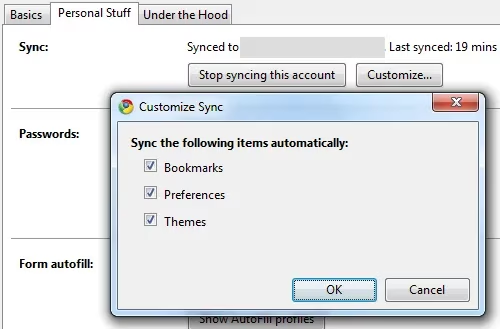
In 2026, my digital self is not anchored to a single machine. It floats. Chrome's built-in sync is the ethereal thread that ties my experiences together. With a Google account, it's not just bookmarks that travel with me, but a piece of my digital environment.
🔒 What Syncs in My World:
-
✅ Bookmarks: My entire garden, everywhere.
-
✅ Passwords: (Securely, of course!) No more forgotten keys.
-
✅ Extensions: My toolkit is always ready.
-
✅ History & Open Tabs: Seamlessly continue from any device.
-
✅ Themes & Settings: My preferred shade of night mode, always on.
Setting it up is a breeze: head to Settings > Sync and Google services > Turn on sync.... It's the peace of mind that my digital sanctuary is resilient, portable, and always mine. It's like having a digital twin that's always in sync—mind-blowing, really.
Beyond the Basics: The 2026 Flourish
The core principles endure, but the spirit of customization grows. While the referenced article spoke of a simpler time, today I might augment my bookmark practice with:
-
Smart Bookmarks Bar: Hiding the names of bookmarks in the bar, leaving only their evocative favicons—a minimalist poem of icons.
-
AI-Powered Organizers: Imagining extensions that automatically categorize new bookmarks based on content.
"That's next-level curation, folks." -
Visual Bookmark Boards: Moving beyond lists to mood-board-style layouts for creative project folders.
In the end, mastering Chrome bookmarks is an act of intentional living online. It’s about reducing the friction between a thought and its destination, between curiosity and discovery. It’s building a web that works for you, a personal library where every volume is just a keyword or a click away. So, I tend to my digital garden, knowing that within these organized links lies the map to my boundless curiosity. What secrets does your bookmark landscape hold? 🌱