Time tracking apps for freelancers boost productivity and income with automation, dashboards, and seamless integrations in 2026.
I have lost count of the afternoons I thought were productive until I looked at my timesheet and realized I had bounced between email, messaging apps, and half-finished tasks for hours. As a freelancer, that lack of clarity directly affects my income because every unlogged minute is a billable hour I cannot recover. Over the last few months I have been exploring time tracking apps that promise to make logging effortless. In 2026 the category has matured a lot, with smarter automation, better dashboards, and more integrations than the older spreadsheet-like tools. Here are the ones that genuinely changed how I manage my working hours.
HourStack: A Visual Planner for Your Week
HourStack is the first app I tested because I wanted a clear weekly picture before I committed to any complex setup. Its Kanban-style board lets me see each day as a column and each task as a block. I can drag those blocks from one day to another, stretch them to show longer durations, and color-code them by project or label. That visual calendar approach makes it feel less like a traditional tracker and more like planning where my attention should go.
A built-in timer counts down the remaining time for a task, which helps me avoid overrunning meetings or focus sessions. At the end of the day, HourStack generates charts that reveal how much time I actually saved compared with my original estimates. For teams, there are Professional and Enterprise plans, and integrations with Slack, Todoist, Google Calendar, and similar tools keep my workflow connected. I used the web app on my computer and the mobile apps on Android and iOS. The free trial lasts 14 days, and after that the monthly cost starts at around seven dollars.
Timely: Smarter Automatic Tracking
Timely caught my attention because it looks modern and supports flexible drag-and-drop blocks like HourStack. I can view data by hours, projects, or team members, and the productivity reports help me check budgets for each project without exporting data to another tool.
The standout feature is Memory, an optional automatic tracking module for Windows and macOS. Once I configured it, the AI observed how I used my computer and phone, grouped similar activities, and suggested time entry logs for me. For example, if I opened a presentation app while working at a coffee shop, Timely might recommend logging that block as a client meeting. That kind of hands-free tracking reduces the friction of manual entry, but I did pause to think about privacy. Memory works by monitoring digital activity, so I only enable it when I am comfortable with that tradeoff. Timely also connects with apps like Google Calendar for an even more automatic experience. A 14-day trial is available without a credit card.
Toggl Track: One-Click Simplicity
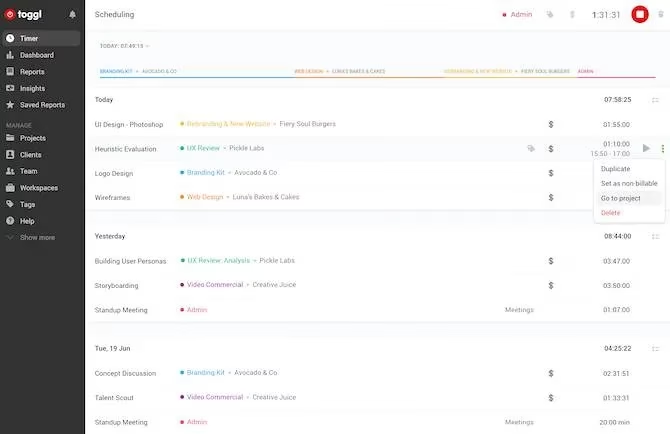
Toggl Track is the app I recommend when someone wants to start tracking without learning a complicated dashboard. The interface does not overload me with charts on the first screen. Instead, it asks me to add the task I am working on right now and start a one-click timer. Browser buttons for Chrome and Firefox make this even faster.
I can choose automatic real-time tracking or enter time manually at the end of the day or week. The dashboard still gives me a complete progress view, and the reporting tools generate detailed insights for my logged hours. I appreciate that Toggl lets me switch between multiple projects, teams, and tags while adding billable rates to specific entries. That last part is essential when I need to invoice a client by the hour. Toggl offers a free Basic plan for personal use, and anyone can try the paid plans for 30 days before subscribing.
Harvest: Time Tracking With Invoicing Built In
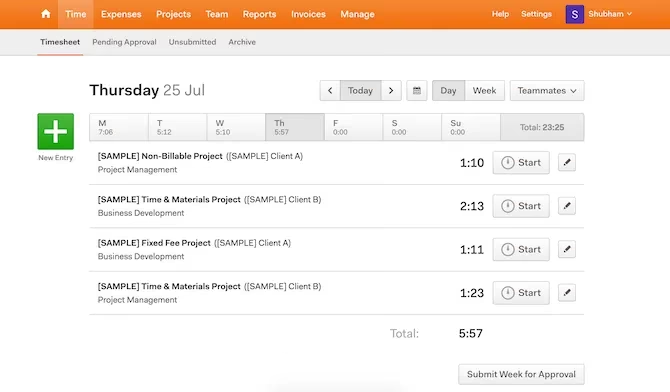
Harvest is the tool I turn to when I want a cleaner experience without sacrificing deep features. The app uses bold typography and straightforward controls, so I understood the interface within minutes. On the home page I can view my timesheet, see a weekly overview, add new tasks, start timers, and check what teammates are working on. There are dedicated tabs for budgets, projects, and reports, which keeps my financial planning close to my time data.
What makes Harvest different from many trackers is its invoicing capability. I can generate a bill directly from tracked time and expenses, which saves me from copying entries into another system. The free version supports a single person with two projects, which is generous for solo freelancers. For larger needs there are paid plans with more capacity.
TimeCamp: A Well-Rounded All-in-One
TimeCamp feels like a balanced combination of the other tools I tested. It has a minimal and modern design, but it does not sacrifice the practical features I need. I can log my day through a Kanban-style dashboard or move step-by-step through a more traditional day view. Tasks can be separated by project, and the reporting section produces extensive insights when I want to review where my time went.
The desktop app adds another useful layer because it can track my computer time and breaks automatically. That is helpful for spotting patterns like long periods of shallow work or too few breaks. TimeCamp also offers 114 integrations with third-party apps such as Slack, Trello, Evernote, and Podio, so it fits into many existing workflows. Individuals can use the core time tracking features for free, while advanced add-ons require a paid tier.
Clockify: Free Tracking for Any Team Size
Clockify is one of the most widely used time tracking platforms because its free plan covers unlimited users. In my testing, that made it the easiest recommendation for small teams that do not want to worry about per-seat costs. The dashboard is no-frills but effective: I can create new entries, start timers, and analyze historical data without clutter. There is also a Time Tracker section that arranges current and previous tasks in reverse chronological order, which helps me quickly pick up where I left off.
Clockify includes reporting tools and apps for all the major operating systems. Premium packages exist for a few extra perks, but most individual users and small teams will likely find the free version sufficient. That combination of simplicity, availability, and no-cost access makes it a strong default option.
Quick Comparison
| App | Best for | Standout feature | Free option |
|---|---|---|---|
| HourStack | Visual weekly planning | Kanban drag-and-drop blocks | 14-day trial |
| Timely | Automatic logging | Memory AI tracking | 14-day trial |
| Toggl Track | Quick one-click timers | Browser timer buttons | Free Basic plan |
| Harvest | Time plus invoicing | Built-in invoice creation | Free for one person and two projects |
| TimeCamp | All-in-one tracking | Desktop activity and break tracking | Free for individuals |
| Clockify | Unlimited team tracking | Free for unlimited users | Free plan |
Final Thoughts
After using these apps side by side, I have learned that the best tracker is the one I actually keep open. Visual planning works well in HourStack, automatic tracking in Timely reduces friction, Toggl offers fast one-click timers, Harvest connects time data to invoicing, TimeCamp is a flexible all-rounder, and Clockify removes the price barrier entirely. The real benefit is not just knowing how many hours I worked, but understanding where those hours went and using that knowledge to protect my focus and income. Even the best time tracking tool only helps if I follow through on my plans, so I try to review my reports weekly and adjust my schedule instead of simply collecting more data.