Gmail customization and Firefox extensions boosted productivity and personalization, shaping email management for users in the late 2000s.
I still remember the early days when Gmail felt like a blank canvas begging to be customized. Back in the late 2000s, I was just an ordinary user who wanted more from my inbox – better organization, faster shortcuts, and a look that reflected my personality. Over the years, I’ve gathered a treasure chest of Firefox extensions, Greasemonkey scripts, desktop apps, and clever hacks that transformed Gmail into a productivity powerhouse. Even though 2026 has brought a sleek, AI-powered Gmail that handles most tasks natively, revisiting those old tools feels like flipping through a beloved diary. They shaped how I work with email today.

Let’s start with the Firefox extensions that once ruled my browser. Gspace was a magical multi-platform addon that turned my Gmail account into an online storage solution – I could upload and access files directly from my account as if it were a remote hard drive. While it no longer works today, the idea paved the way for seamless cloud storage integration we now take for granted. Then there was the Gmail Search Extension, which let me search my inbox straight from the Firefox search bar. Productivity boosters like GcalQuickTab allowed me to toggle between Gmail and Google Calendar with a simple keyboard shortcut – a feature that now feels indispensable but was revolutionary at the time.
My personal favorite was GTDInbox, a full-blown Getting Things Done system layered right into Gmail. It turned my chaotic mailbox into a structured task manager with labels, statuses, and review queues. Managing multiple accounts was a breeze thanks to GMail Manager, which kept all my profiles accessible from the browser toolbar. The real time-saver, however, was DragDropUpload – dragging files directly onto the “Attach a file” link felt like pure wizardry. Later updates brought even more powerful addons: CustomizeGoogle hid ads, enforced HTTPS, and cleaned up the clutter; Better Gmail bundled attachment icons, reminders, label colors, macros, and saved searches; and GmailSkinz let me change inbox colors, embed weather and news widgets, integrate Picasa images, and modify almost every visual element. The sheer creativity of these developers still amazes me.
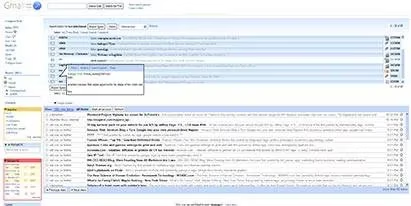
Once Greasemonkey entered the scene, I unlocked a new level of inbox sculpting. Gmail Super Clean stripped away distractions, leaving only what mattered – a minimalistic paradise. Other scripts tackled small annoyances: Gmail Spam-count Hide removed the nagging spam link, and GMail Attachment Icons replaced the generic paperclip with file-type indicators so I could instantly spot PDFs, images, or archives. The integration scripts were game‑changers. Google Reader Integration merged my RSS feeds into Gmail, while Google Calendar Integration displayed my agenda in a sidebar. I could preview the latest headlines and schedule items without leaving my inbox – a forerunner of today’s unified workspace ideas.
Some scripts reshaped my workflow completely. GmailTo forced every mailto link on the web to open a Gmail compose window instead of a desktop client. Saved Searches let me create smart folders – queries like “from:boss is:unread” lived in a navigation box and executed with a single click. Conversation Preview gave me a popup pane to read message contents right from the main view, eliminating unnecessary clicks. With Label Colors, I painted my labels in vivid hues; Gmail Macros added extra keyboard shortcuts like “t” for trash and “r” for mark as read. Security‑conscious users relied on SSLGoogle to force secure connections, while Gmail Encrypt provided end‑to‑end encryption for outgoing emails. The Gmail Date Search script added a “Search by Date” button, and Gmail Signature Float pushed my signature to the top of replies – a small touch that saved minutes every day.
Beyond the browser, a whole ecosystem of desktop applications and web tools flourished. GmailDrive for Windows created a virtual drive inside “My Computer” that used Gmail as its storage medium; dragging and dropping files felt as natural as a local disk. Mac users had gDisk, offering a similar experience. Task management went offline with Gmail ToDo, a desktop app that stored to‑do items under a special Gmail label. Notification utilities abounded: the official GMail Notifier, GTray, GCount, and Gmail+Growl 2.0 all kept me alerted without refreshing. I even accessed my mail on the go with GMail for Mobile, and experimented with GmailFS on Linux to mount a Gmail-based filesystem. Google’s own messaging service, Google Talk, was fully integrable with Gmail, letting me chat and check mail in one place.
A few more notifiers deserve a shout‑out: KCheckGmail for Linux purists and Notifier2 for Windows users kept the ecosystem alive across platforms. Although some services like “You’ve Got Gmail” (a Trillian plugin) have vanished, the sentiment of being instantly reachable survives in modern push notifications.
Some of the most memorable Gmail tricks have become part of my permanent muscle memory. When the office firewall blocked personal email, Unbl0ck was my hidden backdoor. A cute Gmail icon generator created an image of my email address to avoid spam crawlers – a trick I still recommend to friends who run personal blogs. Connecting Gmail to desktop clients was essential: I used the Gmail To Thunderbird guide to pull my archive into Mozilla’s mail client. A printed shortcut list lived under my keyboard for months; combinations like Shift + I for mark as read and E for archive sped up my inbox triage. I even learned how to import Hotmail contacts, how to attach blocked file types by renaming extensions, and how to spot which company was selling my address using the plus‑addressing trick.
When my storage quota blared warnings, I discovered the art of cleaning up Gmail – old attachments, spam, and large messages were the hidden culprits. A secret keyboard shortcut for deleting messages (# then Del) saved me when my inbox overflowed. Back then, I backed up my entire archive using a clever method with Google Groups, and later re-downloaded messages into Outlook when I needed offline access. Learning to work with attachments efficiently meant combining Firefox extensions, Greasemonkey scripts, and a few patience-testing hacky steps.
Today’s Gmail in 2026 has absorbed many of these ideas. Native scheduling, smart replies, integrated tasks, and a fully customizable sidebar exist without addons. Yet I miss the DIY spirit that each extension and script embodied. That era taught me to treat my inbox not as a fixed product but as a personal workspace that could be reshaped to fit my brain. The tools may have faded, but the mindset of continuous improvement remains. So next time you glance at your streamlined, AI‑assisted inbox, spare a thought for the tinkerers who paved the way – and maybe, just maybe, keep a few old Greasemonkey scripts in a virtual museum folder for the memories.