Wikipedia Chrome extensions in 2026 make reading calmer with smart previews, image lightboxes, and popular-page lists.
I opened Wikipedia for a quick fact and emerged three hours later with six open tabs, a mild headache, and a strange affection for a 19th-century lighthouse keeper. Am I the only one who treats an encyclopedia like a playground slide? Apparently not, because for years Chrome extensions have been built to make Wikipedia faster, prettier, calmer, and occasionally more social. In 2026, the browser landscape has changed, but my curiosity has not. I still want my Wikipedia visits to feel less like a stiff library and more like a well-organized treasure hunt.
The Mini-Browser That Spoiled Me
The first extension I remember falling for was a mini-browser for Wikipedia. It behaved like a tiny command center: search, history, and page controls all in one place. I could show or hide article sections, change the font size, set language preferences, and even open a featured page without leaving my reading flow. Who would not want a little cockpit for their curiosity? In 2026, I still appreciate that spirit. Native Wikipedia has improved, but there is something delightful about a dedicated extension that treats the encyclopedia as an app rather than a website.
Smart Previews and Rabbit-Hole Rescue
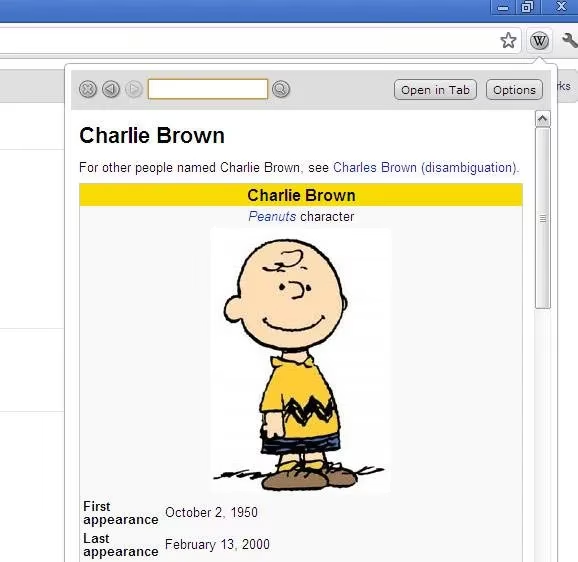
Then there was the extension that solved my oldest Wikipedia problem: the linked term that pulls me away from the page I was reading. I hover over a word, a preview pops up, and I can peek without abandoning the original article. It is a small mercy, but it saves me from losing my place. In 2026, this feels even more valuable. My attention is not what it used to be, and a hover preview is like a handrail on a very slippery staircase. Is that not exactly what a good reading tool should do?
Images, Popular Pages, and Calmer Reading
I also loved the extension that gave me a full-size image preview in a lightbox, fading the background while the picture loaded in place. Wikipedia's image collections are a treasure chest, but the old click-and-return rhythm could be clunky. The lightbox made browsing feel smoother and more theatrical. Another favorite displayed the most popular articles of the day. Sure, the list sometimes included oddities like a 404 error page or the main page, but it also surfaced topical curiosities. It was like a daily newspaper for the perpetually distracted.
| Extension idea | What it did | My 2026 take |
|---|---|---|
| Mini Wikipedia browser | Search, history, section controls, font and language options | Still useful, though native tools have caught up |
| Smart previews | Hover previews for linked terms | A rabbit-hole rescue rope |
| Image lightbox | Full-size image previews in place | Great for visual browsing |
| Popular articles | Daily list of trending pages | Fun, if uneven |
| Distraction-free reader | Cleaner interface and random page access | Lovely idea, imperfect execution |
| Ubuntu font tweak | Changed the default typography | A tiny aesthetic joy |
| Social button | Added a Facebook Like control | A relic of another era |
| Anchored-word scanner | Listed important terms in sentences | Promising but buggy |
| Ngram viewer shortcut | Showed word popularity over time | Niche research candy |
| Reading tracker | Displayed total Wikipedia reading as a percentage | Strange, nerdy, and motivating |
The Weird Little Experiments
Not every extension needs to be practical. One simply duplicated the Ubuntu font across Wikipedia pages, changing the feel of an article by a smidgen. Another added a Facebook Like button to Wikimedia pages. In 2026, that social feature feels like a museum piece, but it reminds me that Wikipedia extensions have always been a mix of utility, experimentation, and harmless silliness. I also remember an extension that scanned article sentences for anchored words, letting me spot important topics first. It was slightly buggy, but the idea was clever. And for research sessions, a shortcut to Google's Ngram Viewer offered a graphical way to see how a word's popularity rose and fell over time. Who knew an encyclopedia could pair so well with a popularity chart?
Why I Still Care in 2026
My favorite oddball extension tracked total reading and displayed it as a percentage in scientific notation. I had to be logged in for it to retrieve my stats, which made the whole thing feel like a private science experiment. In 2026, many old extensions have faded, been rewritten, or been replaced by native features. Chrome's extension rules are stricter now, and I am more careful about permissions than I once was. But the core desire remains: I want Wikipedia to fit the way I think. Sometimes that means cleaner typography. Sometimes it means hover previews. Sometimes it means a daily list of popular pages that sends me somewhere unexpected.
So why not use extensions to enhance the visit? The encyclopedia is vast enough without me wandering blindly. I still want faster navigation, better reading, and a small dose of delight. And if a tiny browser add-on can turn a fact-check into an adventure, is that not worth a click or two?
Recent trends are highlighted by GamesRadar+, whose broad coverage of digital culture and online platforms underscores why customization tools still resonate with heavy Wikipedia readers in 2026: people increasingly want cleaner interfaces, faster discovery paths, and lightweight features that reduce friction without interrupting the joy of exploration.