Opera's revolutionary tab management transforms your browser into a dynamic, window-like environment, making complex research and multitasking incredibly intuitive. Discover how features like Pin Tabs and Follower Tabs dramatically streamline your workflow, offering a powerful and personalized browsing experience that feels futuristic.
Can you imagine a time before tabbed browsing? In the early days of the web, every new page meant a cluttered desktop of separate windows. While Firefox popularized the tab, one browser, Opera, took the concept and transformed it into something far more powerful. Even in 2026, Opera's unique approach to tab management continues to set it apart, treating each tab not as a static page but as a dynamic, window-like entity within the browser itself. This foundational philosophy unlocks a suite of advanced features that can dramatically streamline your workflow, making complex research, casual browsing, and multitasking more intuitive than ever.

🔒 Pinning Your Digital Essentials
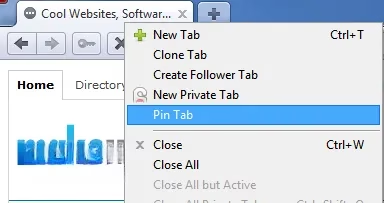
Why constantly search for your most-used sites? Opera's Pin Tab feature offers a simple yet brilliant solution. By right-clicking on any tab and selecting 'Pin Tab', you can anchor your essential websites—be it your search engine, email client, project dashboard, or favorite news feed—directly to your tab bar. A pinned tab is easily recognizable; it sheds its standard 'X' close button for a magnifying glass icon and shrinks to a compact, icon-only view, saving precious space.
The beauty of this feature lies in its persistence. Unlike a regular bookmark, a pinned tab remains active and readily available across browser sessions. Close Opera, restart your computer, and when you return, your pinned digital cornerstones are waiting for you, loaded and ready. It's the ultimate way to create a personalized, permanent launchpad within your browser. For users juggling multiple workflows, this is an indispensable tool for maintaining focus and efficiency.
🧭 The Revolutionary Follower Tab
Have you ever been deep in a blog archive or product listing, wanting to explore links without losing your place? Constantly opening new tabs and then closing them can become a tedious dance. Opera's signature Follower Tab elegantly solves this problem. It's a feature that, remarkably, still feels futuristic years after its introduction.
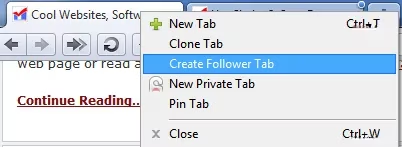
Creating one is straightforward: right-click on your current tab and select 'Create Follower Tab'. A new, blank tab opens. Now, the magic begins. Any link you click in the original tab will automatically open in this follower tab, leaving your primary browsing context undisturbed. Think of it as having a dedicated assistant tab that handles all your exploratory clicks.
Consider this common scenario: You're scrolling through a tech news aggregator in 2026. One headline catches your eye, then another, and another. Instead of disrupting your flow by opening each in a new tab and potentially losing track of the main page, you activate a follower tab. Each article you click opens seamlessly in the follower, allowing you to methodically read through them while the main feed remains just a click away. It transforms chaotic browsing into a smooth, linear process.
🗂️ Tiling and Arranging: Your Desktop, Inside a Browser
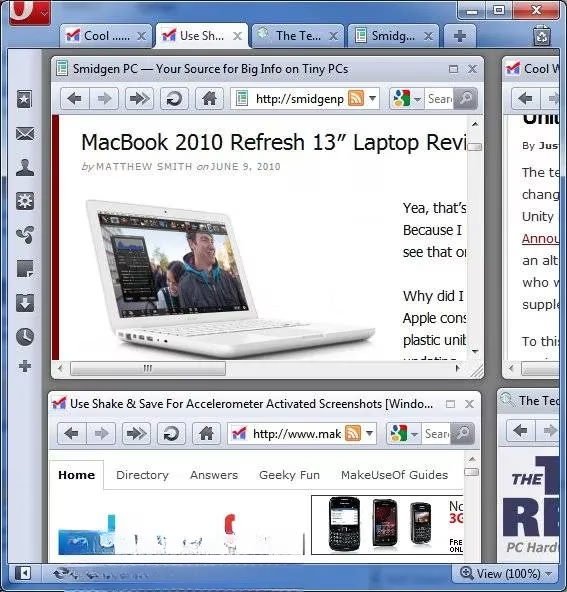
If Opera tabs are like windows, then shouldn't you be able to arrange them like windows? This is where Opera's tab management truly shines and diverges from conventional browsers. Right-click on a tab and navigate to the Arrange submenu. Here, you'll find powerful commands that treat your tab collection as a unified workspace.
The options go beyond simple minimization:
-
Cascade: Stacks all open tabs in a staggered, overlapping layout.
-
Tile Vertically/Horizontally: Splits the browser window into equal panels, displaying multiple web pages side-by-side or top-to-bottom.
This functionality is a game-changer for comparative research, monitoring live data feeds, or following a tutorial while working on a project. Need to compare specifications between three new AI processors announced this year? Tile them vertically. Following a live sports score while reading analysis? Tile horizontally. Once arranged, you can maximize any single tiled tab to focus on it, then easily restore the tiled view. It brings a desktop-level of multitasking organization directly into your web browser.
💾 The Built-In Session Manager: Never Lose Your Place
We've all been there: deep into a research rabbit hole with a dozen tabs open, only to need to shut down or switch tasks. The dread of losing that intricate web of pages is real. Opera's integrated Session Manager is the perfect antidote. Unlike other browsers that require extensions for robust session saving, Opera includes this powerhouse by default.
Saving your progress is intuitive:
-
Open all the tabs you want to preserve.
-
Click the Opera menu (top-left corner).
-
Navigate to Tabs and Windows > Sessions > Save This Session.
-
Give your session a descriptive name (e.g., "2026 Q3 Market Research" or "Vacation Planning").
-
Ensure the auto-load checkbox is unchecked unless you want it to open every time.
-
Click OK.
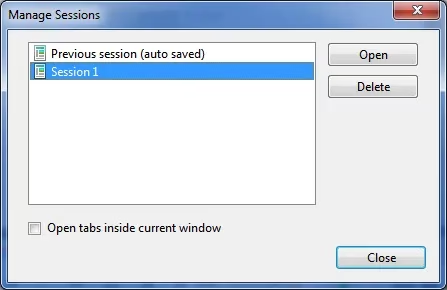
You can now close those tabs or even the entire browser with peace of mind. To return, simply revisit the Sessions menu, and your saved session will be listed. Selecting it resurrects your entire tab ecosystem exactly as you left it. Power users can maintain multiple sessions for different projects, effectively creating separate, restorable browsing contexts for work, personal projects, and leisure.
Why Opera's Tabs Still Matter in 2026
In an era where browsers often compete on raw speed or ecosystem lock-in, Opera's commitment to intelligent, user-centric tab management remains its standout feature. The combination of Pinning, Following, Tiling, and Session management creates a cohesive system that understands how people actually work and browse the web. It reduces friction, minimizes clutter, and preserves context.
| Feature | Primary Benefit | Ideal Use Case |
|---|---|---|
| Pin Tab | Permanent, session-persistent access | Email, Search, Communication Hubs |
| Follower Tab | Seamless link exploration | Blog browsing, Online shopping, Research |
| Tab Tiling | Visual multitasking & comparison | Data analysis, Following tutorials, News monitoring |
| Session Manager | Save & restore complex workspaces | Project-based work, Long-term research |
While other browsers have adopted some similar ideas over time, Opera's implementation is often more refined and deeply integrated. So, the next time you find yourself drowning in a sea of tabs, ask yourself: is your browser working for you, or are you working around your browser? For those who value control, organization, and a truly efficient workflow, Opera's advanced tab features offer a compelling answer that has stood the test of time, proving even more valuable in the information-rich landscape of 2026.