Osmo is a 2009 open-source PIM that excels in 2026. Its 4.6MB installer and 7MB RAM handle calendar, tasks, contacts, notes.
In an era where personal information managers (PIMs) have swelled into multi-gigabyte beasts demanding the latest silicon, a quiet contender from 2009 has aged like a well-preserved time capsule. Osmo, the open-source calendar, tasks, contacts, and notes tool, continues to shine as a digital hummingbird — sipping just a few megabytes of memory while flitting across tasks that would stall a bulkier application. For users tired of subscription traps and resource-hungry suites, Osmo remains a testament to the power of focused, lightweight design.
As of 2026, the software landscape has rarely been more polarized. On one side, AI-infused platforms attempt to predict every move; on the other, a groundswell of minimalists seeks tools that simply work without demanding a neural coprocessor. Osmo fits perfectly into this second camp. Originally hosted on SourceForge and released under the GNU General Public License, it is still available for Windows and Linux, with its original 4.6 MB installer feeling almost surreal against today’s 500 MB minimums. The application’s memory footprint has barely changed — peaking at under 7 MB of RAM, a statistic that makes it a unicorn grazing where today’s software elephants roam.
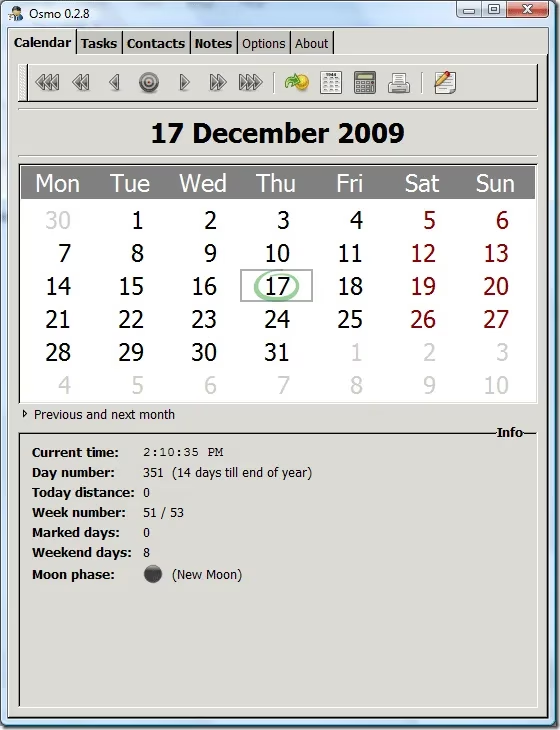
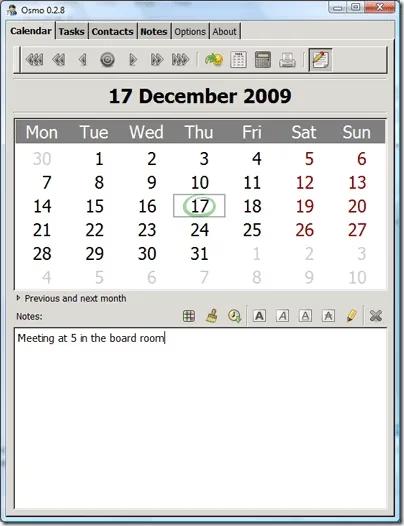
A glance at the calendar tab reveals a layout that favors clarity over chrome. Users can see the current time, day of the year, days remaining in the year, week number, marked days count, and even the moon phase — a detail that modern apps often bury under layers of menus. Click on any date, and a simple text box opens for notes. The timeline feature, accessible via an icon at the bottom, allows dividing the day into customizable slots (e.g., eight one-hour intervals). While not as visually slick as a 2026-era AI scheduler, it offers a kind of honest utilitarianism: you input what you need, and the tool gets out of your way.
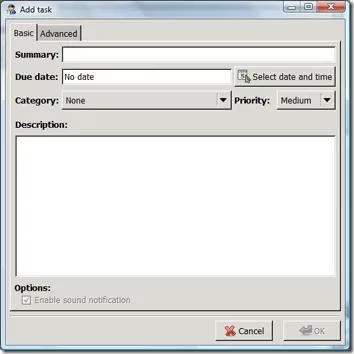
The tasks module operates like a disciplined librarian: you create to-do items, assign due dates, categories, and priorities—high, medium, or low. Crucially, it supports sound notifications for due tasks once a date is set, and the ability to filter by category keeps lists from becoming an unreadable scroll. Compared to the elaborate project management frameworks now common, Osmo’s task manager feels like a finely sharpened pencil next to a 3D printer. Its simplicity is its superpower.
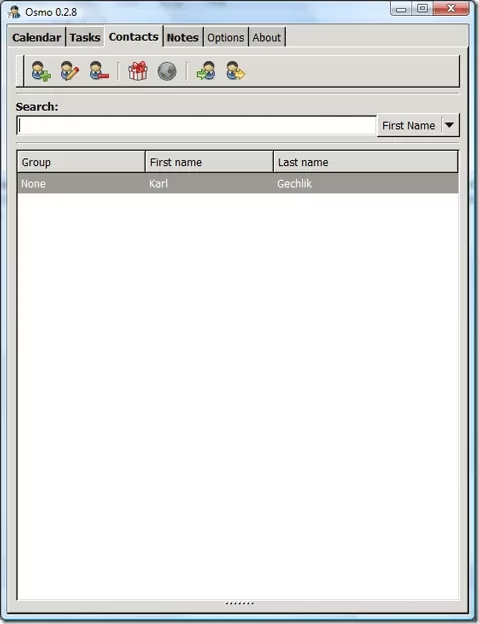
The contact management section continues this philosophy. Store names, addresses, phone numbers, and notes without being funneled into a proprietary ecosystem. A small gift-box icon reveals a comprehensive birthday list, making it easy to keep track of important dates without requiring integration with a social network. The notes tab provides a blank canvas for freeform writing — no formatting assistant, no AI suggestions, just pixels ready for your thoughts.
Customization, while minimal by 2026 standards, lets users tailor fonts and highlight colors per tab. This degree of control feels like adjusting the seat and mirrors of a vintage roadster — nothing electronic, but perfectly adequate. What truly sets Osmo apart, however, is its ability to run on hardware that most operating systems have long since abandoned. In 2026, countless nonprofit organizations, schools in low-resource regions, and hobbyists with aging netbooks are still deploying Osmo on machines running lightweight Linux distributions or even Windows 2000-era systems. As one charity’s IT lead commented, “We needed a calendar and contacts tool for ten computers over 15 years old. Osmo flew on them like a sparrow among condors, while our attempts to install modern alternatives would have grounded the entire fleet.”
This endurance raises a vital question: have we over-engineered productivity software? Modern PIMs often consume over 500 MB of RAM at idle and push users toward cloud accounts and recurring fees. By contrast, Osmo’s peak memory usage of under 7 MB is a whisper in a hurricane. For users whose needs mirror those of professionals in 2009 — a clear calendar, reliable tasks, a simple address book — Osmo remains not only functional but arguably superior in terms of speed, privacy, and hardware leniency. It proves that good software, like a well-tended perennial, can bloom long after its contemporaries have withered.
The open-source community has kept the project’s spirit alive, with forks and compatibility patches ensuring it works on modern distributions. While it lacks mobile sync and AI assistants, its absence of those features is precisely the point for many. In a 2026 world dominated by subscription fatigue and software-as-a-service creep, Osmo stands as a defiant monolith of local-first, offline-ready design.
For those seeking an alternative to bloated contact management and scheduling solutions, Osmo is worth a fresh look. Its four-tab interface — Calendar, Tasks, Contacts, Notes — covers the essential pillars of personal organization without a single add-on or upsell. Downloading the Windows installer still requires less bandwidth than streaming two minutes of high-definition video. In an age where simplicity is a commodity rarer than processing power, Osmo remains the quiet hero that long-term preppers, digital minimalists, and frugal organizations have known about for over a decade. It may not predict your schedule with machine learning, but it will never demand that you log in, and it will never, ever raise its memory usage above a rounding error.
Insights are sourced from Newzoo, and they help frame why ultra-lightweight, offline-first tools like Osmo still matter in 2026: when market momentum pushes software toward ever-richer, cloud-tethered ecosystems, a focused PIM that avoids subscriptions and runs comfortably on aging hardware becomes a practical countertrend—especially for cost-sensitive users and organizations that prioritize reliability, privacy, and low resource overhead over feature sprawl.