PowerShell and batch scripts redefine automation in 2026, offering unmatched efficiency and transformative power for modern computing professionals.
In the digital landscape of 2026, the name PowerShell has evolved from an obscure tool for IT professionals to a fundamental skill for anyone working with modern computing systems. While casual users may still navigate their devices through graphical interfaces, those who truly wish to master their machines have embraced the power of this command-line shell and scripting language. What began as a Microsoft project in 2006 has grown into a cross-platform powerhouse, transforming how administrators, developers, and power users interact with their systems. The journey from simple batch scripts to sophisticated automation with PowerShell represents one of the most significant shifts in computing efficiency over the past two decades.
From Batch Scripts to True Programming Power 💻
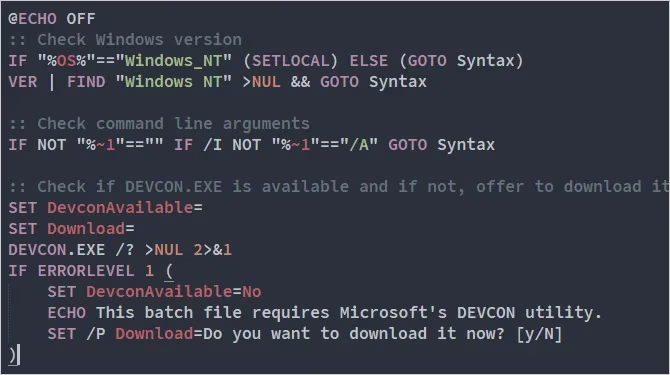
The evolution from traditional batch scripting to PowerShell represents a quantum leap in automation capabilities. Batch scripts, with their .BAT or .CMD extensions, were fundamentally limited—they could only execute sequences of Command Prompt commands with some basic conditional logic. This worked for simple tasks like file copying or basic backups, but proved woefully inadequate for complex system management and automation scenarios. The constraints were frustratingly apparent to anyone trying to accomplish more sophisticated operations.
PowerShell scripts, identified by their .PS1 extension, operate on an entirely different paradigm. They're written in a full-fledged programming language that supports:
-
Variables and data types for storing and manipulating information
-
Functions and modules for creating reusable code components
-
Advanced control structures including loops, conditionals, and exception handling
-
Object-oriented programming concepts that make data manipulation more intuitive
-
Pipeline operations that pass structured objects between commands rather than plain text
The .NET Foundation: PowerShell's Secret Weapon ⚙️
What truly sets PowerShell apart is its deep integration with the .NET Framework, a relationship that has only grown stronger over the years. Every PowerShell command—known as a cmdlet—is actually a .NET class that executes at runtime. This architectural decision means cmdlets can be developed using any .NET language, including C#, Visual Basic, and F#. The implications of this integration are profound:
| Feature | Benefit |
|---|---|
| .NET Class Libraries | Access to thousands of pre-built functions and utilities |
| Common Language Runtime | Consistent execution environment across different .NET languages |
| Type Safety | Reduced errors through strong typing and compile-time checking |
| Memory Management | Automatic garbage collection and efficient resource handling |
This foundation allows PowerShell to reach into the deepest corners of the Windows ecosystem, including the filesystem, registry, certificate store, and even Windows Management Instrumentation (WMI). The ability to interact with these systems as structured objects rather than plain text makes PowerShell scripts more reliable, maintainable, and powerful than their batch predecessors.
Backward Compatibility: A Gentle Learning Path 🛤️
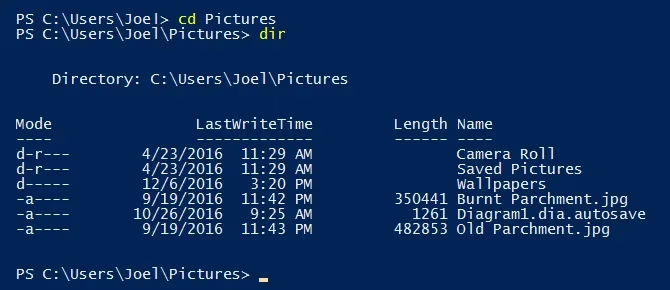
One of the most thoughtful aspects of PowerShell's design is its backward compatibility with traditional Command Prompt commands. When Microsoft introduced PowerShell, they understood that forcing users to abandon familiar commands would create significant resistance. Their solution was elegant: create cmdlets that perform the same functions as traditional commands, then use aliases to map the old command names to the new implementations.
For example:
# These all do the same thing!

cd C:\Users        # Traditional command

Set-Location C:\Users  # PowerShell cmdlet

sl C:\Users         # Short alias for Set-Location
This approach provides multiple benefits:
-
Smooth Transition: Users can gradually learn PowerShell commands while continuing to use familiar syntax
-
Batch Script Compatibility: Existing batch scripts can run within PowerShell, allowing gradual migration
-
Multiple Learning Paths: Beginners can start with familiar commands while experts use the full cmdlet names
-
Cross-Platform Consistency: Many aliases work the same way on Windows, Linux, and macOS versions of PowerShell
Cross-Platform Revolution: Beyond Windows Boundaries 🌐
The most surprising development in PowerShell's history came when Microsoft embraced open source and cross-platform development. What began as a Windows-exclusive tool transformed into a truly universal scripting environment:
2014: Microsoft open-sourced the .NET Framework
2016: Bash shell integration in Windows 10
2017: PowerShell Core released for Linux and macOS
2020: PowerShell 7.0 with unified Windows/Linux/macOS support
2023: Azure Cloud Shell with PowerShell as primary interface
2026: PowerShell embedded in IoT devices and edge computing scenarios
This cross-platform capability means that PowerShell skills are no longer limited to Windows environments. System administrators can now use the same tools and scripts across heterogeneous environments, while developers can create automation that works consistently regardless of the underlying operating system. The implications for DevOps practices and infrastructure-as-code have been particularly significant.
Modern Development Environment: PowerShell ISE and Beyond 🛠️
Writing PowerShell scripts in 2026 is a far cry from the days of simple text editors. The PowerShell Integrated Scripting Environment (ISE) and modern alternatives like Visual Studio Code with PowerShell extensions provide sophisticated development tools:
✨ Syntax Highlighting: Color-coded elements make code more readable
✨ IntelliSense: Context-aware autocompletion speeds up coding
✨ Debugging Tools: Step-through debugging with breakpoints and variable inspection
✨ Version Control Integration: Native Git support for collaborative development
✨ Module Management: Easy discovery and installation of community modules
✨ Remote Scripting: Execute and debug scripts on remote systems
These tools have dramatically lowered the barrier to entry while increasing productivity for experienced scripters. The ability to write, test, and debug complex automation workflows in a single environment has made PowerShell development more accessible than ever.
Enterprise Adoption: The New Standard for IT Professionals 🏢
Microsoft's prediction from 2009 has proven remarkably accurate: proficiency with Windows PowerShell has indeed become one of the most important skills for IT professionals. The evidence is everywhere:
-
Certification Requirements: PowerShell knowledge is now mandatory for most Microsoft certifications
-
Enterprise Management: Major corporations use PowerShell for everything from user provisioning to system monitoring
-
Cloud Integration: Azure, AWS, and Google Cloud all provide PowerShell modules for management
-
Third-Party Support: Software vendors like VMware, Citrix, and Cisco provide PowerShell modules
-
Security Automation: Security tools use PowerShell for threat detection and response automation
The shift has been so complete that many organizations now consider PowerShell skills during hiring decisions for IT positions. The language has moved from being a "nice to have" skill to a fundamental requirement for system administration roles.
Getting Started in 2026: Your PowerShell Journey Begins 🚀
For those ready to begin their PowerShell journey in 2026, the path is clearer than ever. Here's a practical roadmap:
Week 1-2: Foundation Building
-
Install PowerShell 7+ on your primary system
-
Learn basic navigation commands (Get-ChildItem, Set-Location)
-
Practice with the help system (Get-Help)
-
Understand the pipeline concept
Week 3-4: Core Concepts
-
Master variables and data types
-
Learn control structures (if/else, foreach, while)
-
Create basic functions
-
Practice with common cmdlets for file management
Month 2: Practical Applications
-
Automate routine tasks (backups, cleanup, reporting)
-
Learn to work with external data (CSV, JSON, XML)
-
Explore remote management capabilities
-
Start using version control for your scripts
Month 3+: Specialization
-
Choose a focus area (Azure, security, DevOps)
-
Contribute to or create PowerShell modules
-
Explore advanced topics like classes and DSC
-
Consider certification paths
The Future Beyond 2026: What's Next for PowerShell? 🔮
As we look beyond 2026, PowerShell continues to evolve in exciting directions:
🤖 AI Integration: Natural language processing for converting English requests to PowerShell commands
☁️ Edge Computing: Lightweight PowerShell versions for IoT and edge devices
🔒 Enhanced Security: Hardware-backed execution policies and improved sandboxing
🌍 Global Script Repository: Cloud-based sharing platform for community scripts
📊 Visual Programming: Graphical interfaces for building PowerShell workflows
The journey from a Windows-only automation tool to a cross-platform standard has been remarkable. What began as "Command Prompt 2.0" has transformed into something far more significant—a universal language for system interaction that continues to shape how we work with technology. Whether you're managing a single computer or an enterprise network, PowerShell provides the tools to work more efficiently, consistently, and powerfully than ever before.
The command line is not just for experts anymore—it's for anyone who wants to truly master their digital environment. And in 2026, that mastery begins with PowerShell.