Chrome dictionary extensions make online reading seamless, delivering instant definitions without breaking focus.
Online reading is a double-edged sword: it opens a vast ocean of information, yet every unfamiliar word can become a tiny anchor that drags a reader out of the flow. Instead of abandoning the page to consult a search engine, readers can rely on Chrome dictionary extensions that surface definitions the moment a word is highlighted. These tools act like a pocket-sized lexicographer riding shotgun on every browsing session, offering reliable meanings without breaking concentration. In 2026, as browsers grow more capable and reading moves increasingly to the web, such extensions remain indispensable for students, professionals, and casual readers alike.

📖 Google Dictionary: The Original On-Page Lookup
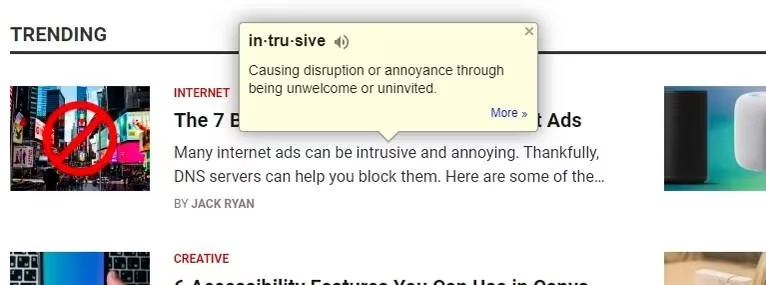
Google Dictionary is a straightforward extension from Google that places definitions directly on the active webpage. A double-click on any word summons a pop-up with its meaning and pronunciation, and if the pop-up fails to appear after installation, a simple page refresh usually resolves the issue. Beyond the on-page lookup, the extension includes a search feature accessible through its icon in the Chrome toolbar. That search returns more detailed definitions and links to synonyms, which is useful when copying or highlighting is disabled. Users can also assign a trigger key, customize behavior through settings, and optionally store or download a history of looked-up words. It is a linguistic Swiss Army knife: simple on the surface, yet quietly capable of handling most daily vocabulary needs.
🧰 Definer: A Feature-Packed Bubble of Knowledge
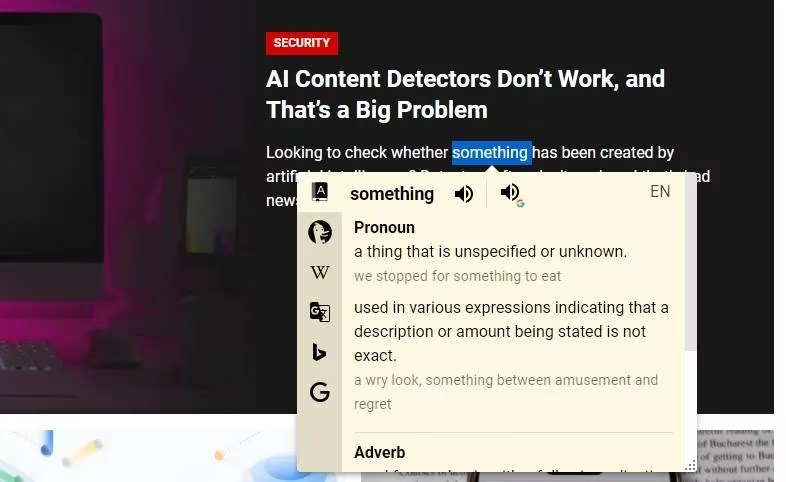
Definer earns its place among the most versatile options. Double-clicking a word opens a "Bubble" that displays definitions from multiple sources, including Google Dictionary, DuckDuckGo Instant Answers, Wikipedia, Google Translate, Bing Images, and Google Search. Users can switch between these sources via tabs on the left of the pop-up, listen to pronunciations, and adjust the Bubble's behavior and appearance. The extension also supports adding languages and choosing from a list of themes. Definer is less a simple dictionary and more a linguistic control panel, giving readers the power to compare sources without leaving the page.
🗂️ Dictionariez: Open-Source and Highly Customizable
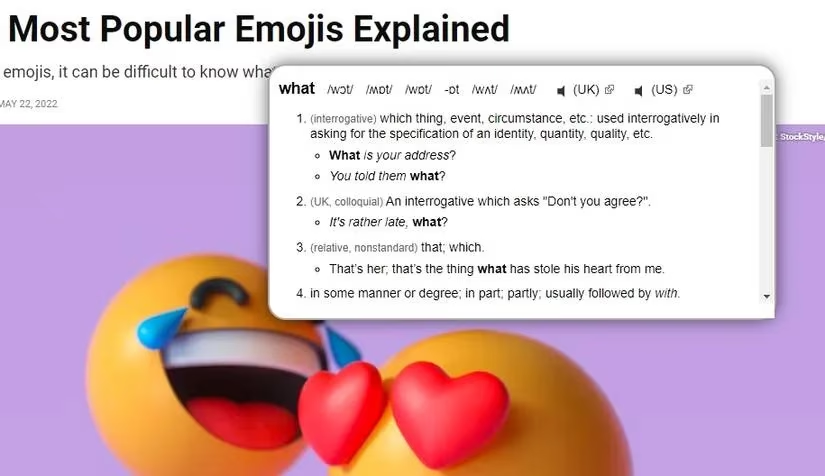
Dictionariez is an open-source extension that appeals to readers who like to fine-tune their tools. It supports double-click lookups, a search pop-up, and pronunciations for several English accents, including UK and US. Search history is stored for later review, and nearly a dozen dictionary sources—including ChatGPT—can be selected from the settings. Hotkeys, appearance changes, and history management are all available, making Dictionariez feel like a personal library that rearranges itself according to the reader's habits.

🔍 Dictionary Lookup: Minimalism With a Modifier Key
Dictionary Lookup keeps things lean. A double-click while pressing Alt opens a clean pop-up with detailed meanings, synonyms, and pronunciations. Users who dislike the modifier key can set the mouse lookup modifier to None in the settings. Keyboard shortcuts, content options, and pop-up size are all adjustable, though reaching the settings menu requires pinning the extension and choosing Options—a minor quirk that may be fixed in future updates. For readers who want a no-frills experience, Dictionary Lookup is a quiet gatekeeper to the world of words.
⚡ Instant Dictionary: Context-Aware Definitions
Instant Dictionary distinguishes itself by offering different meanings for the same word depending on whether it is used as a noun, verb, adverb, or adjective. This context awareness helps readers understand complex terms in different situations. The extension works on many websites, including Google Docs, so writers can look up words without leaving their drafts. A trigger key, adjustable font size, a search feature, and saved search history round out the package.
📚 Dictionary: The To-the-Point Option
Dictionary is one of the simplest extensions available. Double-clicking a word produces a clean pop-up with a definition and synonyms; clicking More opens Google for deeper details. It stores search history and allows a trigger key to be assigned, though its settings menu is accessed in the same pinned-icon way as Dictionary Lookup. It is the essence of minimalism: a dictionary that does exactly what its name promises.
🫧 Longman Dictionary Bubble: Usage in Context
Longman Dictionary Bubble draws on the well-known Longman Dictionary. It handles double-click lookups and pronunciations, but its standout feature is showing words in sentences to demonstrate usage. Clicking More leads to a fuller webpage entry for readers who want to learn more. The extension can be disabled entirely, allowing readers to use it only during study sessions. It is a silent tutor perched on the shoulder, speaking only when a word needs explanation.
| Extension | Key Strength | Ideal For |
|---|---|---|
| Google Dictionary | On-page double-click lookup and pronunciation | Everyday reading |
| Definer | Multiple sources in a customizable bubble | Readers who compare definitions |
| Dictionariez | Open-source flexibility and many sources | Tinkerers and language learners |
| Dictionary Lookup | Minimalist pop-up with modifier key | Focused, distraction-free reading |
| Instant Dictionary | Context-aware meanings by part of speech | Students and writers |
| Dictionary | Simple definitions and synonyms | Quick lookups |
| Longman Dictionary Bubble | Usage examples in sentences | Deep vocabulary study |
Reading requires focus, and focus requires minimum distractions. Leaving a tab to look up a word may seem harmless, but each departure chips away at the flow of reading. The extensions above reduce that friction by bringing definitions into the page itself. They are not merely tools; they are companions that turn passive browsing into active learning. In 2026, with more reading happening online than ever before, a good Chrome dictionary extension is less of a luxury and more of a necessity for anyone who wants to grow their vocabulary without losing their place.