Preview and expand shortened web addresses safely with a no-nonsense URL preview tool. Spot redirects and phishing risks before you click.
I’m just a casual gamer, but I spend a lot of time clicking around game forums, Discord servers, patch-note threads, creator pages, and mod communities. In 2026, long posts are common, yet shortened web addresses are still everywhere: in chat, SMS, QR-code handoffs, event signups, and even support tickets. That is why I still care about previewing and expanding shortened web addresses before I click. A short address hides its destination, and that tiny mystery is exactly where spam, scams, phishing pages, affiliate redirects, adult content, and gambling traps like to hide. I do not need to be a security expert to want a peek behind the curtain. I just want fewer surprises.
Here’s the simple problem I keep in mind: a shortened web address tells me almost nothing. I cannot judge the destination by looking at it, and I cannot tell whether it is a normal article, a fake login page, an affiliate trap, or something worse. The first wave of micro-blogging made shorteners normal because they helped people share long web addresses inside tight character limits. That convenience never disappeared. What also never disappeared is the risk. Website owners can use shorteners to hide affiliate addresses, build phishing pages, or push adult and gambling content toward curious clicks. So my rule is simple: if I cannot preview where a shortened address goes, I treat it like a mystery box with a bad attitude. 😅
What I want from a preview tool is pretty basic. I want to see the real destination, the page title, and maybe some redirect details without opening the page. I also want the tool to stay out of my way. If it turns every forum thread into a wall of warnings, I will uninstall it. If it only works on one browser from 2011, I will keep it as a nostalgic memory and move on. That balance between visibility and calm is what makes a preview add-on useful.
| Tool | What I liked | 2026 reality check |
|---|---|---|
| Long URL Please Mod | Expanded addresses from 182 shortening services and felt almost invisible while browsing. Its settings let me replace the short address while keeping the same character count, replace both the address and linked text, or change only the path. | This is still the most natural approach I remember, but old browser add-ons can break after modern browser updates. |
| Xpndit | A Firefox option and userscript that was supposed to show the full address path and page title. | In the original testing it could not retrieve the extra information, and performance reports made it feel risky. |
| ViewThrough | A Chrome extension that showed the full address path and page title on hover. It supported several popular shorteners. | Many users reported it did not work on newer Chrome versions, even though one tester noticed no performance issues. Mixed reports mean I would not rely on it alone. |
| LongURL | Used the LongURL API to turn short addresses into page titles, redirect information, and meta descriptions on hover. It supported most shortening services I knew. | The Firefox add-on was already outdated in the original article, so in 2026 I would treat it as a legacy tool rather than a guarantee. |
| ViewThrough-style userscript | Worked like the Chrome extension and used the LongURL API, so Firefox users could get a similar hover preview. | It had not been updated for a long time, which is a warning sign in a browser ecosystem that changes constantly. |
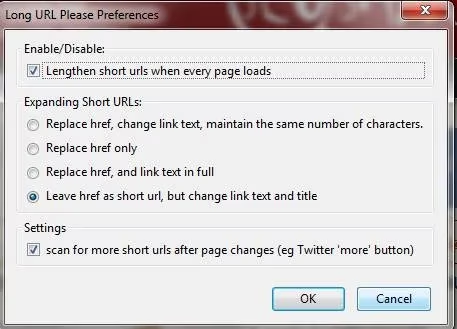
Long URL Please Mod is the one I remember most fondly. It did the job without shouting. The character-preserving mode was clever: the short address stays the same length, but the rest gets replaced by dots, so I can at least see the linked domain. Another mode replaces both the address and the linked text, which lets me read the path without hovering. A third option changes only the path or keeps the path while changing the link text. That kind of customization matters because every browsing habit is a little different. Some people want a tiny domain hint; others want the full address path visible at a glance.

ViewThrough and the ViewThrough-style userscript appeal to the hover-and-check habit. I like hovering because it is fast and noncommittal. I can see the destination and page title, then decide whether to click. But hover previews have a weakness: they depend on the browser, the extension, and the shortening service all behaving nicely. If one part breaks, I get false confidence. That is why I never treat a preview as a full safety check. It is a clue, not a certificate.

LongURL was interesting because it went beyond the bare address. Hovering could reveal the full path plus redirect information and page metadata. That extra context helps me judge whether the destination matches the conversation. If someone sends me a short address in a game-trading thread and the preview shows a random login page or a page title about casino bonuses, I do not need a second warning. I close the tab and move on. The catch is that API-based tools depend on an external service staying alive. In 2026, I assume any old add-on might be abandoned until I see evidence otherwise.
My 2026 routine is less about loyalty to one extension and more about habits:
-
🔍 Hover or long-press first, click later.
-
🧠 Check whether the expanded destination matches the context.
-
🚫 Treat unexpected login pages, prize claims, and free-currency offers as suspicious.
-
🧩 Prefer tools that are actively maintained, or use built-in browser previews when they are available.
-
📱 On mobile, slow down even more, because hover previews do not exist and tiny screens hide clues.
I still think short-address preview tools are worth using. They make the web less opaque, and they help me browse forums and chat servers with fewer accidental clicks. But I do not expect a 2011-era add-on to solve every 2026 problem. I use previews as one layer of common sense, not as a magic shield. If a shortened address feels off, I trust that feeling. In gaming, the best loot is rarely behind a mystery box in a random DM. The same logic works for browsing. 🎮