Snaptimer is a free, portable productivity timer that helps you break work into focused intervals. Stay in the flow without distractions.
Productivity, at its core, often boils down to a simple truth: big, scary tasks become manageable when you slice them into bite-sized pieces. There is wisdom in breaking down a mammoth project into focused chunks of time. After all, task management is really just time management wearing a different hat. And if we can tame time, we are cruising on the smooth highway of getting things done. For many, the Pomodoro Technique has long been the go-to method—short bursts of work followed by tiny breaks. But any timer can work, as long as it stays out of your way. That is where a tiny, unassuming tool called Snaptimer steps in. Even in 2026, this little champion remains a favorite among those who crave simplicity. It doesn't scream for attention; it just, well, works.

Let's be real—nobody wants a productivity app that requires a manual the size of a novel. Snaptimer was born out of that exact frustration. Its developer once said, in a fit of relatable honesty, that all the timers they tested were too complex for their taste. So they wrote one that was dead simple: fire it up, type in a time, hit Enter, and boom, you are counting down. The download is a feather-light 1.45 MB, completely free, open-source, and portable. That means you can toss the unzipped folder onto a USB stick and carry your productivity mojo anywhere, without losing your Zen. No installation fuss, no clutter. For a busy freelancer racing against a deadline or a student cramming for finals, this is a breath of fresh air.
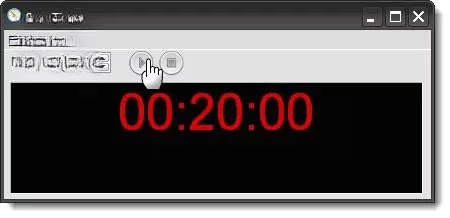
When you launch Snaptimer for the first time, it greets you with a pristine, no-nonsense window displaying a default number of minutes. That is your canvas. Suppose you have 40 minutes to finish a piece of writing. You might decide to split it into two 20-minute sprints. Simply change the digits to 20, click the Start button, and off you go. The timer then politely minimizes itself to the system tray, like a respectful little assistant who doesn't want to hog your screen space.
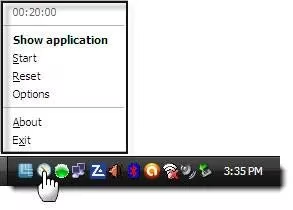
A quick mouse-over on the tray icon reveals the countdown ticking away. A right-click brings up a neat menu with Pause, Reset, and Options—the holy trinity of timer control. You can sneak a peek without breaking your flow. There is no fuss, no drama. Just the steady, silent passing of minutes.
Digging into the Options menu is where Snaptimer shows a bit of personality. The first tab lets you enable a ticking sound if you enjoy a little “atmosphere.” Fair warning, though: many find it more of a distraction than a motivator. The second tab, Alarms, is where things get interesting. You get twenty looping alarm sounds to choose from, each one a little nudge to snap you back to reality. You can pick a gentle chime or a cheeky little bell that says, “Hey, your time is up!”
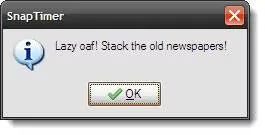
But the real magic happens when you pair the timer with custom actions. The Display Message feature lets you type in a short to-do or affirmation. When the countdown finishes, a pop-up appears, whispering directly to your subconscious, “Finish that report, you’ve got this.” It is like a friendly tap on the shoulder from a very punctual friend.
Then there is the Run program option. Imagine setting it so that when your work sprint ends, Evernote or your favorite GTD app springs open, revealing the day’s task list. Or maybe you want your music player to fade in some calming lo-fi beats. Suddenly, a simple countdown becomes a trigger for a whole productivity ritual. You can also save different preset timer shortcuts—one for writing, one for email batching, one for a quick meditation break. It all happens without you having to wrestle with a complex interface.
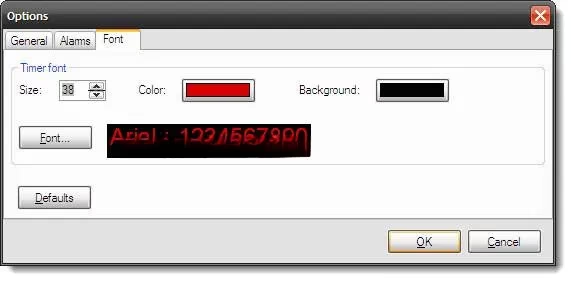
Who says countdown timers have to look boring? The Font tab lets you tweak the background and text color. Red digits on a black background? That looks sleek and a bit intense, perfect for high-stakes focus sessions. You can craft a visual that matches your mood or simply stands out on a cluttered monitor. This is a tiny cosmetic touch that makes the tool feel just a little more yours.
A stopwatch mode is tucked in there, too. Set the timer to zero, click Start, and it counts upward. This is a game-changer for measuring how long a task truly takes, helping you refine your time estimates. Forget Usain Bolt—you can break your own personal records as you race toward efficiency. Watching the seconds accumulate is surprisingly satisfying and often reveals just how much (or how little) time those supposedly quick emails actually consume.
Using Snaptimer becomes a ritual of its own. Picture a writer sitting down to craft an article. They set two 20-minute chunks, minimize the timer, and dive in. Halfway through, a mouse-over check reveals they are ahead of schedule. That small victory fuels the next sprint. When the alarm sounds, the custom message pops up: “Stretch and review the draft.” The cycle repeats, and before they know it, the work is done—right on time. This is not just wishful thinking; it is how the author of this very piece wrapped up the writing process. The satisfaction of beating the clock, even by a few minutes, is a notch on any productivity scoreboard.
In a world overflowing with bloated productivity suites, Snaptimer remains a quiet rebel. It doesn’t demand a subscription, it doesn’t sync with fifty different services, and it definitely doesn’t overwhelm you with features you will never use. It does one job, and it does it with a kind of humble brilliance. So, is it the best portable timer out there? Many swear by it, and for good reason. Whether you are a student cramming, a coder in deep focus, or a creative chasing flow, this little tool deserves a spot in your digital toolbox. Give it a try—you might just find that simplicity is the ultimate sophistication.
If you find yourself constantly seeking tools that simplify your workflow, it's worth exploring other resources that cater to different aspects of productivity and focus. After all, balancing work with moments of relaxation is essential for sustaining long-term efficiency. Whether it's a quick break to recharge or a more extended pause to indulge in hobbies, having the right tools and platforms can make a noticeable difference.
For those who enjoy unwinding with games during their downtime, platforms like DealNest game deals offer a curated selection of gaming discounts to explore. It’s a great way to discover new titles or stock up on favorites while keeping your budget in check. After a productive session, diving into a well-earned gaming break might be just what you need to refresh and reset.