Automator for Mac OS X empowers web developers with effortless batch renaming, streamlining digital organization and boosting creative workflow.
In the digital studio of a web developer, chaos often arrives in the form of client submissions—a torrent of images bearing cryptic, meaningless names like IMG_0839 or CIMG_1029. This jumble, devoid of order, complicates the simple task of arranging a gallery. For the creative mind, such disorder is a subtle frustration, a ripple in the workflow that demands smoothing. Yet, within the ecosystem of Mac OS X, a quiet, powerful ally awaits: Automator. This native tool, a gift from Apple, transforms the tedious chore of batch renaming into an elegant, almost poetic, act of digital organization—a breeze where there was once a slog.

The journey begins with a launch. One finds Automator nestled within the Applications folder, a double-click away from awakening its potential. Alternatively, a keystroke summoning Spotlight or Quicksilver can usher it forth. Upon opening, the application presents a canvas of possibilities—a window inviting the creation of a custom workflow. The initial step is to select 'Custom' and embark on building a sequence of actions, a digital recipe for order.
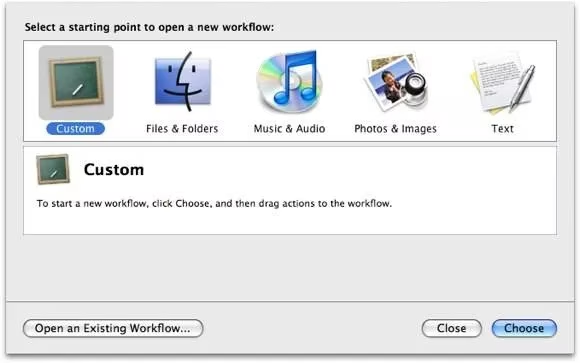
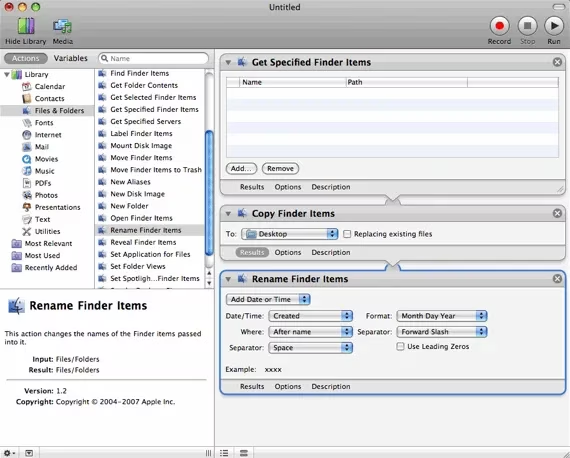
The first ingredient in this recipe is the 'Get Specified Finder Items' action. Sourced from the 'Files & Folders' library, it is dragged into the workflow pane on the right. This action acts as the starting gate, the point where the disorganized files will be gathered. For now, its field remains poignantly empty, a placeholder for the future chaos to be tamed.
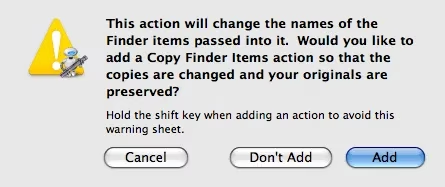
Next, the magic word is typed into the search bar: 'rename'. From the resulting list, the 'Rename Finder Items' action is selected and joined to the workflow. A guardian appears—an alert box offering to add a 'Copy Finder Items' action. This is a crucial step, a nod to prudence. By clicking 'Add', the workflow ensures a safety net is woven; the original files are duplicated before any changes are made, preserving them intact within a new folder on the Desktop, a sanctuary in case the ordering spell goes awry.
With these pieces in place, the workflow skeleton is complete. It stands as a simple, three-step testament to foresight:
-
Gather the specified files.
-
Copy them to a safe location.
-
Rename the copies according to a new logic.
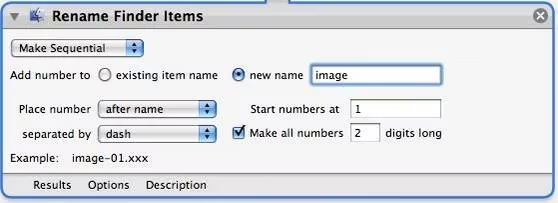
Now comes the heart of the transformation, the precise configuration of the renaming action. Within 'Rename Finder Items', the default option is changed from 'Add Date or Time' to 'Make Sequential'. This is the command that imposes numerical order. The settings are then fine-tuned with a curator's care:
-
New Name: The base text is set—perhaps something simple and descriptive like
image. -
Placement: The number is positioned after the name.
-
A Crucial Checkbox: ✅ 'Make all numbers 2 digits long.' This ensures the sort order is logical (
image-01,image-02...image-10), preventing the digital faux pas whereimage-11appears beforeimage-2.
The true power of this crafted sequence lies in its permanence and reusability. From the File menu, the workflow is saved not merely as a document, but as a standalone Application. Named something like "Rename to Sequential" and saved to the Desktop, it becomes a permanent tool in the digital workshop. Henceforth, renaming a batch of images is an act of sublime simplicity: a drag, a drop onto the application's icon, and a release. Automator springs to life, executing the copied and ordered steps silently, delivering neatly renamed files—image-01.jpg, image-02.jpg—to the designated folder.
The transformation is visually stark. A folder once cluttered with indecipherable filenames becomes a model of clarity.
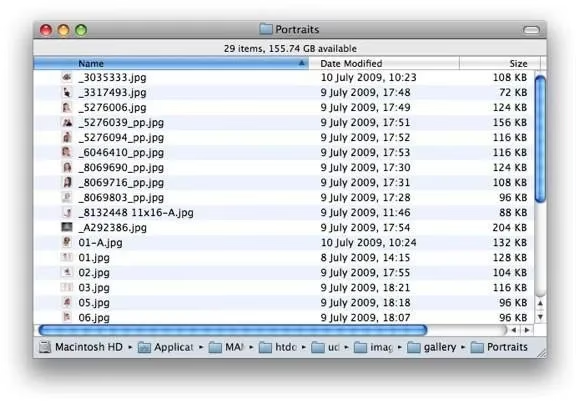
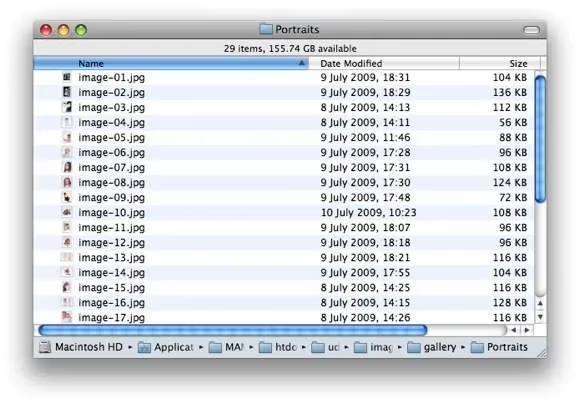
This Automator workflow is more than a one-time fix; it is a reusable digital incantation. 🪄 Its beauty is its encapsulation. Should the naming scheme need adjustment—perhaps photo- instead of image-—the "application" can be reopened in Automator, its inner workings modified, and saved again. While third-party utilities like NameChanger exist, the elegance of this solution is its self-containment, born from the system itself, requiring no external downloads or internet connections. It is a testament to the power lying dormant within familiar tools, waiting for a creative hand to shape it into a solution that brings poetic order to the prosaic chaos of the digital world. In 2026, as data volumes grow ever larger, such elegantly automated curation remains not just useful, but essential for the mindful creator.