Discover the best free Adobe Character Animator puppets and unleash your creativity with pre-made digital actors for effortless 2D animation.
Hey everyone! ✨ Ever dreamed of making your own slick 2D animations for your gaming channel, stream overlays, or just for fun, but felt totally overwhelmed by the thought of designing a character from scratch? 😩 Well, guess what? You don't need to be a pro artist or spend hours learning complex software anymore. The secret weapon for every aspiring creator in 2025 is ready-to-use Adobe Character Animator puppets! 🎭 These pre-made digital actors come loaded with triggers, draggers, and pre-programmed movements, letting you jump straight into the fun part—bringing stories to life for your audience. Let's dive into the best spots to snag these awesome assets, completely free of charge. 🚀
🏆 Adobe: The Official Source for Premium Puppets
When starting your animation journey, Adobe itself is the most reliable and feature-packed launchpad. Right on the Character Animator home screen, you'll find over 20 example puppets staring back at you, ready for action. And that's just the beginning! Hitting the 'See More' option unlocks a treasure trove of 37 additional example puppets, giving you a massive library to choose from without spending a dime. 💸

Adobe's collection is incredibly diverse, catering to all sorts of creative visions:
-
🎨 Animated Seasonal Backgrounds: Perfect for holiday-themed streams or special event videos.
-
🧱 Clay Puppets: Offer a charming, stop-motion aesthetic that viewers love.
-
🗣️ Talking Heads: Ideal for podcast-style commentary or reaction content.
-
🧚 Imaginary & Fantasy Characters: Great for RPG storytelling or fantasy game recaps.
Getting Started is a Breeze:
-
Find your perfect puppet on Adobe's resources page.
-
Hit Download.
-
Extract the ZIP file you receive.
-
Simply double-click the extracted puppet file, and it auto-opens in Character Animator! No complex importing needed. It's that simple to get your first animated co-host for your next gaming montage. 🎮
⚔️ Okay Samurai: The Community's Go-To Free Arsenal
If you're looking for a massive, completely free-of-cost puppet library, Okay Samurai is your holy grail. 🏯 This platform is so trusted and high-quality that even Adobe officially recommends it as an alternative resource. That's a major stamp of approval for any creator!

But wait, there's more! Okay Samurai isn't just about using pre-made assets. They empower you to become the creator. 🛠️ At the bottom of their download pages, they offer blank character templates designed for Adobe Illustrator and Photoshop. This means you can take your own fan art, original character designs, or even a stylized version of your gaming avatar and turn it into a fully functional puppet. This is a game-changer for building a unique brand identity on platforms like Twitch or YouTube!
Quick Download Guide:
-
Browse their extensive catalog.
-
Click Download on your chosen puppet.
-
Extract the ZIP and double-click the puppet file to launch it in Character Animator.
🦸 Graphic Mama: For the Creator Who Wants Total Control
Graphic Mama takes things to the next level with a hybrid model. They offer over 50 puppets, with a mix of free and premium (paid) options. What makes them stand out in 2025 is their commitment to long-term creative growth. 🚀

When you download a puppet from Graphic Mama—especially their design bundles—you often get more than just the Character Animator file. They frequently include the original source files (like .ai for Illustrator or .psd for Photoshop). This is HUGE because as your animation skills level up, you can go back and tweak the character's design, colors, or accessories to perfectly match your evolving channel's aesthetic. It's like future-proofing your content!
What You Get:
-
Puppets: Your main animated character.
-
Accessories: Hats, weapons, gadgets to customize your puppet.
-
Backgrounds: Themed scenes to set the stage.
-
Additional Design Elements: Icons, overlays, and more for a complete package.
Download Process:
-
Select your desired puppet or bundle.
-
Click Download Archive.
-
Extract the ZIP file.
-
Open the puppet file to load it into Character Animator.
⚡ Electro Puppet: Unique & Seasonal Gems
Don't let the smaller catalog fool you! Electro Puppet specializes in highly unique and thematic puppets that can make your content pop. While they primarily offer puppets for purchase, they have a famous freebie to get you started: Dudley. 🎁
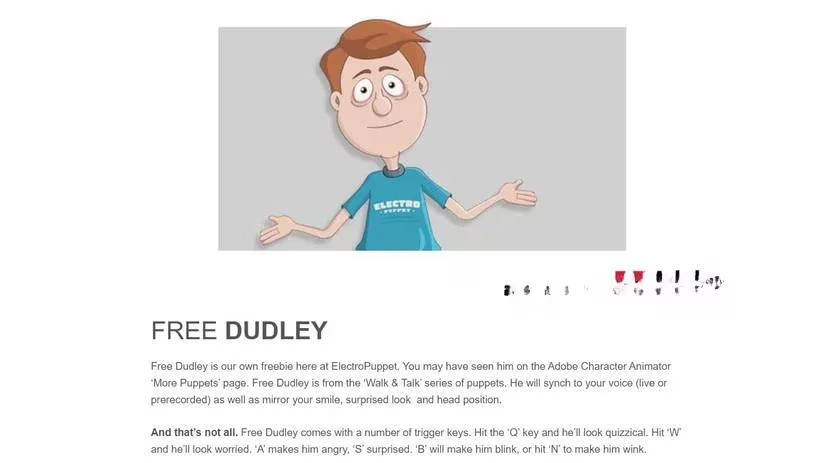
Their paid selection is where they truly shine, especially with a large seasonal selection. Imagine having a spooky vampire puppet for Halloween gaming streams, a cheerful elf for Christmas specials, or a patriotic character for a July 4th event. This allows you to keep your content fresh and engaging all year round! 📅
How to Get Dudley (The Free Puppet):
-
Visit their free puppet page.
-
Provide your email address to subscribe to their newsletter.
-
Check your inbox for a download link sent by Electro Puppet.
-
Extract the ZIP and launch the puppet file.
For Paid Puppets:
-
Browse their themed collections (clay, flat, presenter, seasonal).
-
Select and purchase your chosen puppet.
-
Download the provided ZIP file, extract it, and open the puppet in Character Animator.
🎬 Time to Animate! Your 2025 Creative Playground
So, you've got your puppet loaded up in Adobe Character Animator... now what? The possibilities in 2025 are endless for a savvy gamer and content creator:
🔥 Top Use-Cases for Your New Puppet:
-
🎮 Dynamic Stream Overlays & Alerts: Replace static images with a talking mascot that reacts to new followers, subscriptions, or donations.
-
📈 Engaging Social Media Promos: Create short, eye-catching animations to announce new videos, streams, or community events on TikTok, YouTube Shorts, or Instagram Reels.
-
🎥 Virtual Meeting Avatar: Tired of your webcam? Be the cool one who appears as a custom animated character in your team's Discord calls or online collaborations.
-
📚 Interactive Storytelling & Lore Videos: Explain game lore, walkthroughs, or backstories with a compelling animated narrator.
-
💬 Animated Commentaries & Reactions: Add a hilarious or insightful animated character to your gameplay commentary videos.
Remember, the key is to start simple. Pick a free puppet from Adobe or Okay Samurai, play with the triggers (try making it talk with your microphone! 🎤), and see how it moves. The built-in behaviors do most of the heavy lifting. As you get comfortable, you can explore more advanced puppets, customize them with source files, or even build your own from templates. The world of 2D animation is now open and accessible. So, what are you waiting for? Download your first puppet today and start creating content that truly stands out! 🚀 Remember, in the fast-paced world of online content, a unique animated identity can be your greatest asset. Happy animating! ✨