Getting Things Gnome, a serene open-source task manager, brings clarity and calm to digital chaos with intuitive tagging and subtasks.
In a digital cosmos teeming with pings, pop-ups, and the relentless hum of distraction, the simple act of organizing one’s thoughts can feel like trying to catch moonlight in a sieve. Yet there exists, in the verdant meadows of open-source software, a tool so unassuming it almost whispers rather than shouts—a task manager named Getting Things Gnome. Yes, the name might trigger a wry smile (who thought of that?), but behind its awkward moniker lies a canvas where chaos blossoms into clarity. As of 2026, this little gem has aged like a fine manuscript, its pages yellowed with experience but its ink as fresh as morning dew.
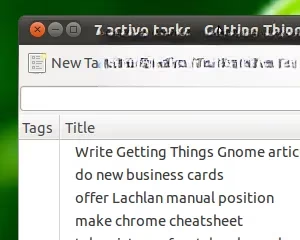
From the very first launch, the program extends an invitation to slow down. The interface greets you not with garish menus or confetti-driven onboarding, but with a serene, almost monastic blank slate holding a few sample tasks. It’s as if the app is saying, “Read me, then rewrite me with your own story.” Those welcome notes are a gentle tutorial, nudging users to grasp the fluidity of @tags, the subtlety of subtasks, and the freedom of a text area that doubles as a journal. Deleting them feels like wiping away dust from a mirror—now you see your own reflection.
Planting a Task, Tending a Tree 🌱
Adding a new to-do is a breath of fresh air. One click, and a blank expanse appears. The first line you type becomes the task’s title, a single phrase that will eventually bloom in the main list. Below it, you can pour everything else: whispered reminders, phone numbers, links, or a rambling narrative that captures the why behind the what. There’s no rigid structure, no mandatory fields screaming for attention. Just you and the page, a digital haiku waiting to be composed.
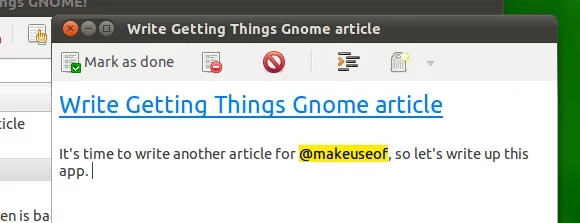
But wait—this isn’t a mere repository of whispers. With the magic of the “@” symbol, each task can be adorned with tags that sparkle like constellations.
“Tag unto others as you would have them tag you,” the app seems to hum.
An @home, @errand, or @projectX instantly connects scattered stars, making the night sky navigable. And when a task demands more than one step, you can nestle baby subtasks under a parent, breaking a mountain into pebbles that even Sisyphus might juggle with a grin. This hierarchical embrace is a subtle nod to the GTD philosophy, where monolithic anxieties are chopped into actionable morsels.
The Dashboard of Equanimity 🧘
Once a few tasks have taken root, the main window transforms into a sanctuary of order. At a glance, you see the titles you penned, each one a flag planted on the shifting dunes of your day. Completion is a gentle click away—a quiet victory marked by a strikethrough or a fade, not a fireworks display. Opening a task for editing unfolds the full story you stored, and the sheer simplicity invites you to revisit and refine rather than abandon.
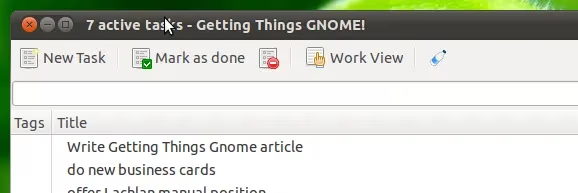
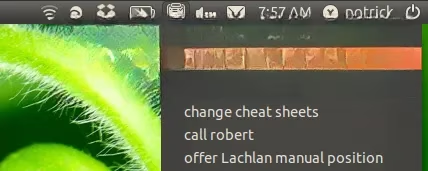
The lack of visual noise is almost defiant in an era of neo-brutalist UI and dopamine-hacking toggles. Getting Things Gnome holds its ground with a quiet dignity—it knows that true productivity isn’t about flash, but about flow. And for those who crave a dash of immediate accessibility, there’s a panel plugin tucked under the hood. With a brief pilgrimage to Edit → Preferences, the app can shapeshift into a dropdown menu that lives in your system tray, a genie ready to surface your tasks with a single glance.
Old-school Soul, Digital Handshake 🤝
Picture this: you’ve got a love affair with the old guard. You’ve been romancing Remember The Milk since its early web 2.0 days, and the thought of abandoning those creamy lists makes your heart heavy. Fear not, for Getting Things Gnome extends an olive branch. A built-in plugin (again, lurking in the preferences) conjures a synchronization button onto the toolbar. Click it, authorize the connection, and behold—your RTM tasks waltz into the Linux desktop like old friends at a reunion.
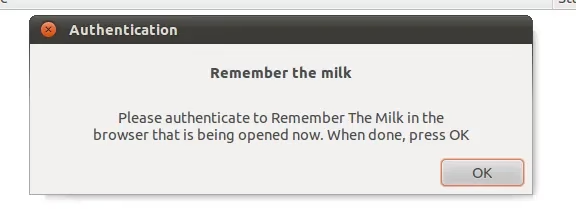
Now, let’s keep it real: syncing ain’t an instant tango. You’ll need to remember to punch that button, a manual ritual that feels like mailing a letter in a world of instant messages. But as the years have rolled on to 2026, whispers in the community suggest that the gears are turning toward smoother integration. Even so, there’s a charm to its modesty—a reminder that technology should serve us, not enslave us with ceaseless notifications.
A Timeless Muse in a Throwaway World
Why does this program endure? In a landscape where task apps are born, hyped, and abandoned like mayflies, Getting Things Gnome maintains a Zen-like composure. It doesn’t track your habits, nudge you with algorithmic guilt, or wrap your intentions in a subscription model. It’s just there, a steadfast companion for the thinker who values depth over decoration. The installation process remains delightfully earthy—a few terminal incantations or a package manager whisper, and it’s ready to serve.
As we stand in 2026, with AI assistants brewing coffee and augmenting our every thought, there’s a profound comfort in returning to tools that honor human pacing. The missing sync button might feel like a pebble in the shoe, but as any Linux devotee will tell you, “Ain’t no mountain high enough” when the foundation is this solid. The program’s DNA—tagging, subtasks, a free-form body—is a canvas for the modern minimalist who still believes in the romance of a to-do list.
So, pour yourself a cup of tea, launch Getting Things Gnome, and let the poetry of organized stillness wash over you. Mark a task done and feel the quiet ripple of accomplishment. In the wise words of every tinkerer that’s ever touched this gem: “If it ain’t broke, keep loving it.” ✨