Discover how the Infrared (IR) Blaster transforms your smartphone into a powerful universal remote, enabling effortless home automation and control in 2026.
Hey everyone! Remember those clunky universal remotes? Well, in 2026, your smartphone can be so much more powerful, and I'm here to show you how. My journey started when I realized my living room was overrun by remotes—TV, soundbar, air conditioner, you name it. Then I discovered the magic of the Infrared (IR) Blaster, a feature still found in many mid-range phones and some clever external gadgets. It's not just about replacing remotes; it's about creating a smart, automated home without needing a ton of expensive hubs. Let me walk you through how I turned my phone into the ultimate home control center.
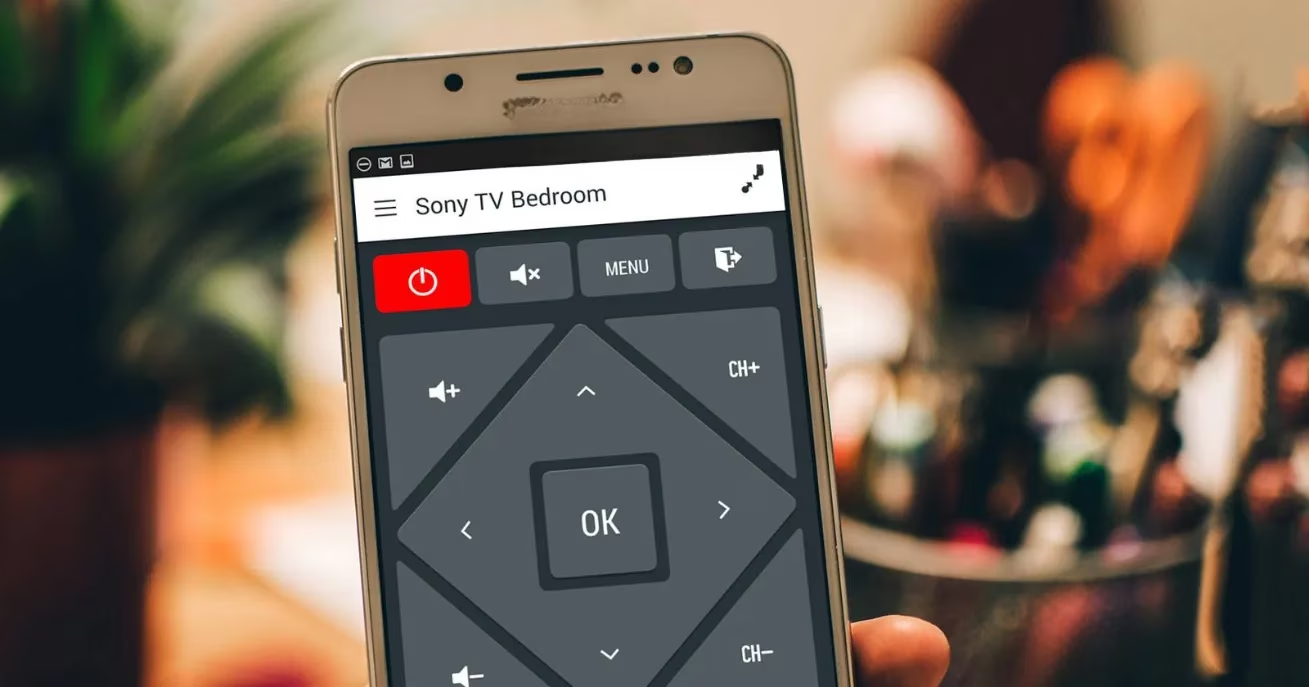
First things first: you need the hardware. While it's true that many flagship phones phased out the built-in IR blaster a few years back, the scene in 2026 is fantastic for enthusiasts! 😊 Many fantastic mid-range devices from brands like Xiaomi and Realme still include it as a standard feature. And if your phone doesn't have one? No sweat! External Bluetooth IR blasters like the AnyMote Home are more affordable and powerful than ever, often integrating seamlessly with voice assistants like Alexa and Google Assistant. I personally use a Xiaomi phone with a built-in blaster for my main setup.
The real game-changer is the software. After trying a few apps, I settled on AnyMote. Its free version is incredibly powerful, though I eventually upgraded (around $7) to remove ads and get unlimited remotes. The setup is a breeze.
Here’s my simple setup process:
-
Open AnyMote and swipe open the side menu.
-
Tap the '+' symbol and select 'Add Remote'.
-
Choose your device type (TV, AC, etc.).
-
The app will show sample buttons—just test which preset works for your gadget!
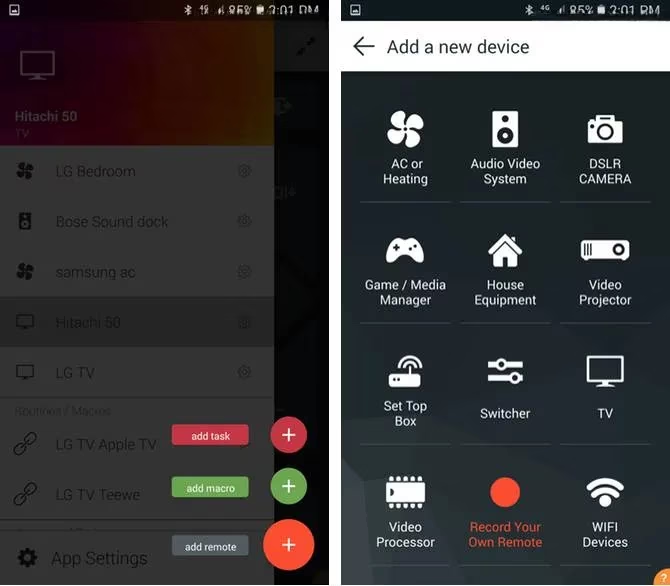
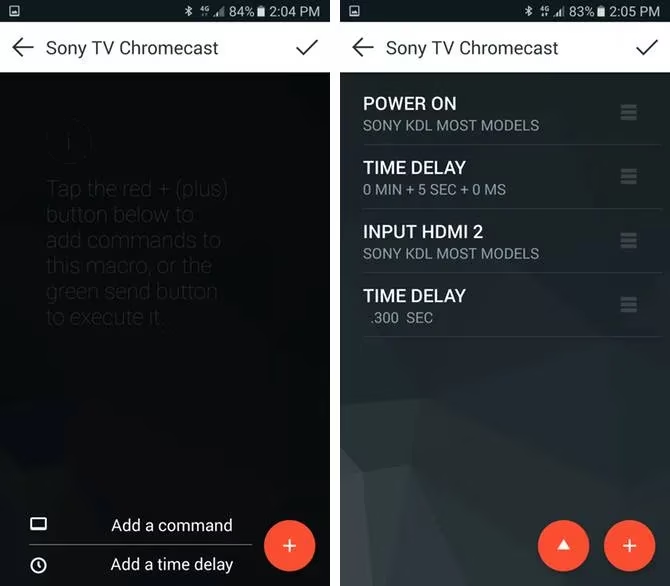
Once all your remotes are added, the real fun begins: Automation with Macros. A macro is just a sequence of commands you trigger with one tap. My first life-changing macro? 'Movie Night.'
I have a projector, a sound system, and an AC. My macro does this:
-
Turns on the projector.
-
Waits 8 seconds (crucial delay for boot-up!).
-
Switches the projector to HDMI 1.
-
Powers on the soundbar.
-
Sets the AC to 22°C on low fan.
-
Dims the smart lights (via a separate smart plug integration).
Creating it was intuitive. I just added each command one by one, inserting delays where needed. The key is timing—observe how long your devices take to respond. The satisfaction of tapping one button to set the perfect scene is unreal! 🎬
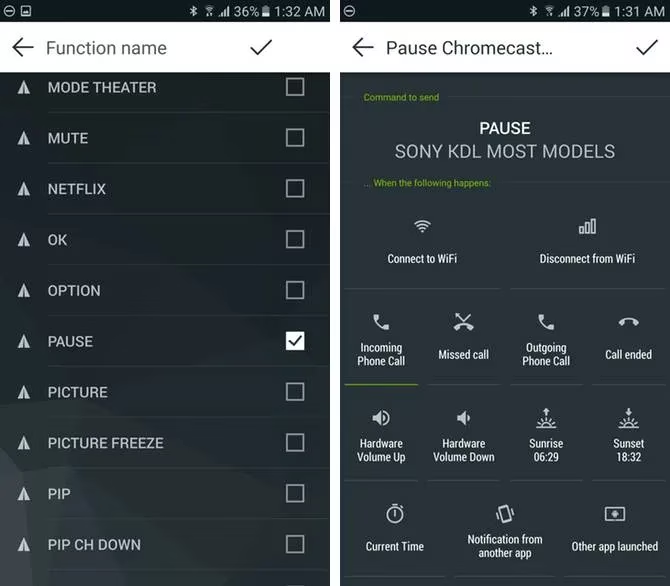
But macros are just the start. Tasks are where things get truly intelligent. Tasks are automated actions triggered by events on your phone. My favorite? 'Pause on Call.'
We've all been there: watching a show, a call comes in, and you scramble to pause. My task automatically sends a 'Pause' IR signal to my TV whenever my phone rings. The setup:
-
In AnyMote, create a new Task.
-
Set the trigger to 'Incoming Phone Call.'
-
Set the action to send the 'Pause' command from my TV remote.
A couple of notes: Your TV needs to support HDMI-CEC for this to work with devices like Chromecast, and you need a clear line of sight (IR's one limitation). But when it works, it feels like magic.
My automation doesn't stop there. Here are some other routines I've built that save me time every single day:
-
🌙 Goodnight Macro: Turns off the TV, turns on the bedside fan for 1 hour, and powers down the living room lights.
-
☀️ Morning Task: Triggered by my 6:30 AM alarm, it turns on the bedroom AC at a gentle 24°C to cool the room before I get up.
-
🍿 Snack Time Button: Lowers the TV volume by 70% for 3 minutes (so I can hear the microwave beep!), then restores it. Perfect for those kitchen trips!
The possibilities in 2026 are endless because our homes are filled with IR devices. Think old DVD players, music systems, even some ceiling fans. With a little creativity, you can make them all work together.
So, does your current phone have an IR blaster? Have you ever tried using it for more than just changing the channel? I went from having seven remotes to having one smart, automated control center in my pocket. It's one of the most underrated tech hacks that genuinely improves daily life. Let me know in the comments what you'd automate first—I'm always looking for new ideas! 🤖✨
Pro Tip: If you're using an external IR blaster, place it in a central, elevated location for the best line-of-sight coverage to all your gadgets.