Linkclump and Revolver - Tabs are quirky Chrome extensions for effortless tab management, batch link opening, and automatic tab rotation.
I have a confession to make: my Chrome window in 2026 still looks like a raccoon broke into a tab factory. I open a dozen pages, promise myself I will read them later, and then spend the next hour playing whack-a-mole with the tab strip. Chrome has added plenty of shiny features over the years, but when I need serious tab wrangling, I still reach for two delightfully odd little extensions: Linkclump and Revolver - Tabs. They are not glamorous. They are not trendy. They are the duct tape and WD-40 of my browser workflow.
Linkclump: The Drag-Select Party Trick 🖱️
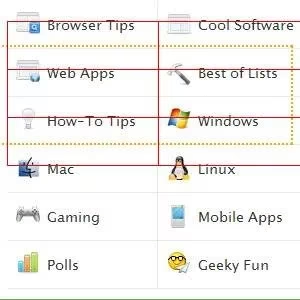
Linkclump is the extension I show people when I want them to think I am some kind of browser wizard. The idea is simple: hold down the right mouse button and drag a marquee around a pile of links you want to open. Let go, and every selected link opens in its own background tab. No middle-click marathon. No Ctrl-click finger gymnastics. Just one dramatic swoop, like you are lassoing cattle, except the cattle are hyperlinks and the ranch is your increasingly unstable browser session.

The clever part is that Linkclump is not a mindless vacuum. It knows not to grab every clickable thing in sight. Those little Similar or Block site links do not get swept up, which saves me from opening a tab titled something like Why You Should Never Close a Tab. If I change my mind mid-drag, I can left-click while still holding the right button, and the marquee vanishes without launching a single tab. That tiny escape hatch has saved me from many regrettable tab explosions.
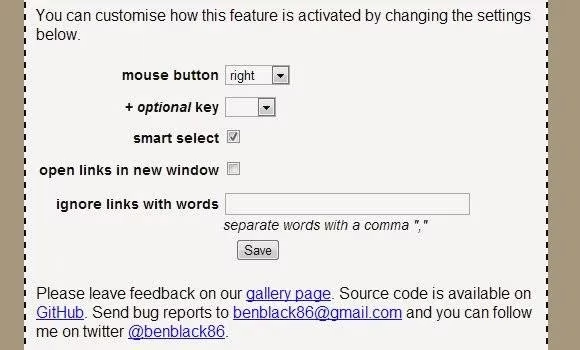
Linkclump is also customizable, which is a polite way of saying it lets me turn my mouse into a personalized tab-opening machine. I can choose which button activates selection mode, add a modifier key, and maintain an ignored-words list so the extension skips links I never want to touch. In 2026, when every page seems to have seventeen floating buttons and a newsletter pop-up, that kind of control feels less like a luxury and more like basic survival.
Revolver - Tabs: The Tab Carousel With a Hyphen Problem 🎠
Once Linkclump has filled my window with background tabs, I need a way to check them without manually clicking through the stack like a caffeinated squirrel. That is where Revolver - Tabs comes in. The name is a bit of a mouthful, and the hyphen is doing strange things, but the job is straightforward: it rotates between tabs on a timer. You set an interval, pick your tabs, and let the browser become a slow-motion slideshow of your responsibilities.
This is genuinely useful for eBay auctions, trouble ticket queues, news sites, and any page where you need to glance at updates without living inside the tab. Revolver - Tabs is refreshingly bare-bones. You can set the switch interval and decide whether Chrome should reload each tab as it becomes active. There is also a Rotate only when inactive option, which waits until you leave Chrome idle for 15 seconds before starting the carousel. That sounds clever until you realize it means the whole browser needs to be idle, not just one window. If I want one Chrome window for real work and another for rotating sites, I have to disable that option; otherwise the tabs just sit there while I pretend to be productive.
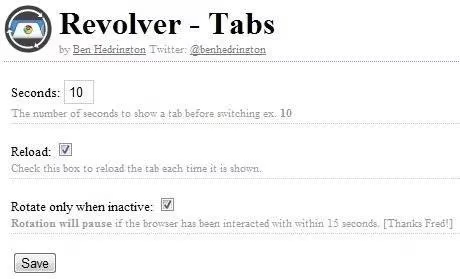
Once everything is configured, I open the pages I want to monitor and click the Revolver - Tabs button. It does not start immediately, because the interval must elapse first. That tiny delay feels like the extension is thinking about whether it really wants to participate. Fair enough. So is my browser.
| Tool | My main use | Mood |
|---|---|---|
| Linkclump | Opening a pile of links in background tabs with one right-drag | 🧙♂️ Wizardly |
| Revolver - Tabs | Timed rotation for auctions, tickets, and news | 🎠 Oddly soothing |
Why These Still Matter in 2026
Chrome has tab groups, memory-saving features, and enough settings to make a philosopher weep. But Linkclump and Revolver - Tabs solve two very specific, very human problems: I want to open many things at once, and I want to check them without clicking like a maniac. They are small, scrappy, and slightly eccentric, which is exactly why I keep them around. They do not try to reinvent the browser. They just make my tab chaos feel a little more intentional.
If your Chrome window currently resembles a digital landfill, give these two a spin. And if you have an obscure tab-management extension hiding in the depths of the Chrome Web Store, tell me about it. I am always ready to add one more tool to my collection, right after I close about forty tabs.