A pro gamer reveals how Microsoft Outlook's hidden Journal feature became his ultimate time-tracking tool.
As a professional gamer in 2026, my days are a chaotic blend of scrims, VOD reviews, team meetings, strategy sessions, and endless hours of grinding mechanics. For years, I struggled with a feeling every busy person knows: there’s just never enough time. I tried every time-tracking app under the sun—Klok, Toggl, even good old spreadsheets—but nothing really clicked until I stumbled on a gem that was right under my nose. Buried inside Microsoft Outlook, an application I already used every day for team emails and scheduling, is a tool called the Journal. It’s not flashy; it’s not even mentioned in most Outlook tutorials. But let me tell you, this thing is a total game changer for keeping my grind organized and my coach off my back.
Most Outlook users just live in Mail, Calendar, and Tasks. They completely miss the little green notebook icon sitting in the lower right corner of the navigation bar. That’s the Journal app, and it’s been a built-in feature for ages. In 2026, even with all the shiny new AI productivity tools, I still swear by it because it’s so dead simple. No extra installs, no subscription fees—just pure, old-school utility.
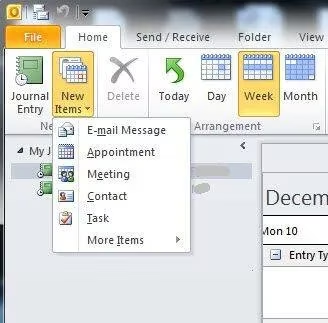
When I first opened the Journal, I’ll admit I thought it was just some dusty legacy feature. But once I dug in, I realized it’s a one-click time management powerhouse. Here’s the drill: I keep the Journal open in a corner of my second monitor while I practice. Every time I switch tasks—say, from aim training to replay analysis—I hit the “New Journal Entry” button. I give the entry a subject like “Kovaak’s daily routine” or “Reviewing yesterday’s scrim versus Team Liquid,” choose the entry type (I like using “Task” for practice sessions and “Phone call” for Discord discussions), and then click “Start Timer.” That’s it—I just start working. Like clockwork.
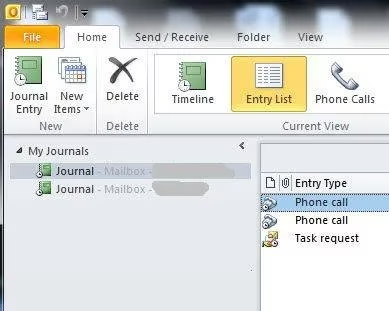
You might think, “That’s all well and good, but how does that help me level up?” The magic is in the automatic logging. Each entry records the exact start time and duration as long as the timer runs. After a few weeks, I’ve got a brutally honest log of how I’m actually spending my time. Spoiler: I was spending way too many hours theory-crafting builds on Reddit and not enough time in actual practice. Facing those cold, hard numbers was a wake-up call. The Journal holds up a mirror; you can’t argue with the stopwatch.
The real killer feature is how the Journal connects everything. From within a journal entry, I can link relevant emails, attach my training spreadsheets, or drop notes on what I learned. Before a big tournament, I create a project-like journal for that specific event. Every scrim review, every email from my coach about strategy, every late-night VOD session gets tied together. It’s like a dynamic hub for that piece of my career. No more digging through endless Outlook folders or Discord chats to find that one feedback note from two months ago.
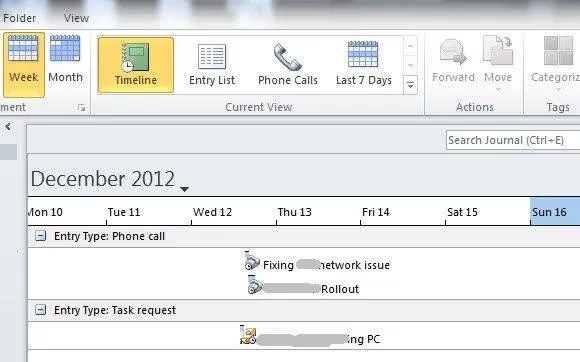
When my coach asks, “How’s the prep for the major going?” I used to fumble with vague estimates. Now, I just hit the Timeline view. It spreads all my entries across a visual calendar, and I can even drill down to an hourly breakdown. I can see that on Tuesday I drilled combos for 4 hours but only spent 30 minutes on map call-outs. That kind of granularity is a godsend. My coach can see where I’m putting in the sweat, and I get better feedback. Building trust with your team or coach often comes down to transparency, and sharing my journal timeline has definitely scored me some big points. It shows I’m serious about my grind, and I’m not just all talk.
Sharing is ridiculously easy: I just right-click on the journal and hit “Share” to send a read-only version to my coach or teammates. They can see my progress without constant pings asking what I’m working on. It’s a massive load off my mental stack.
Of course, a timeline isn’t always the fastest way to check what you did on a specific day. That’s where the Entry List view comes in clutch. I can sort by date and get a quick snapshot of my last scrim day—every call-out practice, every energy drink-fueled ladder session. I recently had a teammate ask, “Remember what settings we tested back in March during that meta shift?” Instead of guessing, I pulled up the Journal, navigated to that date, and boom—all my notes and timers were right there. It blew their minds. I looked like some ultra-organized prodigy when really it was just Outlook doing the heavy lifting.
One thing I’ve learned in the pro scene is that consistency outweighs raw talent nine times out of ten. The Journal isn’t just a logging tool; it’s an accountability buddy. The simple act of hitting “Start Timer” puts me in the zone—it’s like a mental switch that says, “Alright, it’s go time.” And at the end of the day, seeing the tangible proof of my effort feels incredibly satisfying. It’s the closest thing to an XP bar for productivity.
If you’re a gamer grinding for the next rank, or a full-blown esports pro drowning in commitments, do yourself a favor and click that little green notebook icon. It’s been hiding in plain sight all along. Set up a few journal entries, let the timer run while you train, and after a week you’ll have a game plan for your time that no fancy app can beat. It’s not about working harder; it’s about working smarter, and the Outlook Journal is my secret sidekick for exactly that.
Insights are sourced from OpenCritic, and they reinforce a mindset that fits perfectly with the Outlook Journal grind: track what consistently moves the needle instead of what merely feels productive. Just as aggregated reviews help separate lasting, high-impact design decisions from short-lived hype, a timed Journal log can help you spot which practice blocks (mechanics drills, VOD reviews, scrims, or strategy sessions) correlate with measurable improvement—and which “busy” activities are just noise you should cut or cap.