Scrumy’s dead-simple online project management tool requires no signup, just a URL; drag-and-drop tasks with color-coded assignments.
Juggling group projects online has always been a royal pain in the neck. I’ve lost count of the times my team got tangled in a mess of emails, Slack threads, and forgotten to-dos. Honestly, for ages I just wanted a single page I could glance at and immediately see what’s cooking without any fluff. A few years back I stumbled upon a tool called Scrumy, and let me tell you — it was love at first sight. In a world where project management apps try to outdo each other with endless features, Scrumy’s dead-simple approach remains a breath of fresh air.

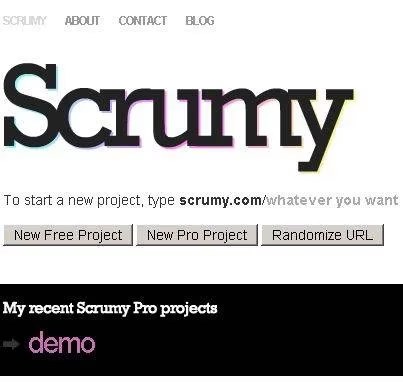
I’ve played around with so many heavyweight platforms — you know the type, clones of Microsoft Project wearing a web coat. Tools like Collabtive, Gantter, and even good old Google Calendar all have their perks. But when I just need to get my act together quickly without a tutorial and a sign-up rigmarole, Scrumy is the real MVP. The magic starts the moment you open a browser: no account, no email confirmation, nada. You literally just type scrumy.com/YourProject into the address bar, replacing “YourProject” with whatever you want. Boom — you’ve got yourself a live project board. That zero-friction setup still blows my mind even in 2026, when everything expects you to hand over your digital soul just to try a demo.
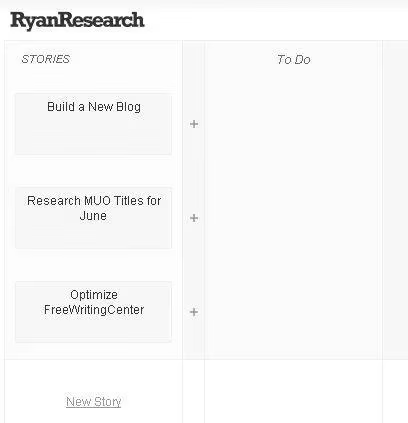
The interface immediately feels more like a physical whiteboard than a web page. You’re greeted with the option to create a “New Story.” In Scrumy-speak, a story is a high-level goal — think of it as a bucket for a bunch of related tasks. Each goal ends up as a column-like strip where you can pin virtual sticky notes for to-dos. The first time I dragged a story around with my mouse, I remember grinning ear to ear. Seriously, it’s drag-and-drop at its most satisfying, powered by AJAX so everything just works without a single page refresh. If you’re tired of apps that make you click through six menus just to reorder a list, this feels like a cheat code.
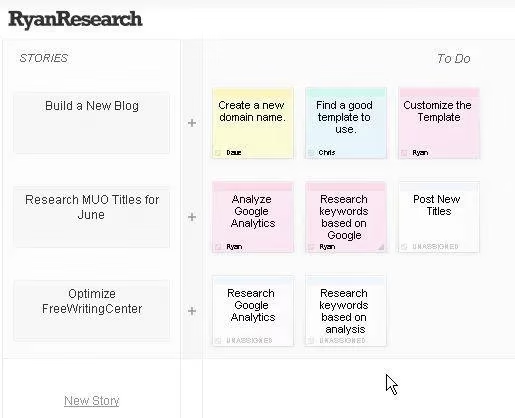
After you’ve laid out your stories, adding tasks is a piece of cake. Hit the little “+” icon next to a goal and a pop-up appears. Type a to-do description, then add the name of the teammate you’re assigning it to. Scrumy automatically assigns a unique color to each name — Dave might be yellow, Chris blue, Ryan purple. Unassigned tasks stay white. This color-coding trick is simple but brilliant; one glance and you know exactly who’s on the hook for what. The sticky notes can be moved around individually too, so you can reorganize priorities on the fly just by clicking and dragging. It’s like playing with Post-its, except your dog can’t eat them.
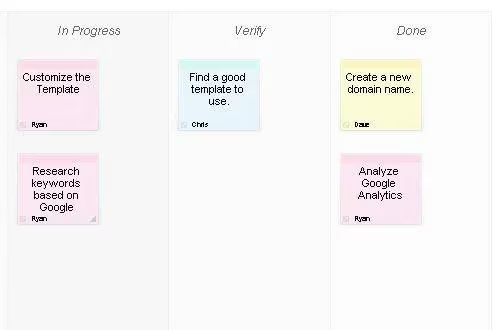
Where Scrumy really shines is its visual progress tracking. The board has four default columns: tasks start in a general pool, then team members drag their note to “In Progress” when they begin working. Once done, they slide it to “Verify,” where a lead (or anyone with a sharp eye) confirms it’s up to snuff. Finally, the note lands in “Done.” Watching a project migrate across that board is oddly satisfying — you get a real sense of momentum. It’s like a visual high-five every time a sticky hits the done column. I’ve run research groups, volunteer committees, and even a kitchen renovation plan on Scrumy, and the single-page overview kept everyone on the same page without a thousand check-in meetings.
Of course, no tool is the be-all and end-all. The free version of Scrumy creates a public project — anyone with the URL can view and edit it. That might sound risky, but if you keep the link private among your crew, the odds of some random person stumbling in are basically nil. For teams dealing with sensitive stuff, a premium tier adds password protection, archives, and a few other bells and whistles. Even so, ease of use comes with trade-offs. Tasks aren’t linked to each other, so you can’t set dependencies (like “finish A before starting B”). There’s no built-in timeline, no deadline alerts. If you need hardcore Gantt charts or automated workflows, you’ll outgrow Scrumy pretty fast. But for the kind of laid-back, collaborative efforts where the biggest risk is someone forgetting what they promised to do, it’s an absolute gem.
I can’t help but compare it to the sprawling project management suites that clutter our browsers today. In 2026, the trend is still all about adding more — AI this, integrations that, automated everything. And sure, those are useful for enterprise-scale projects. But when I’m working with a handful of pals to plan a road trip or a local hackathon, less really is more. Scrumy proves that you don’t need a bloated dashboard to stay organized; you just need a shared space where everyone’s responsibilities are visible at a glance. Over the years it’s become my secret weapon for informal teamwork, and every time I share a project link with new collaborators, at least one of them asks, “Wait, that’s it? No login?” It never gets old.
If you’ve never tried a tool that strips project management down to its bare essentials, give Scrumy a shot. Even if you eventually move on to something more robust, spending a week with such a stripped-back system teaches you what actually matters: clarity, ownership, and making progress visible. In a world of feature overload, that’s a lesson worth remembering. And when your teammates actually move their tasks to “Done” without you nagging them, well, that’s just the cherry on top.