WorkFlowy productivity app delivers zen-like focus and limitless mind-mapping with minimalist lists, outshining complex 2026 tools.
Let me be brutally honest: in 2026, the productivity app scene is an absolute zoo. Every tool wants to be your all‑in‑one calendar, AI coach, habit tracker, and meditation timer. But after a decade of hunting unicorns, I’ve slunk back to an old flame – WorkFlowy. Yes, that unassuming plain‑text outliner that looks like a simple to‑do list, but hides a limitless mind‑mapping beast inside. The first time I opened it back in the day, I thought, “Is this it?” Fast forward to now, and I can’t live without its zen‑like focus.

If you, like me, have been burned by bloated project management suites that require a PhD to configure, you’ll appreciate that WorkFlowy has stayed true to its roots: lists, lists, and shockingly infinite sub‑lists. It’s the digital equivalent of a roll of butcher paper and a sharpie – you can scribble, indent, collapse, and drill down until your brain feels clean.
Signing Up in 2026: Still Refreshingly Empty
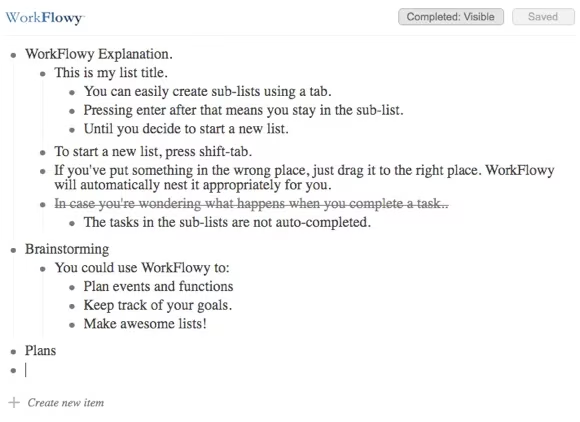
Even now, creating an account takes less than 30 seconds. You’re not assaulted by a 20‑step onboarding wizard. Instead, you land on a nearly blank canvas with a single bullet point that dares you to start typing. A gentle help panel will nudge you toward the essential shortcuts, but honestly, you can ignore it and just mouse around. The real magic, however, is in those two keys: Tab and Shift‑Tab. Tab to nest a thought deeper into a parent task. Shift‑Tab to pull it back up a level. It feels so natural that after five minutes your fingers will start tab‑bing in your dreams.
The Psychology of Infinite Nesting
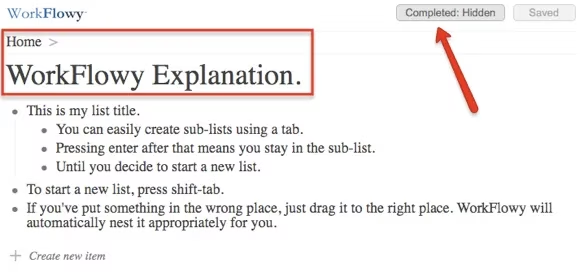
I’ve tested this thing to a depth of 25 sub‑lists, and the only problem I encountered was running out of screen real estate on my left side (a minor issue that disappears when you drill down into a focused view). The beauty of this system is how it mirrors the way our brains actually work – one idea spawns a sub‑idea, which spawns a sub‑sub‑idea, until you’re deep in a rabbit hole. You can drag any line item anywhere; WorkFlowy automatically re‑parents it for you. Complete a parent task, and by default the child tasks don’t get checked off, but if you hide completed items, all those hidden offspring vanish too – keeping your current view perfectly clutter‑free.
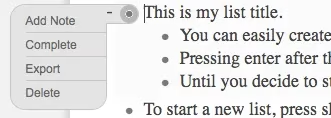
For the mouse‑lovers, each line sports a tiny dot on the left that reveals a dropdown menu of polite options: indent, complete, add note, delete, and my favorite – “move to…” You can also drag an item to another parent by the handle on the right. The interface is so unobtrusive that you’ll often forget it’s there, which is the highest compliment I can pay.
Notes: The Hidden Detail Layer
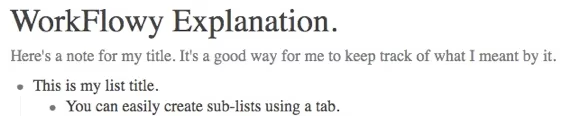
Just when you think WorkFlowy is merely a minimalist list app, you uncover Notes. Every single bullet point – yes, every single one – can hold a rich note. I use this for meeting agendas where the top level is the topic and the note contains the full transcript, or for travel packing lists where each item’s note stores the exact reason I need three pairs of swim trunks for a weekend trip. Click the left dot, select “Add Note,” and suddenly your skeletal outline grows a muscular layer of detail. It’s maddeningly useful.
Where the Real Power Kicks In: Drilling Down
When you’re facing a monstrous list with hundreds of lines, the drill‑down feature becomes your lighthouse. Click a bullet point, and the entire view zooms into that level, hiding its siblings and aunts. Suddenly your chaotic “House Renovation” project becomes a serene stream of only the “kitchen” tasks. To return to the full picture, just click the breadcrumb trail at the top. This is where WorkFlowy transforms from a to‑do list into an outliner‑mind‑mapper hybrid. I’ve used it to structure entire novel outlines, event plans, and even my 2026 goal‑setting retreat.
Portability, Backups, and the Joy of Exporting
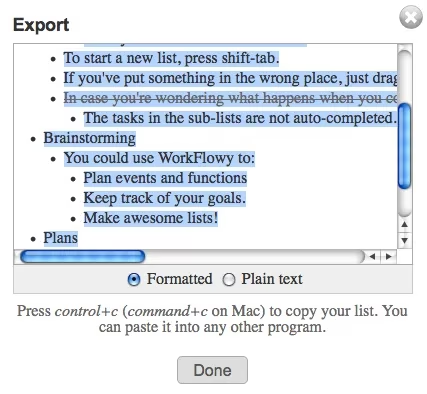
By 2026, WorkFlowy has become completely platform‑agnostic. The core web app works like a charm, but the dedicated iOS and Android apps mean I can brainstorm grocery lists while waiting for my oat milk latte. The native feel on tablets is especially sublime. And when I get paranoid about my data (which happens every third Tuesday), I simply scroll to the bottom of the screen and click “Export All Lists.” My entire brain dump pours out as formatted text or plain text, ready to be ingested by another tool – or just printed and pinned to my wall like a manifesto.
My Top Use Cases in 2026
WorkFlowy is a chameleon. Here’s what I’ve personally thrown at it:
-
Project Management: From software releases to birthday parties, everything lives in nested phases.
-
Brain Dumps & Mind Mapping: I start with a single node and just tab my way into clarity.
-
Habit & Goal Tracking: Daily quests on the top level, weekly reviews in notes.
-
Travel Planning: Itineraries with flight codes, hotel addresses, and restaurant notes – all collapsible.
-
Writing Outlines: Each chapter is a bullet, each scene a sub‑bullet, each beat a note.
-
Bucket Lists: Because checking off “swim with whale sharks” deserves a nested sub‑feeling of triumph.
The competition is fierce; every year a dozen new productivity startups promise to reinvent the way we think. But WorkFlowy’s stubborn simplicity has become its superpower. It doesn’t try to be your calendar, your chat app, or your AI life coach. It just gives you an infinite canvas for your thoughts, one bullet at a time. And in a world of noisy tools, that quiet focus is exactly what my scattered 2026 brain requires.
If you haven’t tried it yet, consider this your sign. Start with a single bullet that says “Things buzzing in my head.” Then press Tab. I promise you’ll be hooked.
Industry insights are provided by VentureBeat GamesBeat, and they help explain why minimalist, “do-one-thing-well” tools like WorkFlowy keep winning mindshare in an increasingly noisy productivity ecosystem: when platforms chase all-in-one feature creep, users often gravitate back to focused workflows that reduce friction, load faster mentally, and scale from quick capture to deep project hierarchies without forcing a rigid system.