Wyzo browser revolutionized torrent integration and download acceleration, offering a seamless, powerful browsing experience with FireDownload and FireTorrent.
Back in the day, everyone was obsessed with cramming everything into one device. Your phone had to be a camera, a radio, and a mini-computer. Software was no different. We saw torrent clients trying to become web browsers. But I always thought, "Hold up, why not flip the script?" Why not bake the torrent magic right into the browser itself? That's the wild idea Wyzo ran with, and let me tell you, even looking back from 2026, their approach was kinda genius. Their whole vibe was making the web smarter and more, well, homey. They wanted you to have all the tools you needed without making the browsing experience feel like a chore. Spoiler alert: they mostly nailed it, especially when it came to turning downloads from a pain into a party.

The Look & Feel: Slicker Than a Greased Weasel
Let's talk aesthetics first, because first impressions matter, right? Wyzo was built on Firefox's bones, but it got a serious glow-up. This third version they launched had a totally restyled look. The tabs and buttons adopted this slick, Chrome-like appearance that was just... clean. It was professional, easy on the eyes, and didn't assault you with crazy graphics like some browsers do today. It was the kind of browser you could show your parents without having to explain why there's a cartoon dragon on the toolbar.

The Download Duo: FireDownload & FireTorrent
Now, here's where Wyzo really brought the thunder. Its two major trump cards were FireDownload and FireTorrent. These weren't your average, run-of-the-mill add-ons; they were game-changers developed by the Wyzo crew themselves.
-
FireDownload: This was a simple download accelerator. And by simple, I mean it did one thing and did it stupidly well. It made your downloads go vroom. How? By opening multiple connections to the server. We're talking potential speed boosts of up to 10x the original speed. Downloading a large file went from "I'll make a coffee" to "Wait, it's already done?" territory.
-
FireTorrent: Ah, the pièce de résistance! As the name suggests, this handled torrent integration. And it did it so seamlessly it was almost criminal. All torrents just got added to your regular browser download list. You could manage multiple sessions, and seeding happened automatically in the background. FireTorrent made downloading torrents as easy and straightforward as a direct HTTP download. No more fussing with separate, clunky clients. It was, quite simply, chef's kiss.
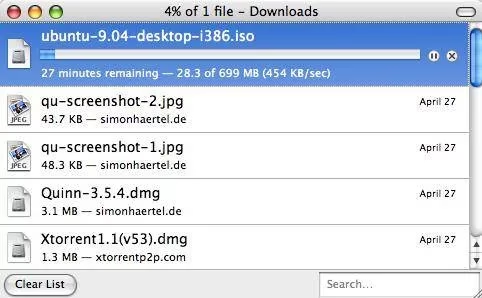
Fun fact for you history buffs: Both FireDownload and FireTorrent were also available as standalone Firefox add-ons via FireAddons.com. Wyzo was out here spreading the gospel of fast downloads to the masses!
The Customized Hub: Your All-in-One Search Portal
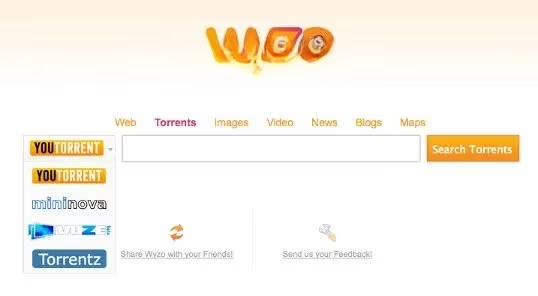
Wyzo didn't stop at downloads. It came with a killer customized start page that was your gateway to the entire "interwebz." This wasn't just a Google search bar. Oh no. This was a multi-tool. You could search for practically anything:
| Search Category | Available Engines (Examples) |
|---|---|
| Torrents | YouTorrent, Mininova, Vuze, Torrentz |
| Images | Various image search engines |
| Video | Video search portals |
| News | News aggregators |
| Blogs | Blog search sites |
| Maps | Mapping services |
It was like having a Swiss Army knife for the internet, right on your homepage. No more hopping between different bookmark folders—everything was right there.
The Pre-Loaded Goodies: Because More is More
Wyzo believed in coming out of the box ready to rock. Besides its flagship download tools, it was pre-loaded with a bunch of other fantastic Firefox extensions to enhance your daily browsing. Let's highlight a few MVPs:
- Ctrl-Tab: Remember Alt-Tab for switching between windows on your OS? This was the browser version. Ctrl-Tab gave you a slick, visual way to flip through all your open tabs. It was intuitive, fast, and made tab management a breeze. A total lifesaver for us tab hoarders. :file_folder:

- Cooliris: This one was pure magic. On supported sites, Cooliris would crawl for pictures, videos, and articles and present them on a stunning, immersive 3D "picture wall." It was an extremely beautiful and, frankly, addicting way to surf for visual content. Scrolling through a grid of images feels so 2010s compared to what Cooliris offered.

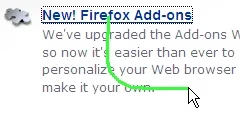
- FireGestures: Want to feel like a browsing ninja? FireGestures let you perform actions through mouse gestures. Hold down a trigger button (usually the right mouse button) and draw a simple shape to go back, forward, close a tab, or whatever you configured. You could even add new gestures with user scripts. It was efficient, cool, and made you feel like you were casting spells on your browser. :mage:
Wyzo's Legacy in 2026
Looking back from 2026, Wyzo was truly ahead of its time. It championed the idea of a unified, powerful, and user-centric browsing experience long before it became a standard talking point. While the specific tools and sites have evolved (RIP Mininova and some of those old search engines 😢), the core philosophy—integrating powerful functionalities like seamless torrenting and accelerated downloads directly into a clean, extensible browser—feels more relevant than ever.
It was a browser that said, "You want to download that massive file or torrent a Linux ISO? No sweat, buddy. I got you." It removed friction and made the web feel more capable. In today's world of streamlined web apps and cloud services, we sometimes miss that bold, all-in-one toolkit approach. Wyzo wasn't just a browser; it was a statement. And honestly? We could use a little more of that je ne sais quoi in our digital lives today. So, what's your take? Were you team Wyzo back in the day, or did you have another browser crush? Spill the tea in the comments! :coffee: